


LineOfJustice
Members
-
Joined
-
Last visited
Everything posted by LineOfJustice
-
Are you using the Print Screen function? If that's the case then all you have to do is disable the Aero Glass effect. I know it works for Windows 7 but you can try with your Windows 8.
-
 Lol yep! I wanted to make it exactly the same but there's no female Trooper model so I just changed all the names.
 -
-
From the album: My Screenshots
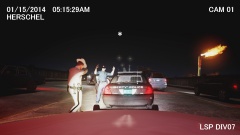
01/18/2014 PLUMBERS SKYWAY, ALDERNEY - Liberty City police officer Jose Ramirez caught on LSP dashcam going 120 mph. The officer who was off-duty at the time of the incident, was heading to a private security gig in complete uniform and a marked squad car when an LSP Trooper attempted to pull him over. According to Trooper Herschel, the squad car was traveling at rates up to 120 mph and was crossing lanes recklessly. Herschel catches up to the squad car and activated his lights and sirens but Ramirez kept on going. Herschel continued to follow, but at one point loses sight of the squad car. After several minutes Herschel sees the squad car again going about 90 mph this time. Another chase insues for 5 minutes until Ramirez finally pulls over. Herschel believing this police car may have been stolen, approaches the driver's side door at gunpoint and orders Ramirez out. Ramirez complies with hands up and Herschel handcuffs him and places him in the back of his own squad car. Ramirez tells the Trooper he did not think he was being pulled over so therefore he kept going and apologized for doing so. The Trooper furiously tells him that he is a criminal for his recklessness before shutting the door on him. After being detained for about an hour, Ramirez is let go with a hefty citation and gets reprimanded one more time by the Trooper. Both the Liberty State Police and the Liberty City Police are investigating the incident. In the meantime, both the Officer and the Trooper are suspended with pay. -
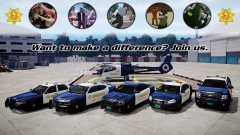 Thank you! The NOOSE Stockade wasn't included because I did not make a Sheriff livery for it and the other stockade has been replaced with the late model Dodge Charger which is the second vehicle in the picture lol. Thank you!
 -
From the album: My Screenshots
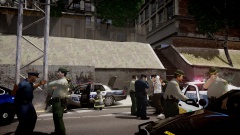
LIBERTY COUNTY - A very embarrassing incident for the LCPD Thursday morning. An LCPD officer by the name of Andre Tyson gets his cruiser stolen while 10-7 at a Rusty Brown's Donuts. After calling in the embarrassing situation, other officers quickly caught up to the stolen cruiser. After the suspect headed out of city limits, LCSO deputies joined in on the chase and then an LSP chopper assisting in the skies. Getting desperate, the suspect drives even more aggressively which leads to a spin-out and a crash. The pursuing officers and deputies quickly detained the suspect and questioned him. Turns out he was intoxicated 5 times the legal limit. Fortunately, no one was injured throughout the ordeal. "It seems like he was really enjoying himself, he even wore the officer's cover" says Deputy Watts while laughing with fellow deputies. While Deputy Watts may find humor in this ordeal, Officer Tyson will find himself blushing. This incident is his 3rd time getting his cruiser stolen and wrecked, and he's been on the force for only 4 years. -
From the album: My Screenshots
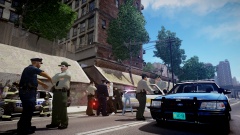
LIBERTY COUNTY - A very embarrassing incident for the LCPD Thursday morning. An LCPD officer by the name of Andre Tyson gets his cruiser stolen while 10-7 at a Rusty Brown's Donuts. After calling in the embarrassing situation, other officers quickly caught up to the stolen cruiser. After the suspect headed out of city limits, LCSO deputies joined in on the chase and then an LSP chopper assisting in the skies. Getting desperate, the suspect drives even more aggressively which leads to a spin-out and a crash. The pursuing officers and deputies quickly detained the suspect and questioned him. Turns out he was intoxicated 5 times the legal limit. Fortunately, no one was injured throughout the ordeal. "It seems like he was really enjoying himself, he even wore the officer's cover" says Deputy Watts while laughing with fellow deputies. While Deputy Watts may find humor in this ordeal, Officer Tyson will find himself blushing. This incident is his 3rd time getting his cruiser stolen and wrecked, and he's been on the force for only 4 years. -
Does anyone know of a mod or a way to change the orientation of Happiness Island? It would be awesome to rotate the whole island 180° so that the Statue of Happiness can face the sea just like the real Liberty Island. If the whole island is too difficult, is there a way to rotate just the Statue itself?
-
From the album: My Screenshots
Featuring patrol fleet. -
@LC03-03-97A, Wow...I'm not sure. I was at school so I don't know. I'll ask him but I remember seeing it it parked in the driveway when I got back.
-
Lol it is not an issued car. My dad works for the FBI and he always used the motor-pool Crown Vic. I guess he liked it a lot since he bought this one as a personal car. The only things he has in this car is a laptop and a 12V powered dash light (which he removes if I ever drive it). So yeah, I do drive it sometimes.
-
I drive my dad's 2006 Crown Vic sometimes.
-
Lol yeah.I find that targetting a ped who's not currently wanted(chased by you) or aggressive the ai police arrests them just fine.
-
Everytime this function crashes on me I just type 'reloadscripts' followed by ALT-P and CTRL-P but I would still like to know why this causes the crash in the first place. I remember this function in 0.91 worked great for me. No idea what happened though.
-
I have this same problem too. I would love to use this when I don't feel like having to arrest someone myself.
-
-
-
@vytilind001 - Thanks! It is my first texture. @Someone22 - Cool, do you have a link to the video?
- 16 comments
- 5 reviews
-
You mean as in 4 different unit numbers for each vehicle? If so, I believe they are all in the download. For example, the CVPI has unit numbers 562, 385, 795, and 844. Impala is 820, 411, 490 and 606. Charger is 249, 343, 904, and 530. Lastly, Tahoe is 238, 296, 564, and 386. You have to open the vehicles.ide and add "+livery" to the end of each vehicles' line in order for them to spawn randomly. Also make sure you replace all 4 liveries in Spark IV.
- 16 comments
- 5 reviews
-
Generic LCPD Textures for the Ford Crown Victoria Police Interceptor, Chevrolet Impala, Chevrolet Tahoe, and the Dodge Charger. The unit numbers and license plates are from Cj24's black and white "LCPD" vehicle line-up. For LCPDFR.com only, please do not re-upload these textures anywhere else.
- 16 comments
- 5 reviews
-
Are you sure you made the commandline.txt correctly? I used to have dissappearing textures too, but they were fixed after I used "nomemrestrict". My specs: Intel Core i7-2600k, ATi Radeon 5870 and 6GB RAM. What are yours?
-
I thought windowed mode is only enabled when it is an entry in commandline.txt, if it is not on there I have no idea how it was activated.
-
Try using commandlines such as "nomemrestrict".
-
Really, where have you heard that? I HATE these plates. The flag is okay but the fireworks are just a mess. I asked the MVA representative about getting an old one instead and she said she wish she could do the same about her's.
- 8 comments
- 3 reviews
-
You could use Simple Native Trainer and spawn a pedestrian with task set to "drive" and they will the drive the vehicle away. Or you could try this: http://www.gta4-mods.com/script/abandoned-vehicle-cleanup-2-f8690

