Skip to content
View in the app

A better way to browse. Learn more.

LCPDFR.com

A full-screen app on your home screen with push notifications, badges and more.

To install this app on iOS and iPadOS
  1. Tap the Share icon in Safari
  2. Scroll the menu and tap Add to Home Screen.
  3. Tap Add in the top-right corner.
To install this app on Android
  1. Tap the 3-dot menu (⋮) in the top-right corner of the browser.
  2. Tap Add to Home screen or Install app.
  3. Confirm by tapping Install.

Denuedos

Members
  • Joined

  • Last visited

Everything posted by Denuedos

  1. Ah okay. Please let me know if you need any log or system info etc. thanks alot.
  2. So do you want me to change the system language and try ? if you think it can be related?
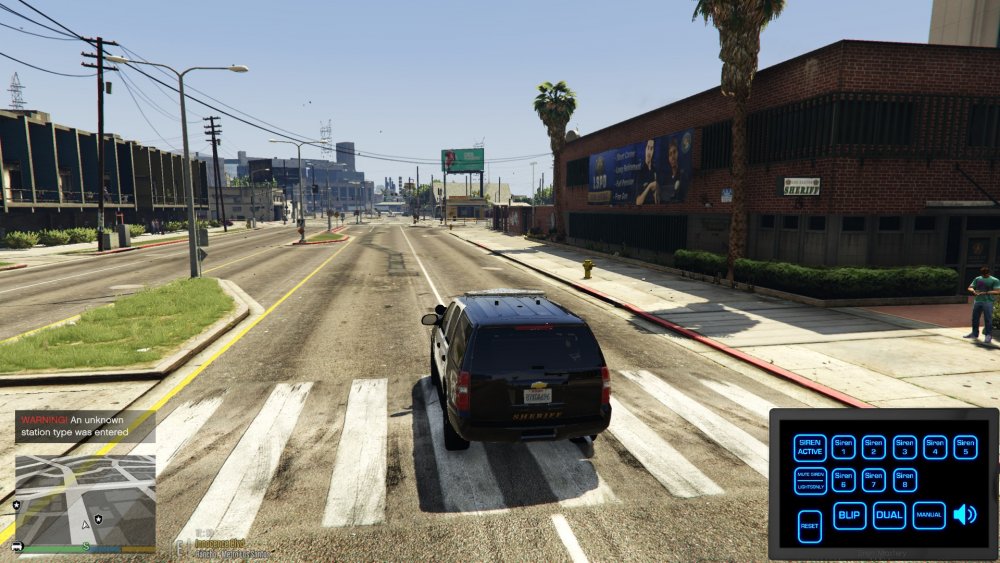
  3. EMS makes some crashing with lspdfr. whenever i press any ems button ( like calling ambulance ) lspdfr getting a crash. i tried everything ' re-installed it about 10 times with whole files. Dont know whats wrong but ill be really happy if anyone can help me. and i also read many comment but couldnt see any similiar with my problem. Thanks alot. RagePluginHook.log it says '' Warning ! An unknown station type was entered '' and then booommm lspdfr is gone. Im using default xml btw didnt change any station or something.
Account

Navigation

Search

Search

Configure browser push notifications

Chrome (Android)
  1. Tap the lock icon next to the address bar.
  2. Tap Permissions → Notifications.
  3. Adjust your preference.
Chrome (Desktop)
  1. Click the padlock icon in the address bar.
  2. Select Site settings.
  3. Find Notifications and adjust your preference.