-
Posts
41 -
Joined
-
Last visited
Content Type
Forums
Gallery
Downloads
Tutorials
News Stories
Wiki
Community Guidelines
LSPDFR BOLO Series
GTA5 Native Database
GTA5 Native Parameters
Release Highlights
LSPDFR Mod Showcase
LML User Contributions
Everything posted by EquitisMortis
-
When will Albo's callouts and plugins support RPH .52?
EquitisMortis replied to SpikeTerm's topic in LSPDFR 0.3 Support
Maybe I'm doing something wrong because none of the albo downloads are working for me either -
I know it's a pain, but the only way I got mine to work is to delete and redownload the updated version of everything: GTAV, LSPDFR, Rage, and OpenIV. I now have to go through and get all my extra mods back, but at least the game works for me.
-
I'm no expert but one thing I noticed is that your file location looks way different than mine. Mine looks like this- Local Dick (C:) > Program Files (x86) > Steam > steamapps > common > Grand Theft Auto V Maybe make sure everything is where it's supposed to be? If everything is where it's supposed to be, I've experienced issues if the modded version of your game is titled anything other than "Grand Theft Auto V" and if you have a shortcut on your desktop. Also try running Rage as an administrator, I know if I don't do that my mod won't load either. My next guess would be make sure you have GTAV, LSPDFR, Rage, and OpenIV all up to date. That could cause issues too. Also if you take screenshots of your file, it helps the mods and admins to help solve your problem, they know way more about what the files are supposed to look like than me lol
-
Maybe redownload LSPDFR, RAGE, and OpenIV with the most current updates? That's the only thing I can think of
-
I just had the same issue. I had to reinstall GTA V (because that will also download with the update), reinstalled LSPDFR, reinstalled RAGE, and reinstalled OpenIV. After that it worked just fine for me. I lost all my old mods and stuff, but at least LSPDFR is working and I probably need updates for some of the mods anyway. Hope this helps!
-
So I reinstalled the game, reinstalled LSPDFR, reinstalled RAGE, and reinstalled OpenIV and that seemed to do the trick and I can play again. I have to redownload all my old mods and whatnot, but that's not a big deal. Thanks again!
-
so I'm confident that it's my game file from steam. The standard game won't even load, so I'll try redownloading it and reloading all the mod files into it.
-
I'll give that a shot
-
yes. everything was working fine up until the newest update
-
Hey guys, so I decided to hop back on LSPDFR to find that my game doesn't work. No big deal. Downloaded the updates from steam and downloaded the new update for RAGE, but I still cant play! Do I need to completely uninstall GTA V and redo everything from scratch? Even the GTA V game itself won't start, so I'm thinking it's an issue with the update or maybe my folders? Any help would be appreciated!
-
Guys I finally got them to work. Maybe something was weird with putting them into the folder through OpenIV, so I just inserted them into the folders manually and got the to work. Got Traffic, Arrest, and Police to work and I grabbed "secondary callouts" which seems to work great. Just need some tweeking because some of the hotkeys are the same for some reason, but other than that they work great. You guys were right, they add a whole new level of awesome to the standard lspdfr. Haven't done lspdfr+, or computer+ yet but I'll probably do those soon. Thanks for the input guys, I appreciate it!
-
do you happen to know of an install video? I thought I put everything where it was supposed to go but none of it loaded up, so I assume I did it wrong lol
-

Emergency uniforms pack - Law & Order
EquitisMortis commented on Alex_Ashfold's file in GTA5 Mods Character
-
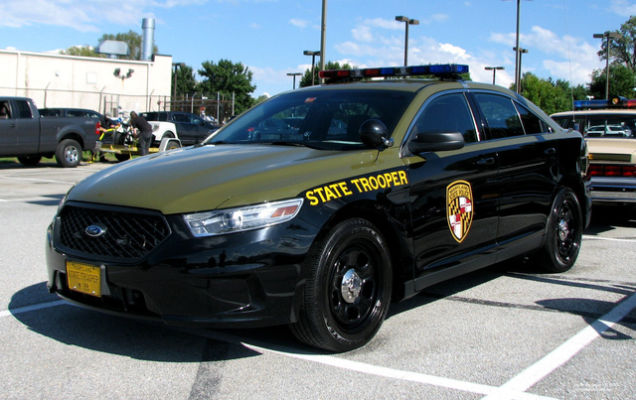
Hey guys, after 2 weeks of issues, trouble shooting, and a lot of help from guys here on the forum, I can finally play LSPDFR. After a few hours playing I'm having tons of fun. Just a few quick questions, and there are probably posts out there that already ask the same things. I'm having trouble using some of the player models, uniforms, and vehicles that I've downloaded. I follow the README's, but they didn't load on start. Does anyone have any tips, tricks, or videos that can help me load in some stuff? I wanted to run around as a Maryland State Trooper, but I must have done something wrong. Secondly, I'm having trouble actually arresting people who run from me lol. I can Taser them all I want, but I either accidentally kill them, do nothing, or issue a takedown. Am I just hitting the wrong key like an idiot? Is there also a way to force someone out of a car that has been running from me and I was able to stop the vehicle without me having to shoot them and everyone in the car? As fun as that is, I feel a little guilty lol. Third, what are some additional mods or downloads that you guys think are essential or that I should get? I'd be open to anything, but any suggested uniform, department, or car mods would be great. I could've put this in the support section, but I didn't really think any of this was super important, more of just an ease of access with some discussion and tips thrown in here and there. Well , I've wasted enough of your time if you're still reading this so I'll stop.
-
.50 update issues, LSPDFR not starting
EquitisMortis replied to EquitisMortis's topic in LSPDFR 0.3 Support
I'm not completely sure how to deal with a cd version, or did you download it directly from Rockstar? But I can try to help. Somewhere on your hard drive should be a file at least containing the games memory, that's what you need to find. For a steam version you would open up File Explorer or My Computer, then find your hard drive or "Local Disk", it's usually the "C" drive. From there you would go to Program Files (x86) and open that up. After that you would go to "Steam", but for you, you may be able to go to the "Rockstar Games" file (that contains only the Social Club app for me but your game data might be saved in there). For me, I would next go to "Steam Apps" and open that up, but you might be able to skip that step since your files would, i'm assuming, be in the Rockstar folder. From there I click on my "common" folder, but since your running a Rockstar or disk edition, a "Grand Theft Auto V" or "common" folder might be there in your "Rockstar Games" folder. If anything I've guessed is right that's where your "Grand Theft Auto V" file should be, if it is, make a copy and rename THE ORIGINAL FILE. I can't stress that enough, you don't want to rename the file you'll be putting mods into; so I renamed the original folder to simply "GTA V", and renamed my copied folder to "Grand Theft Auto V". From there, you should be able to follow the instructions I put earlier and hopefully that'll do the trick. Unfortunately this issue seems to have been a problem for almost a year now with random people being affected. I kinda had to go through everyone's solutions to fix my own issues, but this just means I've gotten a lot of practice dealing with this lol. Keep me updated on this thread, or you can make your own and copy a link and post it here, this was I can try to help you through this. I know it's annoying going through all this, but so far LSPDFR has been a lot of fun and completely worth the effort. Also, posting up screen shots of what your doing helps us see what youre seeing, so feel free to upload as many pics as needed, especially of the files and any error messages you run across. I also found this video to be helpful with basic installation, and it brings you through the basic steps of downloading. I recommend trying it exactly like the video says first, then going to another video he put in the description or comments. If both of those videos don't help, then definitely try the steps I've put on this thread and hopefully it works. It took me 2 weeks and about 40-50 hours trying to figure this out, mostly due to copying files, downloading files, and even having to redownload the complete game, so don't feel bad or get overwhelmed, you'll figure it out and the people on this forum are here to help. heres the video: Thanks @Babylon, I really appreciate all the help you and the other guys on this forum gave me. Of course I'll try to help now, I'm no expert, but I've spent enough time going through all these files; I might as well help people with the info I've learned! Happy Patrolling to you too! -
.50 update issues, LSPDFR not starting
EquitisMortis replied to EquitisMortis's topic in LSPDFR 0.3 Support
I FINALLY GOT IT TO WORK!!!!!!!!!!!!!!!! I post what I did in the hopes it helps others: Basically I had LSPDFR, Rage, and Scripthook in my "Grand Theft Auto V" folder, the name is important. I then went into my Windows Defender and completely disabled it, while there I set my "Grand Theft Auto V" folder as a security exception. But even with that it still wasnt working. I then downloaded OpenIV. In OpenIV theres a tab called ASI Download (or something like that), I was missing 2 things in there, so I downloaded them. I then received a folder in my "Grand Theft Auto V" folder entitled "mods". I renamed that folder to "MODS1", the caps are important. I made sure that my "Grand Theft Auto V" folder was in the "common" folder, which it wasn't. After that I loaded up the game through Rage, but not as an admin. It worked from there and everything loaded up fine. Tested it several times and even restarted my pc just to make sure everything was kosher! I hope this helps anybody having similar issues! and a very big thank you to everyone who helped me on this, I truly appreciate the help and I can't extend my gratitude enough! Thank you! -
.50 update issues, LSPDFR not starting
EquitisMortis replied to EquitisMortis's topic in LSPDFR 0.3 Support
just tried going through each and every file and giving the file full control and permissions. that didn't work either. -
.50 update issues, LSPDFR not starting
EquitisMortis replied to EquitisMortis's topic in LSPDFR 0.3 Support
yup, it's the basic "Windows Defender" that comes with Windows 10. Disabled it, ran as admin, still getting same error message. I've tried doing a scan to see if it automatically blocked one of the programs or files, but so far nothing. -
.50 update issues, LSPDFR not starting
EquitisMortis replied to EquitisMortis's topic in LSPDFR 0.3 Support
yep. and ive tried starting the game through steam and then launching rph as an admin -
.50 update issues, LSPDFR not starting
EquitisMortis replied to EquitisMortis's topic in LSPDFR 0.3 Support
Finally got the update done, renamed the file to Grand Theft Auto V, installed ScriptHookV since I didn't have it in the file, started it up through RPH as an administrator, and got the same old error code. On the off chance I thought maybe Microsoft's automatic virus protector was messing with it I turned it and everything associated with it off...Still got the error message. Any other suggestions? I'm completely at a loss at this point. -
Real Life PD Roll Call
EquitisMortis replied to EquitisMortis's topic in Law Enforcement, Current Events & Society
fair enough point. I'm not looking for names or places, just curious how many of us are out there. But I'll take it that it's a fair majority -
Just curious if there are any current law (or future!) enforcement officers using this mod/site?
-
.50 update issues, LSPDFR not starting
EquitisMortis replied to EquitisMortis's topic in LSPDFR 0.3 Support
I hope so, in retrospect, since I started trying to get this to work, I don't think once that I kept the file name as Grand Theft Auto V. I always changed it so that I knew which file had the mods in it. If that was the problem through all of this I'll feel really stupid, but happy that it worked lol. I'll keep you guys updated, but this update is gunna take like a full 24 hours lol. -
.50 update issues, LSPDFR not starting
EquitisMortis replied to EquitisMortis's topic in LSPDFR 0.3 Support
I would love to tell you that it worked, but for no reason steam has decided that it needs to redownload the entire game, all 66.9GB. why? no idea. Probably because steam hates me and it's also decided to not download it at all even though I have internet (obviously because how else would I be posting this lol). hopefully once steam decides to stop hating me I'll give it another try and let you know how it works out. -
.50 update issues, LSPDFR not starting
EquitisMortis replied to EquitisMortis's topic in LSPDFR 0.3 Support
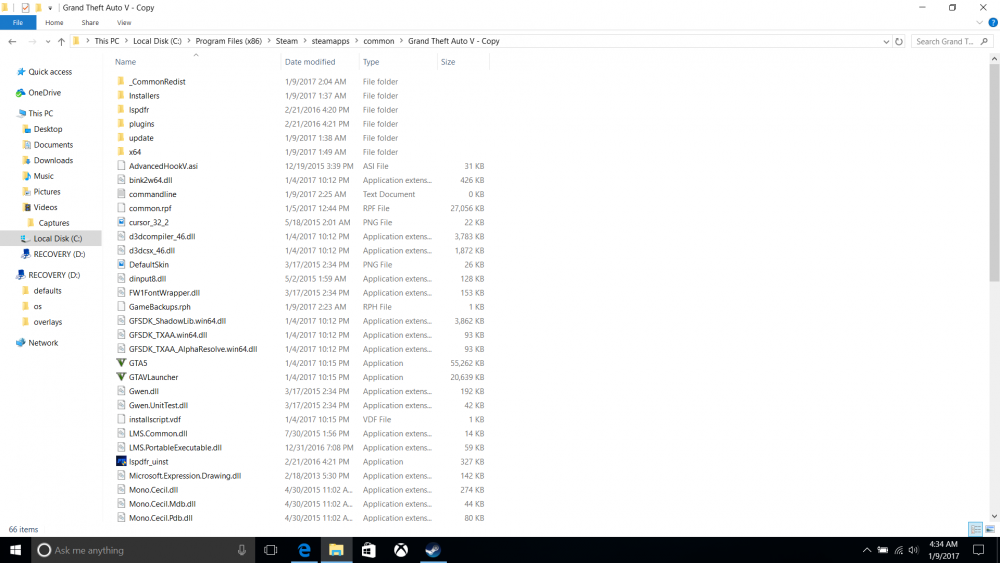
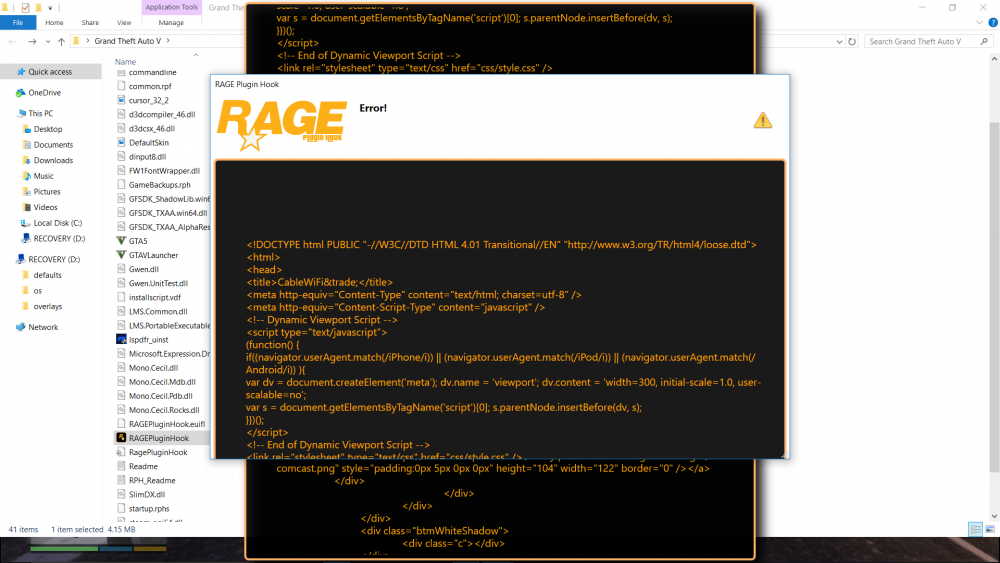
so I deleted everything including WinRAR, lspdfr, rage .50, scripthook v, and open iv. I tried reinstalling lspdfr and rage. still getting the same error message. I'll post the screenshots below. I'm at a loss here. The only thing I can think of is that I can't "unblock" any of the files, the option doesn't even appear. I checked online and Microsoft says that if the unblock option doesn't appear then that means the files are already unblocked, but that is the only thing I can think of that's wrong at this point. I'm also posting the complete file of my modded folder, maybe I'm missing something?

.png.fdab16d62ab8306ef34cec59284f4b12.png.9d5e6cf9427ad028178843acb6c725cb.png)