




Dozel
Members
-
Joined
-
Last visited
Everything posted by Dozel
-
Sound like bermuda triangle. Blame Menyoo for that.
-
No. Usually NVE, but not always, so. You have to figure it out.
-
No, just into main GTAV folder.
-
Install CalloutInterfaceAPI.dll into main GTAV folder and try again. Latest one you can find in CalloutInterface archive or it's provided with JM Callouts Remastered. If it'll still crashing send new log.
-
If you have ELS, in ELS.ini file set ElsTrafCtrlOn = false
-
Rename mods folder to _mods and try again. If it works - you have corrupted mods folder, rename it back and revert recent changes or start new mods folder.
-
Rename mods folder to _mods and try again. If it works - you have corrupted mods folder, rename it back and revert recent changes or start new mods folder.
-
Attach file itself please.
-
Make sure you have latest RNUI
-
How does pressing F4 in the game and being told to attach a log file connected?
-
Attach RagePluginHook.log, text file in your main game folder. Not from the logs folder
-
Load game normal way into Story Mode > Alt+Tab > Launch RagePluginHook.exe
-
Looks like you messed somewhere during RPH installation. Reinstall it via Manual Install archive.
-
Yes it is. But why you modified update.rpf and update2.rpf in your game folder if you suppose to install it into mods folder? Verify game files and reinstall NVE correctly into mods folder. Don't forget compability patch.
-
You sure? Screenshot your game folder. + you can verify game files.
-
Attach RagePluginHook.log, text file in your game folder. Not from the logs folder.
-
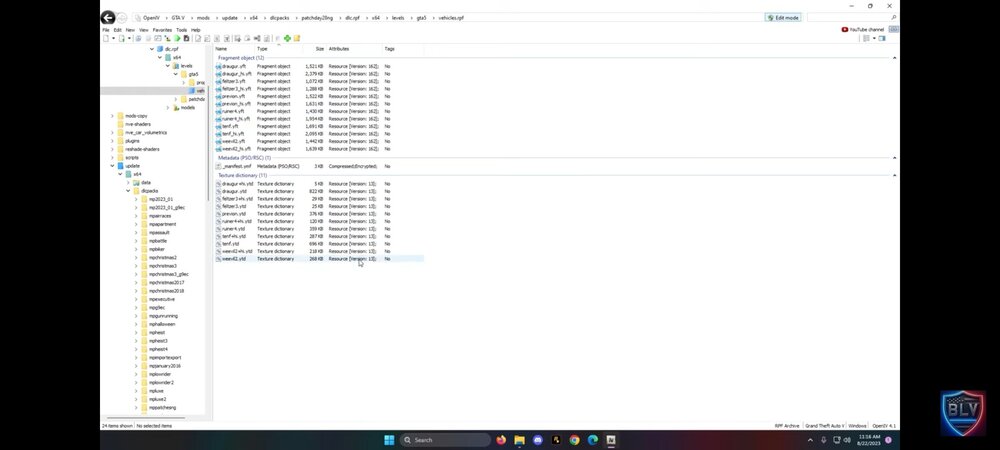
Doesn't it bother you that you removed the cars that should be in patchday28ng and filled vehicles.rpf only with your replacements?🤨 No question, of course, if you have completely cleaned up the tails. But I'm sure you're not, this is not how replacement is works. No wonder the game crashes now. Like what was the point to delete all those files just to put replacement there?
-
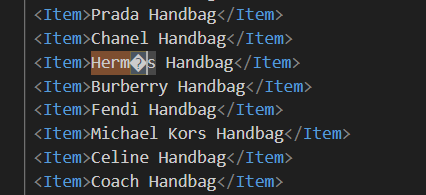
Yeah, as xml validator. Try to open it through edge and you'll get error. I also wondering how STP react on this in log.
-
Because of syntax error. There is several special characters which xml can't handle. For example:
-
Install/Update RageNativeUI
-
-
Attach RagePluginHook.log file. It's text document in your main GTAV folder. Not from the logs folder.
-
Not always. If you have mods folder, rename it to _mods and try again.
-
Try to disable ambient spawn in lspdfr.ini file.
-
Preferably drag & drop RagePluginHook.log file. It's text document in your main GTAV folder. Not from the logs folder.




