


1Adam19
Members
-
Joined
-
Last visited
Everything posted by 1Adam19
-
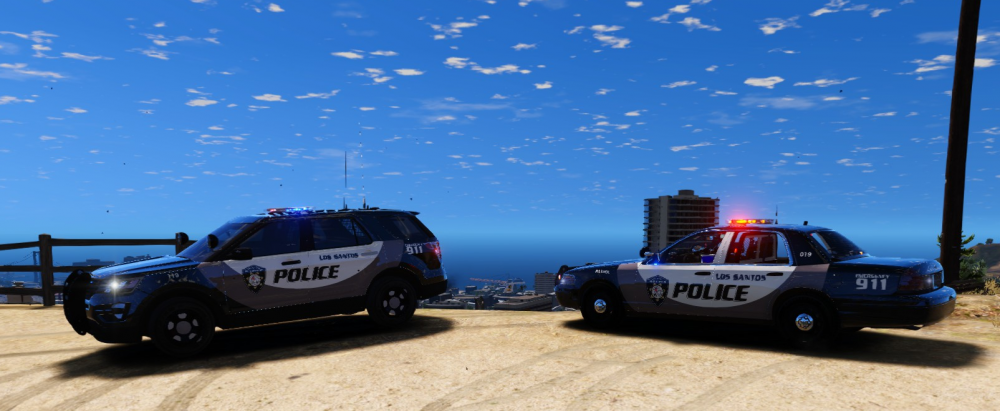
With RDE and ELS out I decided now is a good time to revamp my fleet. I decided to go with all custom skins for all my vehicles, here are two I completed today. This design is based upon the 2016 Award Winning Design for Best Police Vehicle by Police Magazine. When I'm done I'll upload the ENTIRE pack (skins for all RDE agencies) for you folks to enjoy...I just wish I could make it really easy and include the models in a download.
-
.thumb.jpg.c8e24672d78442ee47dacc9a2d80c000.jpg) Works great, I reskinned it to go with my Blaine County Sheriffs vehicles, looks great!
Works great, I reskinned it to go with my Blaine County Sheriffs vehicles, looks great!- 28 comments
- 7 reviews
-
 Any tutorials out there for what does what? I'm comfortable modding game files myself, I just don't know enough about the structure and implications of what I am touching. @Kilyin
- 779 comments
- 187 reviews
-
I love all of these packs, LSPD, Sheriff, and FBI. I used to do a bit of modding and skinning in past games and know how taxing it can be. My only question is this: is there anyway to get the later vehicles (4-7) to spawn dynamically in the game? The ones that fill the base slots appear, but the later ones only spawn via a trainer.
- 779 comments
- 187 reviews


.thumb.jpg.c8e24672d78442ee47dacc9a2d80c000.jpg)
