


pjwhunt98
Members
-
Joined
-
Last visited
Everything posted by pjwhunt98
-
I noted this in the log [6/4/2022 6:11:59 PM.993] LSPD First Response: Origin: Game fiber "Money Truck Theft [UnitedCallouts]". I think this could be caused by the plugin United Callouts. Try to uninstall it if possible, to trial how it goes or reinstall it to see if it gets better. I hope this fixes it for you buddy. Could possibly disable the Money Truck Theft callout as sometimes it could be caused by the plugin itself and not LSPDFR.
-
Damn, I hope you manage to find a solution mate
-
Hoping it works for you buddy, let me know the outcome.
-
I misread your post, my bad. Have you tried to reinstall LSPDFR?
-
Hi, I think the issue could be this [6/4/2022 4:08:39 PM.930] LSPD First Response: UNHANDLED EXCEPTION DURING GAME FIBER TICK To solve this try Download the latest version of RageNativeUI from here. Copy the RageNativeUI.dll & RageNativeUI.xml files into your GTA folder, then click replace when you're asked i.e. if it is the first time you're installing it. Let me know how this goes.
-
Hi have you updated your GPU drivers?
-
I have the same issue, it is so frustrating.
-
Are your graphic drivers up to date? I think this could be caused by out dated GPU drivers.
-
Hi buddy, can you provide the rph log?
-
Glad to have helped mate, any more issues send me a DM 🙂
-
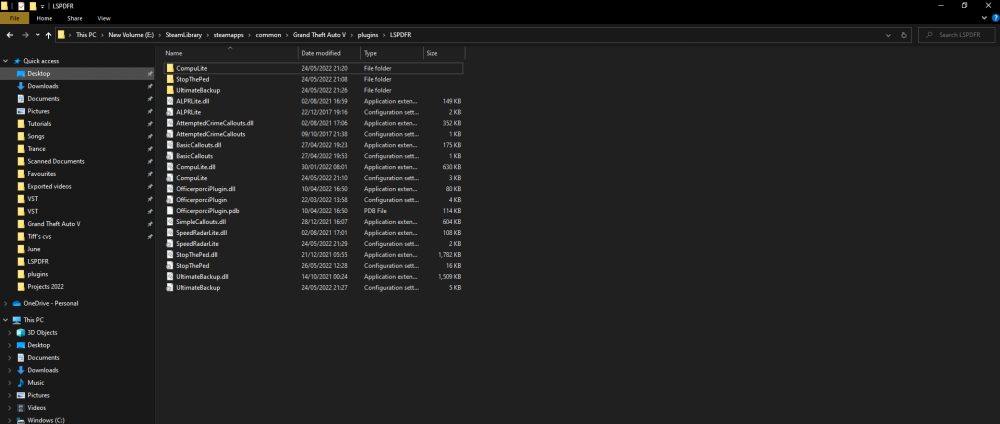
I think I know the issue. I noted that your compulite dll file is just in the plugins folder, I have mine in one created LSPD as per my screenshot. Try move the compuLite ones in an LSPD folder within the plugins folder. Let me know how that goes. Idk if this would work but I think it is worth a try. I have also noted this in your log: [6/3/2022 9:00:30 PM.623] Error while loading plugin D:\SteamLibrary\steamapps\common\Grand Theft Auto V\Plugins\StopThePed.dll. Plugin is skipped during reload. Exception: System.ArgumentException: Assembly StopThePed.dll (StopThePed, Version=4.9.5.1, Culture=neutral, PublicKeyToken=null) does not have the required Plugin attribute. I think this could indicate stop the ped was installed incorrectly. Try to reinstall this buddy. - Copy the contents of "Plugins\LSPDFR" in this package to: "GTA V directory\plugins\LSPDFR" - If you haven't had "RageNativeUI.dll" in your "main GTA V folder", don't forget to copy the file from this package - If you already have newer "RageNativeUI.dll", please keep using it. No need to overwrite the file - Please open and edit "StopThePed.ini" file, if you want to replace the keyboard key or controller button bindings
-
Have you enabled them to start via RPH and have you attempted to load them by via pressing F4? I.e. F4 > type "loadplugin (plugin name)". There is an option to toggle to load your plugins automatically. Can you attach your rph log file too buddy.
-
 Hey, some reason cars still go through the tape. It didn't the other day, any suggestions?
- 299 comments
- 25 reviews
-
I can confirm it works perfectly fine now, I uninstalled and reinstalled which did the trick. I must have installed it incorrectly the first time.
- 299 comments
- 25 reviews
-
 My AI peds have mixed uniforms, I followed instructions as per the readme file. Any help?
- 131 comments
- 5 reviews
-
 Hi I am interested in the patron, quick question though. If I get the cadet package am I able to install new releases of EUP, such as 9.4 etc
- 145 comments
- 9 reviews
-
-
Temporarily
-
Absolutely does no harm disabling it whilst playing LSPDFR, offline. If you read correctly I said temporarily disable it. I also meant by adding it to an exclusion list via antivirus. You also have windows defender as a back up as well.
-
Do you have your anti virus on when trying to run it? Sometimes I have to disable it for it to run. I would disable it temporarily of course.
-
I was devastated when this did not work for me. I followed the steps as above, also installed the modified gameconfig and it unfortunately still crashes.
- 299 comments
- 25 reviews
-
I just want to see what it throws when you have requested transport for a suspect. What plugins have you installed?
-
Can you attach your ragehook log? It is located where you have installed LSPDFR.
-
Have you recently installed any ped packs? I had an issue where I could only select one uniform for LSPDR. I basically installed EUP Menu and EUP Law & Order to customize my uniform. Can you provide your RageHook log and same question as above, have you installed any car packs? I think the missing car could be caused by incorrectly installing a car pack or file.
-
Can you provide the RageHook Log? This should be located in your GTA directory (where you installed LSPDFR).


