



Purzel89
Members
-
Joined
-
Last visited
Everything posted by Purzel89
-
 Best callouts i have ever seen. Mixing this with realistic cop cars and realistic sirens this is the ultimate mod. I liked the Pacific Bank heist the most because this was so intense and action packed. I managed to rescue all but one hostage which i accidentally shot (possibly). How you placed the cop cars around the bank and the SWATs waiting at both doors... wow. Even the synchronized talk between comander and officer is awesome. Also very sophisticated and exciting at the same time are the hot pursuits. I had a Petrol tanker and a bus. In both cases i shot the tyres. The Petrol tanker crashed and blocked the Exit passage of the Olympic freeway. And i chased the bus over another freeway. Which reminded me of this movie... what was it called? I think it was called "the bus that couldn't slow down". Oh btw... not a Support request because i dont think it is bugged but simply not featured. When i have this "Backup for Traffic stop required" i sometimes have the case that the Police car will not leave the Scene if finished. That Police car blocked the road. Thats the only minor negative i have to say.
- 1,081 comments
- 166 reviews
-
-

- 1
-
-
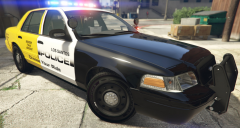 The livery should be reversed. Taxi front, Police rear. Because in the back are the uncomfortable seats.

