


DaveTheDecimator
Members
-
Joined
-
Last visited
Everything posted by DaveTheDecimator
-
@PNWParksFan Hi, I wonder if the betterems xml file can handle liveries? I can use liveries in custom backup but is the syntax the same as in custom backup?
-
 I downloaded a police car that also has a fire department livery, how do I get it to spawn with that livery only?
- 783 comments
- 86 reviews
-
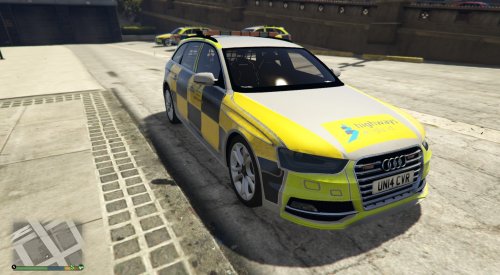 This is a retexturing off the Audi SF by BritishGamer88 (https://www.gta5-mods.com/vehicles/2013-british-police-audi-a4-s4-avant-traffic-uni). Also thanks to British Officer for packaging the vehicle into his "Ultimate British Police Pack". Therefore you need to download the original car first, link at the bottom. This is my first attempt at a reskin, it is loosely based on the real Traffic Officer livery for HE but I've put my own spin on things. Note: The lights are now orange!
 -
How do I spawn police officers with hats? I have replaced my s_m_y_ranger_01 with a skin for the british armed response police (look it up) and they have baseball caps, but how do I spawn them with the caps?
-
Nevermind I saw the above post :P. However, I have noticed it crashes LSPDFR if I am in Paleto Bay after a minute, I can reload LSPDFR and it works perfectly until I restart the game?
-
For some reason it RDE crashes when I use it with LSPDFR? It loads for a bit then it stops working. I can never get past the loading screen
-
Ahhh, thanks
-
I set out my custom entries as the others but I get XML errors, I'll write a custom XML file and could you please point out any errors?
-
Hi, I know HTML, so I thought XML would be a breeze, but I get a lot of errors so I have 3 things to say. 1. Can I change the display names (not internal names, names that appear on the in-game menu) from Local Patrol, State Patrol, Local Air, NOOSE Air, Local SWAT, NOOSE SWAT, Ambulance to, respectively: Traffic Police, Interceptors, Air Track Support, SAS Air, Firearms Officers, SAS Ground, EMS. Now this doesn't match up with the backup that is called, which brings me to point 2: 2. Could you guys please make me a custombackup.xml file with the following parameters: Traffic Police(LocalPatrol): All areas in region of Los Santos city, spawn backup cars police,police2 & police4, with police4 most likely to spawn (chance=50) and police1 & police2 will both be chance=25. Spawn peds: s_m_y_cop_01, s_f_y_cop_01, both equal chance, with weapons: stungun, nightstick, flashlight. All places outside of Los Santos city, spawn sherrif1 and sherrif2, both equal, with peds same as before weapons:stungun, nightstick, flashlight. Interceptors: Same peds and weapons and traffic police, but spawn with police3 everywhere. Air Track Support: Same as LocalAir. SAS Air: LocalAir helicopter, but with soldiers in it, that shoot off the sides with carbine rifles. Firearms officers: Everywhere they have policeT & fbi2, their peds are s_m_y_cop_01 with the stab-proof vest (I don't believe s_f_y_cop_01 can have the vest, if they do, add them too), with weapons: pistol, nightstick and flashlight. SAS Ground: Everywhere they have fbi2, their peds are soldiers with carbine rifles. EMT: BetterEMS Ambulance & Firetruck. This is because I have british police cars & peds so this is the british way of doing it, please can someone make this. 3. A suggestion, a form where you specify like I have and it generates the entire XML file for you to replace yours with. As in, a program you run that could ask "What is the name of your LocalPatrol unit", then "Specify some regions to create parameters", then "what vehicle(s) would you like to use?",etc.


