




ASTTrprDillon95
Members
-
Joined
Everything posted by ASTTrprDillon95
-
 2007 Alaska State Troopers Crown Victoria Police Interceptor](//s3-gallery.int-cdn.lcpdfrusercontent.com/gallery/album_628/sml_gallery_2982_628_78308.png)
From the album: WIP (ASTTrprDillon95)
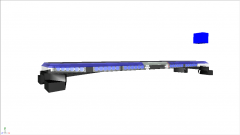
Yes I have posted many images of the AST cars I am working on but since then I have totally restarted the project from scratch. Here is the new 2007 model. New stuff: Ne rambar, new Console, new lightbar(heavily edited) -
From the album: WIP (ASTTrprDillon95)
Original Code 3 X2100 by aznairsoftdude, Edited to Code 3 X2100 LED by Tim98, Modified to Code 3 X2100 LED TR by ASTTrprDillon95 -
-
Your colors are need to be 100% opaque...
-
 awesome!!!!
 -
-
![[REL] 2010 Liberty County Sheriff's Office Dodge Charger](//s3-gallery.int-cdn.lcpdfrusercontent.com/gallery/album_628/sml_gallery_2982_628_8250.jpg)
From the album: WIP (ASTTrprDillon95)
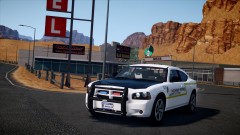
Download: OR http://www.gta-modding-chest.com/database/195-2010-liberty-county-sheriff-s-office-dodge-charge/index.html?saved=1 *************** Content************************** - NAME: 2010 Liberty County Sheriff's Office Dodge Charger - VERSION: LCSO_CHGR_v1.0 - LIGHTBAR: Code 3 X2100 - OTHER EQUIPMENT: laptop, Spotlights - EXTRA PARTS: Speed Radar, Console - MULTIPLE LIVERIES: YES - OPTIMIZED FOR: POLICE, POLICE2, NOOSE, FBI - Status : OPEN - By downloading this file you agree NOT to attempt to modify and or rip the model or any of it's contents included, THIS INCLUDES TEXTURES. Installation: Import the files using OpenIV or SparkIV into the vehicle.img *REMEMBER TO TAKE BACK-UP* ********************* Credits******************** - Model is original Dodge Charger by EA Games, modified for and converted to GTAIV by Lex91, modified to marked police version by Lt.Caine. - Wheels made by EA Games, converted to GTAIV by Lex91. - Center console by unknown author, Modified by Tim98 - Code 3 X2100 by aznairsoftdude edited by Tim98 - Deck Lights by ASTTrprDillon95 - Rambar by BxBugs123 - HG2 Grill lights by EVI, Edited by ASTTrprDillon95 - Headlights wig wag, Strobes and reverse lights strobe by ASTTrprDillon95 - SecuCOM Attenna by PriMan - Livery by Michael V. -
ASTTrprDillon95's Modifications ******************************************************************************************************** 2010 Liberty County Sheriff's Office Dodge Charger ************************************************ *************** Content************************** - NAME: 2010 Liberty County Sheriff's Office Dodge Charger - VERSION: LCSO_CHGR_v1.0 - LIGHTBAR: Code 3 X2100 - OTHER EQUIPMENT: laptop, Spotlights - EXTRA PARTS: Speed Radar, Console - MULTIPLE LIVERIES: YES - OPTIMIZED FOR: POLICE, POLICE2, NOOSE, FBI - Status : OPEN - By downloading this file you agree NOT to attempt to modify and or rip the model or any of it's contents included, THIS INCLUDES TEXTURES. Installation: Import the files using OpenIV or SparkIV into the vehicle.img *REMEMBER TO TAKE BACK-UP* ********************* Credits******************** - Model is original Dodge Charger by EA Games, modified for and converted to GTAIV by Lex91, modified to marked police version by Lt.Caine. - Wheels made by EA Games, converted to GTAIV by Lex91. - Center console(including Laptop, radar watch guard and M4, AR15 and shotgun) by unknown author, Modified by Tim98 - Code 3 X2100 by aznairsoftdude edited by Tim98 - Whelen Spotlight by EVI - Deck Lights by ASTTrprDillon95 - Rambar by BxBugs123 - HG2 Grill lights by EVI, Edited by ASTTrprDillon95 - Headlights wig wag, Strobes and reverse lights strobe by ASTTrprDillon95 - SecuCOM Attenna by PriMan - Livery by Michael V. ********************* Notes *************************** - Vehicle Model is best used with Light Enhancing Mods. ******************************************************************************************************** EXCLUSIVE TO LCPDFR.COM & GTA-MODDING-CHEST.COM YOU ARE NOT ALLOWED TO REUPLOAD, EDIT OR RIP WITHOUT MY PERMISSION. FAILURE TO DO SO WILL RESULT TO PUNISHMENT! WE ARE IN NO WAYS RESPONSIBLE TO DAMAGE TO YOUR GAME. ********************************************************************************************************
- 9 comments
- 10 reviews
-
-
The indicators won't flash because you brake lights is already on....
-
 Man I love you(no homo)
 -
![[REL] 2010 Liberty City State Highway Patrol Slicktop Dodge Charger](//s3-gallery.int-cdn.lcpdfrusercontent.com/gallery/album_628/sml_gallery_2982_628_163088.jpg) LOL well the AST uses a black Slicktop charger they don't have white ones... Anyways thank you.
LOL well the AST uses a black Slicktop charger they don't have white ones... Anyways thank you. -
ASTTrprDillon95's Modifications ******************************************************************************************************** 2010 Liberty City State Highway Patrol Slicktop Dodge Charger ************************************************ *************** Content************************** - NAME: 2010 Liberty City State Highway Patrol Slicktop Dodge Charger - VERSION: LCSHP_chgr_S_v1.0 - LIGHTBAR: SoundOff Pinnacle - OTHER EQUIPMENT: laptop, Spotlights - EXTRA PARTS: Speed Radar, Console - MULTIPLE LIVERIES: YES - OPTIMIZED FOR: POLICE, POLICE2, NOOSE, FBI - Status : OPEN - By downloading this file you agree NOT to attempt to modify and or rip the model or any of it's contents included, THIS INCLUDES TEXTURES. Installation: Import the files using OpenIV or SparkIV into the vehicle.img *REMEMBER TO TAKE BACK-UP* ********************* Credits******************** - Model is original Dodge Charger by EA Games, modified for and converted to GTAIV by Lex91, modified to marked police version by Lt.Caine. - Wheels made by EA Games, converted to GTAIV by Lex91. - Center console(Including laptop, Radar, Watch Guard system, M4, AR15 and shotgun) by unknown author, Modified by Tim98 - Whelen Inner Edge By BxBugs123, edited to SoundOff Pinnacle by Tim98 - Rambar by BxBugs123 - Tomar 200S by NickieB, Edited by ASTTrprDillon95 - HG2 Grill lights by EVI, Edited by ASTTrprDillon95 - HG2 Tag bar by EVI - Headlights wig wag and reverse lights strobe by ASTTrprDillon95 - SecuCOM Attenna by PriMan - Livery by ASTTrprDillon95 ********************* Notes *************************** - Vehicle Model is best used with Light Enhancing Mods. ******************************************************************************************************** EXCLUSIVE TO LCPDFR.COM & GTA-MODDING-CHEST.COM YOU ARE NOT ALLOWED TO REUPLOAD, EDIT OR RIP WITHOUT MY PERMISSION. FAILURE TO DO SO WILL RESULT TO PUNISHMENT! WE ARE IN NO WAYS RESPONSIBLE TO DAMAGE TO YOUR GAME. ********************************************************************************************************
- 7 comments
- 8 reviews
-
From the album: WIP (ASTTrprDillon95)
Download: -
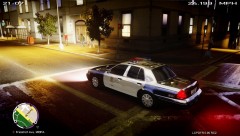
![[W.I.P] CIV TO PI](//s3-gallery.int-cdn.lcpdfrusercontent.com/gallery/album_1567/sml_gallery_49005_1567_361597.png) Was this previously a civilian vehicle?? If it was, lots of stuff need to be changed because Dodge’s police package is very different from the normal Chargers you see....
Was this previously a civilian vehicle?? If it was, lots of stuff need to be changed because Dodge’s police package is very different from the normal Chargers you see.... -
 Also nice claiming you made this car when EVI released here....SMART.
 -
Nice stealing my Image bro..... I know what I upload into the gallery... This is part of my album: LCPDFR in Patrol. Original title of this image: LCPDFR Game play on EFLC (Testing my ENB with EFLC and my command line) Finally got it to work Link to original image:
-
If you prefer modders to release stuff once a month then say so... We have a life too and we release stuff when we want. The reason he has been releasing lately because he is currently away. Might as well think before you even say a thing.
- 14 comments
- 23 reviews
-
well guys isnt it better for us to just admire the work done and not talk about the past.... Those people who build that building... put hours of work into it...
-
-
![[View 5] BMW Z4 Crashes on Broker Dukes Expressway](//s3-gallery.int-cdn.lcpdfrusercontent.com/gallery/album_1463/sml_gallery_43345_1463_98050.jpg) I have a huge suggestion for your staging of events..... use the SNT to the fullest extend.... like how I did here:
I have a huge suggestion for your staging of events..... use the SNT to the fullest extend.... like how I did here: -
-
Saw that on twitter and I can't wait...
-
After accepting the call, press alt + y to stop it or you could use the Indictator script to turn it off. This happens due to the Interference of ELS.
-

 2007 Alaska State Troopers Crown Victoria Police Interceptor](http://s3-gallery.int-cdn.lcpdfrusercontent.com/gallery/album_628/sml_gallery_2982_628_78308.png)

![[REL] 2010 Liberty County Sheriff's Office Dodge Charger](http://s3-gallery.int-cdn.lcpdfrusercontent.com/gallery/album_628/sml_gallery_2982_628_8250.jpg)
![[REL] 2010 Liberty City State Highway Patrol Slicktop Dodge Charger](http://s3-gallery.int-cdn.lcpdfrusercontent.com/gallery/album_628/sml_gallery_2982_628_163088.jpg)

![[W.I.P] CIV TO PI](http://s3-gallery.int-cdn.lcpdfrusercontent.com/gallery/album_1567/sml_gallery_49005_1567_361597.png)
![[View 5] BMW Z4 Crashes on Broker Dukes Expressway](http://s3-gallery.int-cdn.lcpdfrusercontent.com/gallery/album_1463/sml_gallery_43345_1463_98050.jpg)