




ASTTrprDillon95
Members
-
Joined
Everything posted by ASTTrprDillon95
-
![[WIP] 2007 Alaska State Troopers State Troopers Crown Victoria Police Interceptor](//s3-gallery.int-cdn.lcpdfrusercontent.com/gallery/album_1419/sml_gallery_2982_1419_14784.jpg)
From the album: AKDPS Roleplay
WIP right now most stuff is done but missing spotlight -
 I ain't arguing... I am just letting him know the difference and letting him know why I said there is a huge difference between the SRT model and the Police Package
 -
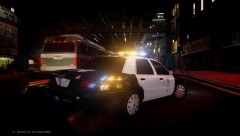 Its a private ENB.
 -
here's my updated one with an LAPD CVPI and ELS 7 running:
-
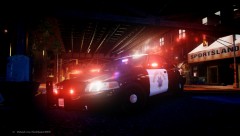
From the album: California Law Enforcement
-
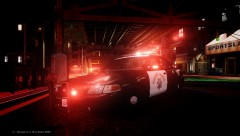
From the album: California Law Enforcement
-
From the album: California Law Enforcement
-
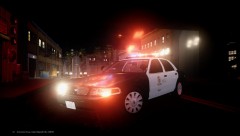
From the album: California Law Enforcement
-
-
Excuse me?? For your info, my friends dad owns a 2013 dodge charger SRT 8 and he drives home a 2013 dodge charger polcie package everyday because he works for his local department.... To be honest, yes it is based off the SRT version but I can tell you there is a whole lot difference in both vehicles.... Many things are really different.... I always do my research before even saying things are different.... I can tell you a lot of things are different in a Dodge Charger Police Package and a dodge charger SRT version... Very big difference.
-
Running more then 7 ELS mods on high setting and running a fps killing ENB. No crashes a all... AI ELS is on and I can have pursuits with more than 10 ELS cars chasing the suspects.... I can run super high poly cars as well.
-
If we all really look into the download section of every website you would notice the same department being released and rleasded over and over again non stop. We were once or are a GAD before. We must remember that. It downs matter what you create or you do. All the matters is the effort put in to the work released. Yes I am once a GAD too... Now that I have got the hang of Zmodeler, it's easier to do many stuff. Everyone has their opinions in stuff. Flaming like that ain't gonna help its Only gonna affect you and your reputation here. All them attend here is the OP's effort. I have seen many LAPD cars to be honest.... That's why I don't even try to do one.... Neither would I try to do a NYPD car.... Every modder hopes to do well in this harsh community. Being a newbie isn't easy. To be honest without opinions, I would have got to where I am today, having srcratch model a full set of Setina rambars, scratch made Lightforce spotlights. It's because of opinions and people voicing out their thoughts on the work. Yes there is testing more and more people who are doing mods. I do hope everyone really takes the time to understand the program fully and do what you do best. Lastly, I want to say is good work on the pack. And to the rest just stop all this shit and move on already. Saying all this won't help at all.its the effort that counts and not what you think of that person.
-
I love the ability to change the wig wags... I changed it to red and it's amazing!!!!
-
Since it has been released, I want to mention to everyone that ELS version 7 is the most stable ELS version released so far... I enjoyed playing with it the whole day. I didnt crash because of ELS at all...I managed to run AI ELS with no problems at all... Calling for backup is no problem .... amazing ......
-
To be honest, I LOVE ELS v7... Its an amazing mod... reading the comments above, I want to say this... WHEN version 7 of ELS was announced, a lot of people kept asking for the release date, then when its released, you come up with comments saying how stupid this amazing thing is... Patience is a virtue, keep reading the guide. It helps
-
-
Right all one person need to do is to remap the keys even if it takes a long time. If I can remap every key in to my laptop and get ELS and the trainer to work at the same time, you should be able to.
-
I am a modder LOL
-
I can help you anytime. Just add me on Skype. I am Tim's friend.
-
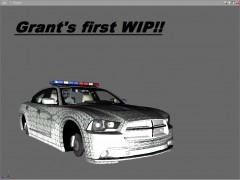
Well it needs a whole new grill and a huge set of things that need to be changed to become a Police Package
-
And it seems you are missing certain textures
-
Grant, if you are gonna use this charger at least convert it to a police package....
-
The file has been removed from all links as per requested by EVI. So is the thread. Where ever you try to download this 2005 expedition model, you will not find it. The model has been taken down long ago. If you want an expedition you will have to wait for me to finish scratch modeling it. AND AS bonehead mentioned. That model is NOT an explorer but a 2005 Ford EXPEDITION.
-
 2007 Alaska State Troopers Crown Victoria Police Interceptor](//s3-gallery.int-cdn.lcpdfrusercontent.com/gallery/album_628/sml_gallery_2982_628_78308.png) For you info... Car modding isn't easy as you think. I am no mod machine either... People are concerned about my mega pack... I am just updating them.
For you info... Car modding isn't easy as you think. I am no mod machine either... People are concerned about my mega pack... I am just updating them. -

![[WIP] 2007 Alaska State Troopers State Troopers Crown Victoria Police Interceptor](http://s3-gallery.int-cdn.lcpdfrusercontent.com/gallery/album_1419/sml_gallery_2982_1419_14784.jpg)


 2007 Alaska State Troopers Crown Victoria Police Interceptor](http://s3-gallery.int-cdn.lcpdfrusercontent.com/gallery/album_628/sml_gallery_2982_628_78308.png)