

DrWyatt
Members
-
Joined
-
Last visited
Everything posted by DrWyatt
-
San Andreas Emergency Medical Service - SAEMS SAEMS is a modification that I've been working on for a long while now, it is intended to emulate real life EMS in GTA V as closely as our platform enables us to with in depth patient conditions and treatment options. This Modification is heavily based on user-created content, with the ability to make use of custom callouts and functions, and with that in mind, I'm recruiting developers that would like to have early access to the modification and develop their callouts before the official release! If you are interested in joining the Callout Development team please contact me via a PM as soon as possible. If you have any suggestions on features to be implemented make sure to leave them down below or PM them to me! Features (Currently Implemented , WIP) Developer API: Ability to set Glasgow Scale, Blood Sugar, Blood Pressure, Pulse, O2 Sat, Airway Condition, Breathing Condition and Visible Injuries Ability to easily create new Patients with a default function Ability to easily create dispatch and paramedic radio chatter Ability to easily create new callouts Ability to add custom audio samples Duty Menu (Control Status, Fast GPS Route to Hospitals) Custom Hospitals added via XML File Patient Care Menu (Administer Medicines, Install Devices [Backboard, AED], Administer Treatments and check for patient's statuses) Use custom paramedic ped and ambulance Set paramedic vehicle More... Base: Rage Plugin Hook 0.56 and RageNativeUI 1.6.1 Current Version: 0.1a Thanks to: @alexguirre for his EmergencyV project which inspired me heavily in the making of this modification. Release Date: [TBA] Preview: [TBA] Link to Download: [TBA]

-
Yes, for GTA V follow the guide on top, and for GTA IV follow the one below.
-
For GTA V: Alrighty, so I'd suggest BlackJesus's video or Devin Kan's series on ZModeler3's basic functions and actions. You can buy ZModeler3 at https://www.zmodeler3.com/ and you can find DEV models and parts (Lightbars, Rambars and all that) in LCPDFR.com's Resource & Assets Section. It may not be easy at first but you'll get the hang of it with time, I hope to see some vehicles from you posted! Good luck @Spikey123 ! For GTA IV: For GTA IV I'd follow haracioss video and you can find the resources in the same link as posted above! It may not be easy at first but you'll get the hang of it with time, I hope to see some vehicles from you posted! Good luck @Spikey123 !
-
First of all, are you interested in Modeling, Texturing or Programming as a starting point?
-
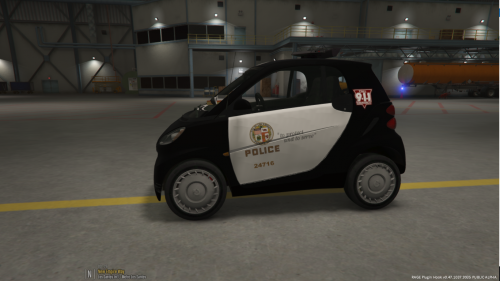 Thanks for your suggestion! It's currently a work in progress!
 -
Thanks for commenting! I made this livery to people who want to play with something different, not exactly realistic. And i believe the LAPD doesn't use a Smart Car too, but i used some google images of LAPD themed Smart Cars as source (Only problem being the the SLR's, but i'm waiting for a Smart Car with another lightbar) . If you have any suggestions of what livery i should do next, it'd be greatly appreciated.
-
This livery was based on the images available on the internet of LAPD's Smart Cars. Not a 100% replica due to the lightbar being specific to the NYPD. A new livery will be made as soon as a Smart car with a LAPD-like lightbar is released. Installation Instructions: 1. Drop the police.ytd file where you installed the SmartCar 2. Have Fun! PS: I still left NYPD Liveries in the vehicle, warn me if you'd like me to replace all of them! PS2.0: This is my first released Texture, and i hope to give you guys more textures in the future! PSThirdTime'sACharm: If you spot any problems with the livery please leave a comment or PM me.
-
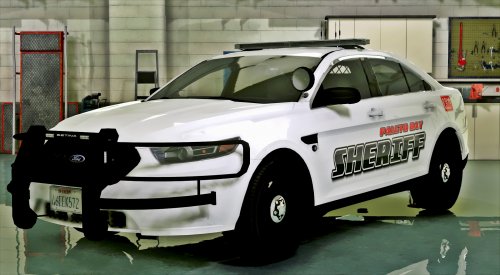 POLICESCO bringing us amazing cars, i'm never gonna get tired of this :) Can't wait for what's next!
- 51 comments
- 18 reviews
-
-

- 1
-
-
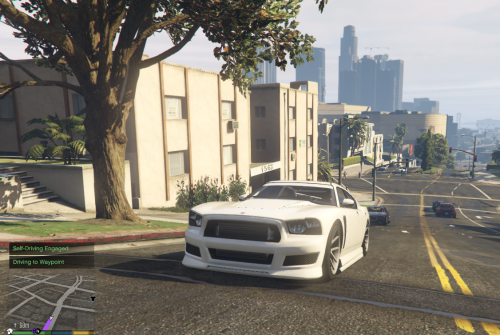 If i understand right, your problem is that when you arrive at a waypoint the car just keeps self-driving? You can change this setting in the .ini . If your problem is not this one, just comment it out again.
 -
Hey there! Do you have a legal copy of Grand Theft Auto V?
-
@takablecobra230 I believe the error is fixed, the update is up.
-
Sorry for taking this long! Just added the mute version, you can now download "SelfDrivev11N.rar".
-
Hold on, i'll be right back to you with a changed version or a mute version.
-
Great! If you face any other problems just comment here and i'll help you the best i can :)
-
Are you using the latest vestion (1.1)? Sorry for taking this long, i am solving some problems and stopped checking LCPDFR.com .
-
-
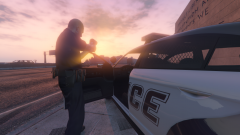
From the album: AvChaotic101's WIP
WIP Release Date: TBA -
Could you please send me the log?
-
Wrong Forum, Sorry, my mistake. You can still find it at: If you are looking for a GTA V one, my previus post was referring to it.
-
I'm currently developing a Escort Callout Pack, i'm going to be releasing a alpha test release soon(-ish), so if you want to help me out with testing just PM me.
-
Problem fixed on latest update, if you still face it, please PM me so i can help you more.
-
Thank you for providing this, i'll get right back to you with an update.
-
Could you please give me the logs?
-
Not my last piece at all, i've already got a few projects on the line of production, so expect to see me around more
-
Thanks, if you have any suggestions or complaints just comment and i'll respond to it Code 3.