




sixium
Friends of LSPDFR
-
Joined
Everything posted by sixium
-
-
 Do you have an LTD also?
 -
From the album: Los Santos Views
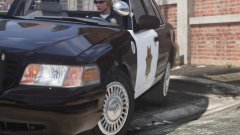
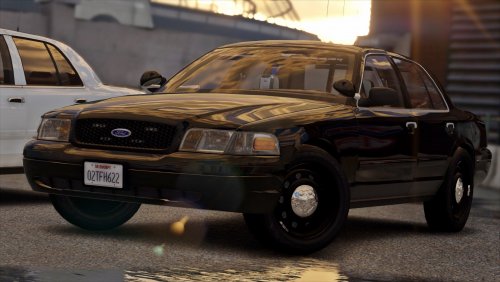
More retro stuff! A '99 Vic outfitted with the "old" version of my Frozen LSPD livery. Same design era as the '95 Caprice 9C1 before this. The LSPD didn't go with the redesign until probably mid '00s. 1999 CVPI with Heliobe by RobertTM!! I wonder what to do next... 2015+ Tahoe? FPI? More retro cars? GO LSPD! -
 Awesome shot!
 -
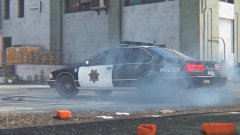 I remember this one, it has the Heliobe! It's awesome, but it also has the side moulding on the front doors, which doesn't go well with the rest of the cars I used =( Do you have an old Vic without the moulding on the front doors? I mean, one other than the one in your 90's pack. Also which Vic are you referring to, the '96 "aero" vic or the 98?
 -
.thumb.png.2940318389c3ca0fbd792e4b5145f917.png) For this being your first skin, you did a very good job. Keep it up! =) For the sides, since you have a big version of the badge up front, I think it's too much to have another badge on the rear fender... I suggest putting it somewhere in the back maybe?
For this being your first skin, you did a very good job. Keep it up! =) For the sides, since you have a big version of the badge up front, I think it's too much to have another badge on the rear fender... I suggest putting it somewhere in the back maybe?- 11 comments
- 3 reviews
-
-

- 2
-
-
From the album: Los Santos Views
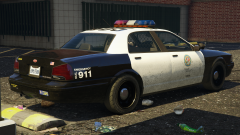
( Ignore the black lightbar, don't know what happened to the light textures =\ ) Caprice 9C1!!! Wrapped in a "retro" iteration of the Frozen LSPD livery (for context, and the "modern" iteration, look at my previous images). GO LSPD!! Caprice 9C1 by RobertTM! I might wrap the "aero" Vic in this livery too. =DDD Donuts!!!! (and not the food kind lol) -
From the album: Los Santos Views
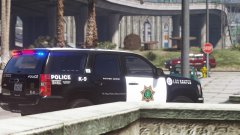
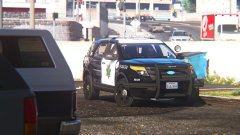
K9-variant of my "Frozen" LSPD livery (if you don't know what that is by now, just look at my previous few images) on a Tahoe!! As requested. Livery is all original, inspiration in part by Fresno PD, star is modified San Jose PD. K9 Tahoe by our very own thegreathah! Enjoy. What should be next??? I'm thinking of a "retro" variant on a Caprice 9C1... =PPP LSPD!!!!!! !!!!!!!!!!!!!!!!!! !!!!!!!!!!!!!!!!!!!!!!!!!!! !!!!!!!!!!!!!!!!!!!!!! !!!!!!!!!!!!!!!!! !!!!!!! -
This topic has been moved to the appropriate forum. Please post in the correct location in the future.
-
This topic has been moved to the appropriate forum. Please post in the correct location in the future.
-
This topic has been moved to the appropriate forum. Please post in the correct location in the future.
-
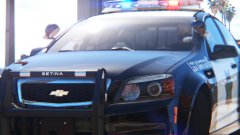 It's unedited. I just turn off the blur.
 -
I agree, it is on the bright side.
-
This topic has been moved to the appropriate forum. Please post in the correct location in the future.
-
Yes, MemeEnhancer
-
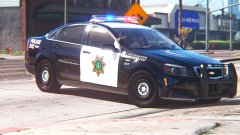 What should be next? Tahoe? FPI? "Retro" Caprice 9C1, LTD? =DDD
 -
-
From the album: Los Santos Views
Next iteration of my "Frozen" livery (you should know what it is by now, if not, look at my previous gallery images) for the Caprive PPC! I mean the Caprice PPV! Livery is all original, inspiration in part by Fresno PD, star is modified San Jose PD. On a side note, I think i've got my graphics dialed down now, no more changes, I think it looks pretty damn good at this point. Caprive PPC by KevinDV (Kane)! Enjoy the below images. =) More to come! -
From the album: Los Santos Views
Wow, hard to believe this came from a freakin video game. -
This doesn't seem like an issue related to R* or GTAV. My PC's specs are much lower and I run the game on ultra and at 4K (downsampled) for screenshots, 2K for gameplay, rock solid 30+ fps
-
Which visual mods did you "frankenstein" together? This topic has been moved to the appropriate forum. Please post in the correct location in the future.
-
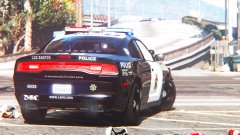
From the album: Los Santos Views
Goddamn the "Frozen" livery looks good on the Charger!! (IMO) If you need context, look at my previous two images. Inspiration in part by Fresno PD, star is modified San Jose PD. Livery is all original. My favorite thus far. =DDD LOS SANTOS PDDDDDDD!!!!! 2014 Charger by thegreathah!!! What's next?? Probably the Caprice PPV! My god, it's hot -
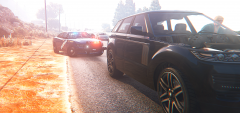 Ah, MemeEnhancer, I knew it haha
 -
What were you graphics settings for this shot, mags?
-
 Visual V + RADIANCE V + ENB w/ VisualV preset + ReShade w/ MemeEnhancer @ 1080p with every setting on the highest it can be.

.thumb.png.2940318389c3ca0fbd792e4b5145f917.png)

