




sixium
Friends of LSPDFR
-
Joined
Everything posted by sixium
-
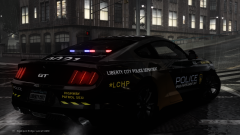
![LCHP Speed Enforcement Unit - [FINAL] 2015 Ford Mustang GT 5.0 Shot #2](//s3-gallery.int-cdn.lcpdfrusercontent.com/gallery/album_3066/sml_gallery_29300_3066_1644130.png)
From the album: sixium's WIP
Another shot of the finalized LCHP SEU 2015 Ford Mustang GT 5.0. Closer shot of the stealth unit in the spoiler. Model by BPM -
![LCPD Highway Patrol SEU - [FINAL] 2015 Ford Mustang GT 5.0](//s3-gallery.int-cdn.lcpdfrusercontent.com/gallery/album_3066/sml_gallery_29300_3066_750383.png)
From the album: sixium's WIP
Finalized LCPD Highway Patrol Speed Enforcement Unit 2015 Ford Mustang GT 5.0 slicktops. Three marked units and a stealth unit, like the Dodge Challenger. These two models, as mentioned with the Challenger, are the workhorses of the LCHP SEU. Model by BPM -
 YUMMY
YUMMY -
-
-
I think it looks pretty good, nice a simple. =) My suggestions: like Officer Vic said, move the text on the hood much closer to the front of the car; and make the roof number much bigger. I generally like to add the unit number somewhere on each side of the car, but that's just me, it's of course up to you.
-
It's a little busy, but I've seen some real-life departments with worse liveries.
- 15 comments
- 3 reviews
-
-
 I'm glad you like it =D Yes, I made the livery, and yes, it will be released as part of a big skin pack sometime in the future =)
 -
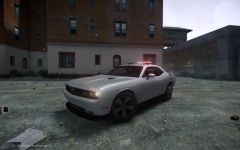
![LCPD Highway Patrol SEU - [FINAL] Dodge Challenger SRT8 Shot #2](//s3-gallery.int-cdn.lcpdfrusercontent.com/gallery/album_3066/sml_gallery_29300_3066_742115.png)
From the album: sixium's WIP
Another shot of the finalized LCHP SEU Dodge Challenger SRT8. Goddamn the Challenger SRT8 looks good. Someone needs to make a Hellcat version!! Model by Chippy. -
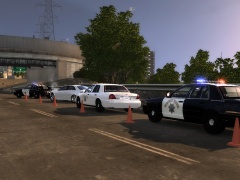
![LCPD Highway Patrol SEU - [FINAL] Dodge Challenger SRT8](//s3-gallery.int-cdn.lcpdfrusercontent.com/gallery/album_3066/sml_gallery_29300_3066_2000768.png)
From the album: sixium's WIP
Dodge Challenger SRT8's of the LCHP Speed Enforcement Unit finalized. Three marked units and a stealth unit. The Dodge Challenger, along with the 2015 Ford Mustang GT 5.0, are the LCHP SEU workhorses. Model by Chippy. -
-
-
 Don't the CHP use flares instead of cones? I don't think I've ever seen the CHP use cones...
 -
 Haha, the LCHP accepts nothing less than the HEMI, no exceptions. ;)
 -
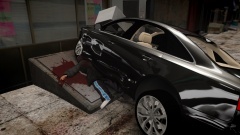 Ouch
Ouch -
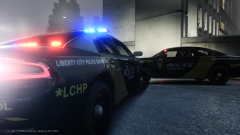
From the album: sixium's WIP
2015 Dodge Charger units from the LCPD Highway Patrol. WIP -
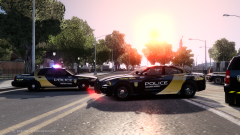 Not all ENBs have the lens flare. It's just a setting, it's easy to turn on/off or modify. I took out the lens flare on my nighttime ENB, but I left it in the daytime one because I like the flare during sunsets and stuff.
 -
[before even watching the video] YES!!!
-
Some test shots of my ever changing ENB customizations lol
-
From the album: ENB Test Shots
Testing out my daytime ENB (because I can't always take pics at night lol). Basically an ELS-friendly slightly-tweaked Nutt's ENB (eliminated the white-light issue). -
The Mustang is by BPM, and you can download it here: http://www.mediafire.com/download/a13933uutkdpabd/2015_Ford_Mustang_Unmarked.rar
-
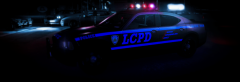 Pbbbbbbbb post-editing
 -
From the album: sixium's WIP
Added another beauty to the LCPD Highway Patrol Speed Enforcement Unit fleet. 2015 Ford Mustang GT 5.0 slicktop. -
Whoa, how'd you get the decals to reflect like that?? =O

![LCHP Speed Enforcement Unit - [FINAL] 2015 Ford Mustang GT 5.0 Shot #2](http://s3-gallery.int-cdn.lcpdfrusercontent.com/gallery/album_3066/sml_gallery_29300_3066_1644130.png)

![LCPD Highway Patrol SEU - [FINAL] 2015 Ford Mustang GT 5.0](http://s3-gallery.int-cdn.lcpdfrusercontent.com/gallery/album_3066/sml_gallery_29300_3066_750383.png)
![LCPD Highway Patrol SEU - [FINAL] Dodge Challenger SRT8 Shot #2](http://s3-gallery.int-cdn.lcpdfrusercontent.com/gallery/album_3066/sml_gallery_29300_3066_742115.png)
![LCPD Highway Patrol SEU - [FINAL] Dodge Challenger SRT8](http://s3-gallery.int-cdn.lcpdfrusercontent.com/gallery/album_3066/sml_gallery_29300_3066_2000768.png)


