Horton
Members
-
Joined
-
Last visited
Everything posted by Horton
-
That’s frustrating. Since you have all the main updates, the issue is likely a specific .asi plugin that's not compatible with the new 3788 update. Do you still have 'SirenSettingLimitAdjuster.asi' (SSLA) in your folder? That mod is known to cause crashes right now. Try this: Temporarily move ALL your .asi files (like OpenIV.asi, SSLA, ELS, etc.) out of your main GTA V folder. If the game starts, put them back one by one until it crashes again. That way, you’ll find the exact culprit!
-
Menyoo and ScripthookVDotNet require un update. Step 1: Install the latest version of LSPDFR. Step 2: Install the new Script Hook V. Step 3: Install the new Menyoo and ScripthookVDotNet. It should work for you now
-
You need to remove the SirenSettings_Limit_Adjuster file. Also, if your Rage crashes after pressing Esc, check if you have CalloutInterfaceAPI in your game directory. Make sure to download the latest version of LSPDFR and ScriptHook V as well. Let me know if that helped!👮♂️🚓🫡
-
Hi, everything is working now, but none of the SirenSetting Limit Adjuster versions seem to work🫤. Is there an alternative mod to get the emergency lights working on more complex car models?🧐
-
Hi, I'm back. After deleting the SirenSettings_Limit_Adjuster file, the police sirens are working without any issues again. As for the Rage Plugin Hook crashing while on duty when pressing Esc, it has been fixed by adding the missing CalloutInterfaceAPI file to the GTA 5 game folder. Everything seems to be working for now. I will confirm if everything is definitely okay by the weekend at the latest. See you for now! 🫡
-
Alright, I'll do as you advise and delete the file. However, I'm at work right now and won't be back until late tonight, around 0:15 AM. I'll let you know tomorrow if it helped. As for the RAGE Plugin crashes when pressing Esc, it’s probably caused by one of the plugins—I'll look into that tomorrow as well. Thanks for your time and help for now, bye!
-
Not on loading, if I press Esc after im in active duty, LSPDFR crash, but GTA still is fine. And innew LSPDFR, police flashing lights not working only sirens. I mean non-els lights.
-
I’m reaching my breaking point after troubleshooting for 8 hours straight. After updating LSPDFR, ScriptHookV, Menyoo, and ScriptHookVDotNet, I’m facing two major issues: Sirens but no lights: I am NOT using ELS. I use standard/non-ELS vehicles. I can turn on the sirens, but the police lights won't activate at all. I’ve double-checked my keybindings and they are set correctly. Crash on Pause/ESC: Whenever I’m on duty and press 'ESC' or 'P' to pause the game, LSPDFR immediately crashes, leaving me with just the vanilla base game. Does anyone have a fix for this? Is there a specific compatibility issue with the latest versions of these plugins? I'd really like to avoid a complete clean reinstall and hours of manual mod sorting if possible. Any help would be greatly appreciated. Thanks!
-
I Have : BrakeLightsPlus.asi,fwBoxStreamerVariable_DecalsLimit-Patch.asi,GTAV.HeapAdjuster.asi,GTAV.PedPropLimitAdjuster.asi,GTAV.ResourceAdjuster.asi,HeapAdjuster.asi,LUA.asi,Menyoo.asi,NativeTrainer.asi,openCameraV.asi,OpenInteriors.asi,OpenIV.asi,PackfileLimitAdjuster.asi,PersistentSteer.asi,ScriptHookVDotNet.asi,SirenSetting_Limit_Adjuster.asi,TimeScaler.asi,TurnSignals.asi,WeaponLimitsAdjuster.asi.
-
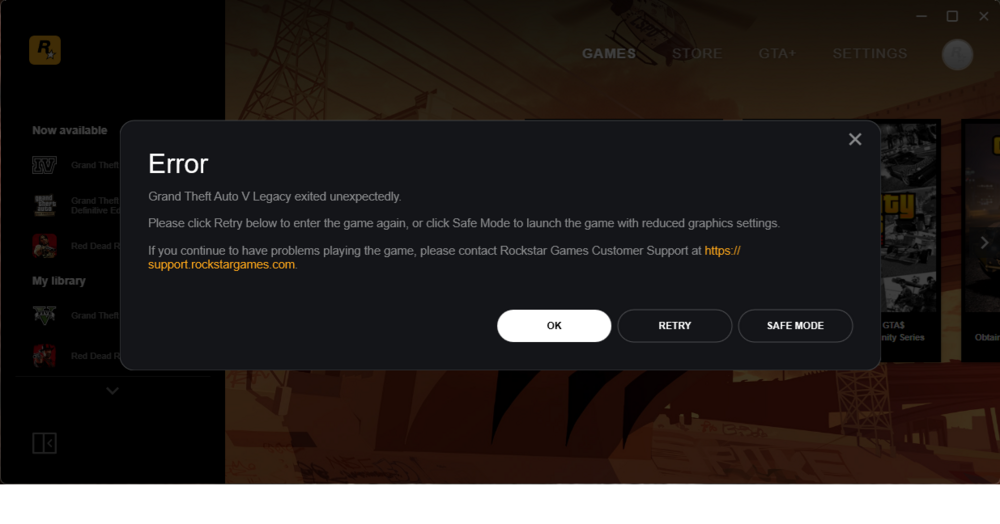
Hi everyone, I am experiencing a critical issue where my game fails to even reach the loading screen. After an extensive investigation, I have narrowed it down specifically to the dinput8.dll file (ASI Loader). System Specs & Version: Game Version: 1.0.3788.0 (Rockstar Games Launcher) ScriptHookV Version: 3788.0 / 1013.33 (latest) OS: Windows 11 LSPDFR Version: Latest available The Problem: If dinput8.dll is present in the main directory, the game crashes immediately upon launch (Crash to Desktop/Launcher error). If I remove dinput8.dll, the game starts normally, but obviously, no ASI plugins or LSPDFR will load. Everything I have already tried (and did NOT work): BattlEye: Completely disabled in the Rockstar Games Launcher settings. Mods Folder: Renamed mods to _mods to isolate any mod-related issues. The crash still occurs with a clean directory except for the ASI loader. ScriptHookV: Reinstalled the latest version multiple times. ASI Manager: Tried using the dinput8.dll generated by OpenIV’s ASI Manager as well as the one from the ScriptHookV zip. Prerequisites: Updated all Visual C++ Redistributables (2015-2022) to the latest versions. Antivirus/Defender: Added the entire game folder to exclusions and tried launching with real-time protection disabled. ScriptHookV.log: The log initializes but seems to hang or terminate during the early script registration phase. It seems like there is a specific conflict between the latest build 3788.0 and the ASI Loader injection method on Windows 11. Is anyone else facing this specific "dinput8 only" crash on the new update? Any advice on how to get the ASI loader working again without reverting to a previous game build? Thanks for any help.
-
 I'm sorry but I don't know where to find the LOG, at least I'm sending pictures of what happens when playing with your plugin. Everything seems to be fine but in the end none of the reinforcements arrive! Dobře , více obrázků nemohu poslat ! Jenom 4 mb 😠 Well I can't send more pictures, only 4 mb😠 I'll join Discord 🤨
 -
I'll send him
-
Hi, yes it happens on all calls, I have the latest LSPDFR and RageNativeUI. And during the backup call I am far enough away from the incident location.🙄
-
It doesn't work for me, the script is loaded but reinforcements don't arrive,🤨 is this only for vanilla police cars? I have modified police cars, is that okay?🤔 Thank you for the answer.
-
The last Update for GTA V "Los Santos Drug Wars" caused that after adding a new vehicle, for example : Declasse Brigham Police Cruiser Minipack [Add-On] 1.0, the game freezes after loading all plugins. I found that when loading only vanilla vehicles the game will start! Cannot modify vehicles! Any help? Advice? 🤔
-
Hello, if i change the vanila car in lspdfr-data-agency to lspdstan2 and then enter the police garage while on duty then the LSPSFR mod stops working and the game freezes! The lspdstan auto is functional via the console call: spawn lspdstan. The car spawn and works normally and so does the game! Who can advise me? Thank you.
-
Hm.... so it's probably better to buy the steam version ...🤬😡 Thank you for your advice and trying to help.
-
Well I did that, I reverted the original supported version of the game, but when I do that and I want to run the game Rockstar downloads the update again and I can't run LSPDFR and like that over and over again !!! 🤨😤 So what's the point of backing up the old version if you can't trick that Rockstar update? 🤔 Oh, and I don't have the Steam version of GTA 5 but the standalone game!
-
Hey, guys, Can someone please explain me how to avoid updating GTA 5 so I can play LSPDFR or how to properly use a backup of the old version of the game via the Rage plugin? Thank you very much 🥴
-
 That mod "https://www.gta5-mods.com/misc/dls-lore-friendly-vehicle-config-megapack-v1-0" helped, now it works !!!! 🤩 But not for the 1993 Vapid Stanier Emergency Pack [Add-On] 1.0 😟, maybe next time🥺 . Thanks for the help Mud!🤗
- 281 comments
- 22 reviews
-
Thank you for your help, I will try to solve it according to that mode "https://www.gta5-mods.com/misc/dls-lore-friendly-vehicle-config-megapack-v1-0" thanks 🤔
- 281 comments
- 22 reviews
-
I don't want to be annoying, but it's not true what is written in the description of this mode: "Easily configurable (and customizable) Traffic Advisory System; Easy to set up for new vehicles (without changes to the model itself or the default .meta files); !! Seriously? There are about a million things I have to do in the instructions on how to set up DLS !!! I'm using a great addon: 1993 Vapid Stanier Emergency Pack [Add-On] 1.0 and it doesn't work for this addon. Example: TEMPLATE VEHICLE CONFIGURATION FILES The Vehicle Configuration Files in the "TEMPLATE VEHICLE CONFIGS" are not ready for in-game use! They are a basic ways to have your vehicles use custom siren sounds (like the SAHP motorcycle siren, ambulance sirens, FBI sirens ...). To use them: 1) Copy the file to your "Plugins / DLS" folder. 2) Rename it to the vehicle model name you want to use with. 3) Copy that vehicle's sirensetting entry (might be found packed with the download for that vehicle or on your game files with OpenIV. 4) Paste the sirensetting entry (without the <Item> tags) into the <Stage3> tag in the .xml file you created. 5) Verify if there are no errors in the XML with: https://codebeautify.org/xmlvalidator 6) Done! Or: DLS - Dynamic Lighting System v1.4.1 (DECEMBER 19 2020) Made by TheMaybeast DLS allows for an extreme amount of customization in a vehicle configuration file. Here I'll list all features and explain how they can be implemented. PRESET SIREN ON LEAVE VEHICLE (<PresetSirenOnLeaveVehicle>) * Allows you to define a pattern that will be toggled to if lights are on and you leave the vehicle (it'll return to the previous one upon entering). WAIL SETUP (<WailSetup>) * Allows you to define a light stage (<WailLightStage>) for the vehicle to turn to when on a specific siren tone (<WailSirenTone>). STEADY BURN (<SteadyBurn>) * Allows you to allocate a few sirens (<Sirens>) to utilize as a steady burn with a custom pattern (<Pattern>) or the default one. SOUND SETTINGS (<SoundSettings>) * <Tone 1> - Allows you to change sound string for Tone 1. If you either keep the field empty or just remove the entry as a whole it'll be disabled. * <Tone 2> - Allows you to change sound string for Tone 2. If you either keep the field empty or just remove the entry as a whole it'll be disabled. * <Tone 3> - Allows you to change sound string for Tone 3. If you either keep the field empty or just remove the entry as a whole it'll be disabled. * <Tone 4> - Allows you to change sound string for Tone 4. If you either keep the field empty or just remove the entry as a whole it'll be disabled. * <Horn> - Allows you to change sound string for Horn. If you either keep the field empty or just remove the entry as a whole it'll be disabled. AIR HORN INTERRUPTS SIREN (<AirHornInterruptsSiren>) * Allows you to define whether utilizing the Air Horn interrupts the main siren. SIREN KILL OVERRIDE (<SirenKillOverride>) * Allows you to override the SirenKill entry on the ini. * Siren Kill is a feature in which the sirens automatically turn off if you leave the vehicle while it's on. TRAFFIC ADVISORY (<TrafficAdvisory>) * <Type> - Defines how many sirens will be allocated for the Traffic Advisory * <DivergeOnly> - Defines whether the Traffic Advisory will only have Diverge mode enabled. * <AutoEnableStages> - Defines in what stages the Traffic Advisory will enable automatically. * <DefaultEnabledDirection> - Defines what direction the Traffic Advisory will turn to when enabled automatically. * <AutoDisableStages> - Defines in what stages the Traffic Advisory will disable automatically. * <TAgroup> - Defines the TA Group for the vehicle. * <DefaultTApattern> - Defines the default TA Pattern for the vehicle, it can be changed in-game. * <EnvColor> - Environment Color for the TA. (Usage with the Dual LEDs only). * <Sirens> - Sirens used for the TA from left to right. ????????? Why do you write "Easy to set up for new vehicles (without changes to the model itself or the default .meta files);" ???? It's much more complicated than the classic ELS !!! I don't want to disparage your work, but the instructions are extremely demanding! Every GTA 5 player is not a pc programmer!🧐😕😟
- 281 comments
- 22 reviews
-
-

- 1
-
-
-
Only Light Stage 3, toggle siren, Interior Light, Hazard Lights work for me. The other does not work. Can anyone advise why? How to control Traffic Advisor? The K button or another button does not work! Thank you for your help 🥴
- 281 comments
- 22 reviews
-
 Jo a to : Obnažování je s malým o! Překlep.... 🤨