


Chip W.
Members
-
Joined
-
Last visited
Everything posted by Chip W.
-
Looking for mapped out models. police cars, police trucks, undercover. Needs to be NON-ELS with lights that reflect very far like in the linked video. I would prefer to get some custom models done for my FiveM server to be honest, but that can be discussed privately. Even though this request is for my community, the modeler is free to post them publicly. For the record, both of the vehicles in the video are NON-ELS on a FiveM server.
-
 Your models are always amazing. My only wish is that you would alse release versions without ELS so they could be used on FiveM (Siren Mastery compatible).
- 427 comments
- 75 reviews
-
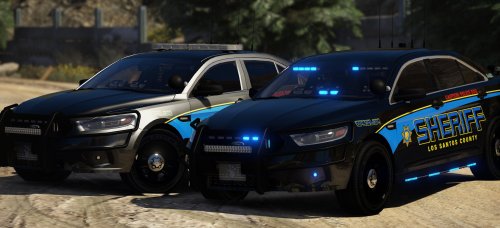 I really didn't do anything to the files other than change the light colors. They belong to other Taurus' I have. No one else was putting anything up, so I just tossed them up really quick for others to use. However, thank you. I'll be making the changes to my own.
- 66 comments
- 31 reviews
-
These ELS files work just fine. The one with the 'st' in it is for the slicktop. I have my file names changed because I put these cars into a personal DLC add-on pack. lssok9.xml lssostk9.xml
- 66 comments
- 31 reviews
-
-

- 3
-
-
 Ok, what did I do wrong. I changed the model name and made sure to change the model name in the carvariations. I did one at a time, making sure to change the carvariations entry before moving on the to the next model. Did I miss something? The cars are well done, but really needed these to have custom model names. I put them into a larger DLC pack along side other packs. The carvariotions file ONLY contains the cars from this pack. No others.
- 779 comments
- 187 reviews
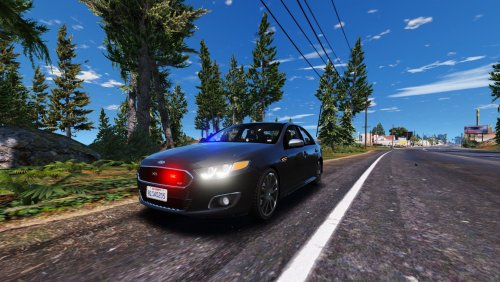 Love the car. I slapped an SAHP skin on it and changed the lights to all blue. Just wish there were more lights on it and some Ford steelies.
- 31 comments
- 2 reviews
I run a program called DS4Windows. I just plug in the controller and it works as if I had it hooked to my PS4 and playing GTA V.This is not a mod for LSPDFR. This is a stand alone program to play dispatch responses. The best use for this program is to help add more realism to your LSPDFR RP videos by giving you a way to get dispatch to acknowledge your calls when another plugin doesn't do it for you. Installation: Download the DispatchResponse.rar to any folder and extract. This file is not required to be in your GTA V, LSPDFR, or Plugins folder. Double click it to run. You will not see anything pop up. To make sure it's running, just use one of the hotkeys. If you do not get any audio, check your task manager for "RandomAudio.exe". if you don't see it, run the program again. To use this program: Run DispatchResponse.exe Use CTRL+SHIFT+1-4 to get a response. CTRL+SHIFT+1 = 10-4 CTRL+SHIFT+2 = Roger CTRL+SHIFT+3 = Roger That CTRL+SHIFT+4 = 10-4 Copy That To close the program: CTRL+SHIFT+5 I use a laptop and did not see any CPU hits or FPS drops while running this program. There is no .ini file to change the hotkeys. When I had it made, I specifically asked that it uses a 3 key combo so that it would not interrupt with any other plugin. The audio files can not be changed. Disclaimer: I did not make this program and can not be held responsible for any damage it may cause to your PC or any software installation. My son created this program for me to use and share with the LSPDFR RP community. This program has been tested on Windows 10 with the Steam version of GTA V using the latest version of LSPDFR and Rage .52. This program is provided free of charge and may be shared unaltered.All I did was take one from another slick top and edit it to work with your car's lights.This is just the ELS file required to make this Police Coquette ELS compatible. This file requires the use of the "Improved Invetero Coquette Q5 Pack 1.0.0" by Voit Turyv You can download this pack here - DISCLAIMER: I did not create this vehicle pack. I have nothing to do with the creator of this pack. I did not ask permission to create the ELS file for this pack. I'm only sharing with the community for those that wish to use it. I have this vehicle mod installed as a DLC as described on the pack download page. ---------------------------------------------------------------------------------- This file was tested with the Emergancy Lighting System 1.05 found here - ---------------------------------------------------------------------------------------------------------------------------- To install this ELS file, just add it to your ELS pack_default folder. ------------------------------------------------------------------------ Credits: Coquette pack by Voit Turyv ELS by Lt.CaineYup, I started recording for Youtube. My setup isn't as great as a lot of others, but I'm also in a truck when I record. I'm an over the road trucker that stays out weeks at a time, so having a nice PC and recording equipment isn't really an option for me. That being said, enjoy. https://www.youtube.com/channel/UCwiv2pzf1YO3jphpx9SZiGw
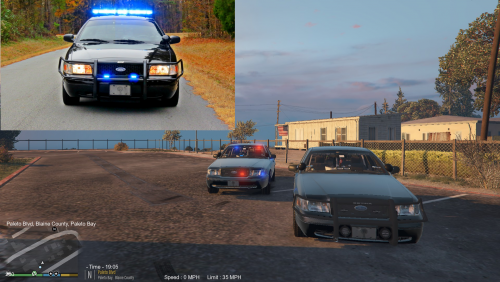 This is my first time creating a skin. This is the Chester County, South Carolina Sheriff CVPI. I realize it isn't perfect, but it's not bad either. This was created for BXBug's 2011 CVPI 1.7U found here - To install, just replace an existing texture in the .ytd file using OPENIV or rename this file as vicz_sign_? (question mark being the number you wish to use). Save the .ytd file and play. Thanks for checking it out.
- 2 comments
- 2 reviews
-
-
- 1
-


Account
Navigation
Search
Configure browser push notifications
Chrome (Android)
- Tap the lock icon next to the address bar.
- Tap Permissions → Notifications.
- Adjust your preference.
Chrome (Desktop)
- Click the padlock icon in the address bar.
- Select Site settings.
- Find Notifications and adjust your preference.
Safari (iOS 16.4+)
- Ensure the site is installed via Add to Home Screen.
- Open Settings App → Notifications.
- Find your app name and adjust your preference.
Safari (macOS)
- Go to Safari → Preferences.
- Click the Websites tab.
- Select Notifications in the sidebar.
- Find this website and adjust your preference.
Edge (Android)
- Tap the lock icon next to the address bar.
- Tap Permissions.
- Find Notifications and adjust your preference.
Edge (Desktop)
- Click the padlock icon in the address bar.
- Click Permissions for this site.
- Find Notifications and adjust your preference.
Firefox (Android)
- Go to Settings → Site permissions.
- Tap Notifications.
- Find this site in the list and adjust your preference.
Firefox (Desktop)
- Open Firefox Settings.
- Search for Notifications.
- Find this site in the list and adjust your preference.