CossackGames
Members
-
Joined
-
Last visited
Files posted by CossackGames
-
Plugin in beta. There will be bugs. Let me know down in the comments and I will do my best to get them addressed in a timely manner
pdComp — Police Computer for LSPDFR
pdComp is a modern in-game police computer for Grand Theft Auto V built specifically for LSPDFR, with optional deep integration for Policing Redefined through the Common Data Framework (CDF).
Inspired by classic MDT/CAD systems, pdComp allows officers to perform:
Pedestrian lookup
Vehicle lookup
Citation issuing
Arrest reporting
Court case tracking & hearings
Unlike traditional standalone police computer mods, pdComp can dynamically pull synchronized data directly from CDF-enabled plugins. That means states such as:
Suspended permits
Expired registration
Insurance lapses
Linked records
Other PR-driven statuses
…can all appear directly inside the computer system when using Policing Redefined.
Features
Core Police Computer System
Fully in-game MDT/CAD interface
Open/close via configurable hotkey
Vehicle & pedestrian database lookup
Citation management
Arrest report filing
Court hearing & outcome system
Persistent JSON-backed record storage
Policing Redefined + CDF Integration
When CommonDataFramework.dll is detected:
Ped records synchronize with CDF
PR-generated states appear automatically
Ped information can auto-populate after ID interaction
Shared ecosystem compatibility with other CDF-enabled plugins
Vanilla LSPDFR Compatibility
pdComp also works without CDF installed.
In vanilla mode:
Vehicle plate lookups still auto-populate during traffic stops
Ped names must be entered manually
Plugin functionality remains fully operational
How It Works
pdComp intelligently detects whether CDF is installed at runtime.
With CDF + Policing Redefined
You get:
Rich synchronized records
Shared plugin data
ID-based ped auto-population
Expanded realism and continuity
Without CDF
pdComp gracefully falls back to standalone functionality:
Vehicle pullovers still integrate
Records persist normally
Citation/arrest/court systems remain available
No separate version required.
Installation
Copy the contents of the archive directly into your GTA V directory.
Final Folder Structure
<GTA>\Plugins\LSPDFR\ pdComp.dll RAGENativeUI.dll Newtonsoft.Json.dll pdComp\ config.ini data\ charges.json citations.json store\Optional Dependencies
For full compatibility and synchronized records support, install:
Policing Redefined
Common Data Framework(included in PR)
Configuration
Configuration file:
Plugins/LSPDFR/pdComp/config.iniAvailable settings include:
Open key / modifier key
Require police vehicle
Require stationary vehicle
Court hearing delay timing
Default open key:
'(OemQuotes)
Custom Charges & Citations
Both citation and charge catalogs are fully editable:
Plugins/LSPDFR/pdComp/data/charges.json Plugins/LSPDFR/pdComp/data/citations.jsonChanges are loaded on plugin startup.
Invalid entries or unknown severities are skipped automatically and logged to:
RagePluginHook.logDesign Notes
Smart Auto-Population
Ped names only auto-fill after an in-world ID interaction event is detected through CDF.
Vehicle plates automatically populate once a pullover begins.
Safe Menu Handling
The same hotkey both opens and closes the interface to prevent UI lock situations.
Persistent Court Timing
Court hearings use real-world UTC wall-clock time, meaning case progression continues even while the game is paused.
Current Status
✔ Feature-complete first public release
✔ Fully functional in-game
✔ JSON persistence implemented
✔ PR/CDF integration operational
✔ Court system operational
Credits
Built for the LSPDFR community
Powered by:
RAGE Plugin Hook
Newtonsoft.Json
Common Data Framework (optional)
- 127 Downloads
- 19 Comments
Updated -
I made this skin for myself and decided to post it here for anyone else who wants to use it.
https://www.lcpdfr.com/downloads/gta5mods/character/25692-eup-vest&earpiece-beta/
- 1,632 Downloads
- 3 Comments
Updated -
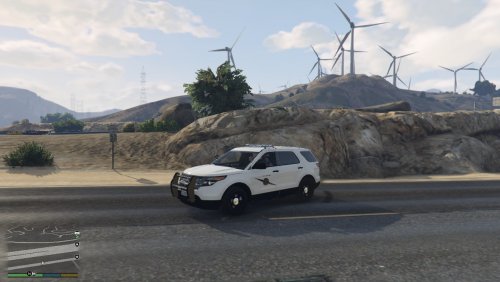
I threw together some Washington State Patrol textures due to the lack of any on here. This is my first attempt at anything mod related so I hope y'all enjoy! And yes I realize WSP doesn't have State Trooper on the back of the cars but I added that in there so it doesn't look so plain.
The cars they go with:
Crown Vic-
http://www.lcpdfr.com/files/file/10610-lspd-cvpi-pack/
Impala-
http://www.lcpdfr.com/files/file/8952-2014-chevrolet-impala-lspdlssd/
Explorer-
http://www.lcpdfr.com/files/file/9751-ford-explorer-interior-fedral-signal-valor-lightbar-by-pimdslr/
- 232 Downloads
Submitted
.thumb.png.a0f80464539c2dd42ee2519c1bda91f2.png)