Reddington
Members
-
Joined
Everything posted by Reddington
-
Unfortunately, I'm about out of ideas as well, but I did some Googling for you. Here's a couple things to try. 1) Right click all .exe and .dll files that comes with RAGE Plugin Hook, click Properties, then click the Unblock button. If there's no unblock button, that's fine. or 2) Basically, he said there's an issue with how you're transferring files.
-
That's an external drive, correct? If so, that might be the issue. I've never used an external HD, so I don't know too much about how it works with modding.
-
Just to clarify, were all the patchdays in the mods folder previously, or did you just make the mods folder? Your topic has been moved to LSPDFR 0.4 Support. Please post in the correct location in the future.What is the name of your GTA V folder that contains Rage?It could, depending on what all you have modded. Before doing that, rename the mods folder to _mods This will disable the mods folder. Go in game and play for the usual time you do and see if it crashes at all.I suggested that way because that is what I do every single time and it works without fail. Since it was working for you previously, double check all of your files, compare it with the Rage and LSPDFR download. It could be that your AV deleted one of the files, marking it as malicious. It happens quite often.The very last thing I can suggest is reinstalling LSPDFR and Rage. However, I believe the issue might be your PC and lack of memory/ram/etc. In your case, I think exception violation means either GTA or LSPDFR is trying to use far too much memory.Alright! If you ever want to try it again and still crash, make a thread and tag me. 🙂 I'll try to help figure out the cause.I could be wrong, but I thought there was an uninstaller for it? Since you installed it in the mods folder, you have a lot more options as to how to remove it. You can either a) Delete your mods folder. or b) Manually revert your files. What I mean by manually is use the vanilla files from the vanilla update folders, and re-add those yourself. Yes, this will be a tedious process. Your topic has been moved to GTA V Support, this is not LSPDFR related. Please post in the correct location in the future.Did you double check your meta/carvar? or was it the car itself?In addition to the lowered graphics, I was told (have not confirmed myself) that if you set the "texture quality" settings to medium or lower, you'll never have texture loss. The downside to this is that your game looks like shit.I have to admit, as sexy as I think it is, I do agree it is a tad on the bulky side. That has advantages and disadvantages. This thing as a SWAT/ERT vehicle would be perfect, maybe even a fire vehicle, but as an every day patrol car? I'd be very curious to see how it fairs in cities that have small or even cluttered streets.Start GTA. Once you're on the home screen to select singleplayer, online, etc, select singleplayer. Right after clicking it, alt tab out and start Rage.Unfortunately, exception violations are the worst to get, because they can be caused by anything. Try removing all of your plugins, scripts and LSPDFR plugins. Play LSPDFR bone dry with just LSPDFR and see what happens.It looks like an issue with SmartRadio. Uninstall and do a clean install of SmartRadio.You can't compare or debate the two, because they both have very different uses, elements and interactions. If you want the full functionality of singleplayer modding and LSPDFR, play LSPDFR. If you want human interaction with roleplays that are 100% human created, go fivem. Both are amazing. The whole "Fivem ready" thing usually means it includes server files. In my opinion, these files should be removed. This website is primarily for LSPDFR and singleplayer mods. Uploading a mod that contains server files is useless to the majority of this community. To be fair, I will say a lot of these fivem files do contain the actual vehicles and data files for the models, so it's not a huge deal, and the car can still be used in singleplayer. There's no such thing as "fivem only car". Non-ELS has been around since GTA V's release. Non-ELS was THE thing everyone used, it's still what a lot of folks prefer. The non-ELS thing has nothing to do with fivem other than ELS is not compatible with fivem.
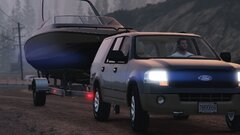 I need an unmarked Expedition!Open your GTA directory, and go into the lspdfr folder. Open the LSPDFR INI/config and look at the very top option, main.preloadallmodels. Set to false. This should help.You're welcome!Post your thread here - https://www.lcpdfr.com/forums/forum/920-lspdfr-04-support/ and include where you're seeing that you have to downgrade plugins.