


.png.98e058a84dc64e607ac955234f78d620.png)

H145
Members
-
Joined
-
Last visited
Everything posted by H145
-
-
.png.d16301c3251f30a7502e4c28b2da0644.png) vapidtarvh145 (15).png
vapidtarvh145 (15).png
-
.png.7fd211b852ba1437bda9fe48e2853a7f.png) vapidtarvh145 (14).png
vapidtarvh145 (14).png
-
.png.c6ea4e478d158fb3b2e62ba6065e7ce5.png) vapidtarvh145 (13).png
vapidtarvh145 (13).png
-
.png.d70b0fbd6c2dda9330403aafe11a01ed.png) vapidtarvh145 (12).png
vapidtarvh145 (12).png
-
.png.4ecc641954ffc4e17c104ddd71e83cfd.png) vapidtarvh145 (11).png
vapidtarvh145 (11).png
-
.png.e233c2e237d0a6d647532ea52590be4b.png) vapidtarvh145 (10).png
vapidtarvh145 (10).png
-
.png.c5c43a633a3df61b5bdbfacb75e900d0.png) vapidtarvh145 (9).png
vapidtarvh145 (9).png
-
.png.b5081e8ddd294cf7b02d84f923f75707.png) vapidtarvh145 (8).png
vapidtarvh145 (8).png
-
.png.1376eea71b7d343abb41eeb970e6e24c.png) vapidtarvh145 (7).png
vapidtarvh145 (7).png
-
.png.a2223b375ddc556131876b99f9c51446.png) vapidtarvh145 (6).png
vapidtarvh145 (6).png
-
.png.66ef1cbc8789c91634e252d475d7c004.png) vapidtarvh145 (5).png
vapidtarvh145 (5).png
-
.png.201053e7f226ff39471b22c97783fac0.png) vapidtarvh145 (4).png
vapidtarvh145 (4).png
-
.png.989b2ddcb10e116feb95a88ef6276b26.png) vapidtarvh145 (3).png
vapidtarvh145 (3).png
-
.png.729db99fe161fd654f0cab42251f122a.png) vapidtarvh145 (2).png
vapidtarvh145 (2).png
-
.png.406e04d9b49d9f5f840ab8011802d8bc.png) vapidtarvh145 (1).png
vapidtarvh145 (1).png
-
-
-
-
-
-
-
-
-
-
-
-
-
-
-
-
-
@Officer J. Day The correct magazine capacity doesn't come with the model itself or the pistol_mag1.ytd file, but with changes to the weapons.meta file or similar .meta folders. I didn't include those edited files in the download, at least for most weapons, simply because most people already use edited weapon.meta files in order to create more realistic recoil etc. You just need to find the weapons.meta file or weaponcomponents file (I am not sure about the right location, might depend on the game version, but it should be easy to find) inside of your mods folder and increase the mag capacity for the standard pistol to 17. These are the changes I made in the weaponcomponent.meta files inside of mods>update>update.rpf>common>data>ai . I recommend you just try that and see if it works! A Glock Model 17 is already included in the download, along with different textures:
-
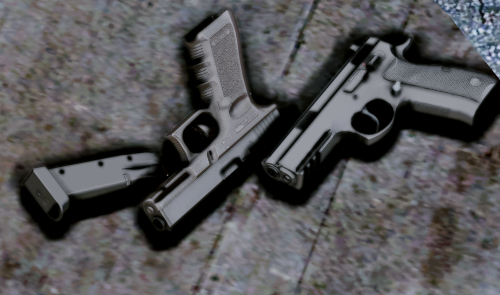 @Riley24 As mentioned earlier in reply to a similar comment, sadly it's not possible to fix the sight issue on the glock. The model would not fit perfectly into the players hands anymore or not point exactly in the right direction if the sights were aligned in first person mode. It is not possible to check if this issue occurs previous to buying a model, so you're always buying the cat in the sack.
- 68 comments
- 15 reviews
-
Not sure if I can help you out regarding this issue, my game is not up to date. You could try placing the files in the newest patchday which still has a weapons.rpf file and see if it works, or maybe install this modification, which I am using, it works perfectly for installing all kinds of modded files and has its own weapons.rpf folder:
- 68 comments
- 15 reviews
-
News: Some texture improvements for the P320 Compact will be uploaded soon, removing an unrealistic glowing effect. I am also happy to announce an additional handgun for the package, which was highly requested in the past. It will take some weeks for it to find its way into the game, but I found a 3D model at a reasonable price which looks very promising and can be converted to Gta 5.
-
Most of the weapons in this pack were converted to GTA 5 by Jridah, I paid him for that service and also bought the models, which were quite expensive, and I created and improved some of the textures. I also was allowed to include some weapons for free in the package as a courtesy by him, but as of now, Jridah only publishes very basic mods on Gta5mods.com. To gain access to all additional content and special weapons (attachments, different versions of the weapons) you need to support him via patreon, which means I obviously cannot reupload any of these weapons on lcpdfr.com., modified or not. He offers different options to support him on patreon, and last time I checked, the option including a variety of handguns, SMGs, rifles etc. was not affordable for me. I already spent a couple hundred bucks on weapon models and on Jridah's work (more than I wanted to) and until I can find a way to purchase some high quality models at a lower price during sales (black friday maybe), the weapon pack is on hold. Currently I only have access to my PC during weekends and I am very busy workwise, so I do not have the time to resolve these issues. If there is any progress made I will let you know, hopefully we will see some additions to Law Enforcement Service Weapons in the future.
-
@Colde As far as I am concerned, the MkII variant is compatible with CopHolster. You might need to edit the CopHolster configuration file and add the line 'WEAPON_PISTOL_MK2' to the settings at some point. Go to Rockstar Games\Grand Theft Auto V\Plugins\CopHolster, open that file and go to [SETTINGS] > EnableOnWeapon, now add 'WEAPON_PISTOL_MK2'. Should look like this: EnableOnWeapon=WEAPON_PISTOL,WEAPON_COMBATPISTOL,WEAPON_APPISTOL,WEAPON_PISTOL50,WEAPON_HEAVYPISTOL,WEAPON_VINTAGEPISTOL,WEAPON_SNSPISTOL,WEAPON_PISTOL_MK2
- 68 comments
- 15 reviews
-
-

- 1
-
-
Thank you for the answer. I tried it, but sadly only the walk style changed, the aim style was still the same. I searched for a .meta that could change the aim style for the freemode model, and I found some promising files from EUP. They are called motiontasks.ymt, movementtasks.ymt and physicstasks.ymt. GTA V>mods>update>update.rpf>x64>date>tune I would love to play around with them and see if I can make some changes to the aim style, but I cannot open the ymt files.
-
Push! Does really no one know how to resolve this?^^
-
Hey, I tried to convert the pistol sound from a gun sound mod which was originally made for GTA IV to GTA V (for my own personal use). Sadly, it doesn't sound as good as in GTA IV at all. What sound files exactly do I have to replace? There are lots of different sound files for the pistol inside the weapons audio file... Thanks in advance for your answers.

.png.d16301c3251f30a7502e4c28b2da0644.png)
.png.7fd211b852ba1437bda9fe48e2853a7f.png)
.png.c6ea4e478d158fb3b2e62ba6065e7ce5.png)
.png.d70b0fbd6c2dda9330403aafe11a01ed.png)
.png.4ecc641954ffc4e17c104ddd71e83cfd.png)
.png.e233c2e237d0a6d647532ea52590be4b.png)
.png.c5c43a633a3df61b5bdbfacb75e900d0.png)
.png.b5081e8ddd294cf7b02d84f923f75707.png)
.png.1376eea71b7d343abb41eeb970e6e24c.png)
.png.a2223b375ddc556131876b99f9c51446.png)
.png.66ef1cbc8789c91634e252d475d7c004.png)
.png.201053e7f226ff39471b22c97783fac0.png)
.png.989b2ddcb10e116feb95a88ef6276b26.png)
.png.729db99fe161fd654f0cab42251f122a.png)
.png.406e04d9b49d9f5f840ab8011802d8bc.png)

