BradM
Members
-
Joined
-
Last visited
Everything posted by BradM
-
 Have you installed the proper ASIs in OpenIV? Do any other vehicles or vehicle slots work?
- 89 comments
- 63 reviews
-
-
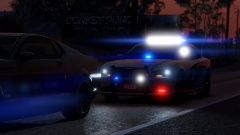
From the album: Modelling Projects
-
" If you are changing the liveries YOU MUST change the textures in both the normal .ytd and the +hi.ytd ... if you just change it in one or the other the liveries will be different at different distances."
- 89 comments
- 63 reviews
-
-
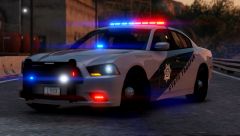
From the album: Modelling Projects
thinking about going with this light setup -
-
-
-
 FILE INFO: This vehicle pack contains 10 vehicles; 6 patrol, 2 traffic enforcement and 2 unmarked cars. The following cars are included: 2011 CVPI 2013 Tahoe 2014 Charger 2015 FPIU 2016 Charger 2016 FPIS 2016 FPIS - Unmarked 2014 Charger - Unmarked 2011 CVPI - Traffic Enforcement 2016 Impala Traffic Enforcement Patrol and Traffic Enforcement vehicles have working takedowns and alley lights. PLEASE NOTE - The unmarked vehicles have been separated from the main folder and are their own download due to upload size limits. - If you do not have extra police slots setup POLICE5 and POLICE6 will not work in game. You can rename these to whatever you want. Just make sure your vehicles.meta, mainly the handling lines, are correct (so you don't have SUV handling for a sedan or something). PREVIEW VIDEO: (The aux coronas don't show up in the editor, so this isn't a completely accurate representation of in game lighting with included VCFs, but you get the idea). CREDITS: OTHER INFO: TINT BUG? Go into the vehicle.meta and find the 'diffusetint' line for the particular model (SHERIFF2, SHERIFF, POLICE, etc). Replace that value with <diffuseTint value="0x00FFFFFF" /> ... Or simply change the tint in game with a native trainer If your Impala is flipping try a different handling line. I have had luck with POLICE3 and FUGITIVE If you are changing the liveries YOU MUST change the textures in both the normal .ytd and the +hi.ytd ... if you just change it in one or the other the liveries will be different at different distances. If you don't like something about the lighting patterns, speeds, light stages or anything related to ELS chances are you can change it! ELS is extremely customizable. Check out the ELS documentation, please don't ask me. All the info you need is in there. If you notice a bug or mistake (which I most likely have made a few) please let me know, and I'll try to fix it in the next update. It could be an easy or quick fix.
- 147 comments
- 65 reviews
-
-

-

- 45
-
-
-
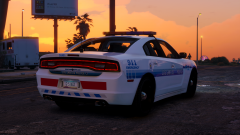
From the album: Modelling Projects
-
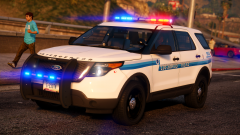
From the album: Modelling Projects
-
The lighting patterns and lighting stages can be changed in the VCF files. The light speeds can be changed in the ELS.ini
- 89 comments
- 63 reviews
-
Use a 'mods' folder to stop the game from automatically deleting your added files. This page will take you through step by step on how to set it up.
- 89 comments
- 63 reviews
-
-
-
-
-
-
Change all the colors of the Extras to blue in the EOVERIRDE section. So all these extras should say blue for the color:
- 89 comments
- 63 reviews
-
Try a different handlingID line for the police slot (or wherever you put the impala) in the vehicle meta. I think I'm using 'Police3'.
- 89 comments
- 63 reviews
-
-
- 1
-
-
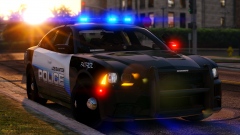
From the album: Modelling Projects
-
Yeah I think I might add a 2016 FPIU Probably not, sorry I'll see if I can fix that
- 89 comments
- 63 reviews
-