



DuctTape
Members
-
Joined
-
Last visited
Everything posted by DuctTape
-
-
 I just published a new update, which fixes those issues. The issue was indeed at my side because the domain moved from TLS 1.0 to TLS 1.1
- 136 comments
- 30 reviews
-
Sorry for my late answer, I'm not that active anymore in the GTA community, however I will look into this, and see if I can fix the issue.
- 136 comments
- 30 reviews
-
-

- 1
-
-
I see why, the zip itself is getting flagged as virus. I will reupload it and it should be fixed.
- 136 comments
- 30 reviews
-
-
- 1
-
-
The virustotal I posted was for a older version. This virustotal is for the newest version https://www.virustotal.com/en/file/c8e0658d96e1344eaa1896031d5d807a0899ad1a37a31dbe33115c010aa09c9f/analysis/ Are you sure you're using 0.6.2.2 ?
- 136 comments
- 30 reviews
-
-
-
Hi there, The download is safe. It needs online communication to check if there are any updates. Virustotal: https://www.virustotal.com/en/file/57c98bc27f701f2284e72595e80ca1c124090e23f28576cc0332f9c3b47ea8ae/analysis/1503071273/
- 136 comments
- 30 reviews
-
-
Thanks for letting me know! I'll have to change stuff in my backend, you'll see this changes in a few hours.
- 136 comments
- 30 reviews
-
-
Some people says GTA works fine after the GTA update and some don't. I think the Christmas update will mess up your Mods but not sure yet :D
- 136 comments
- 30 reviews
-
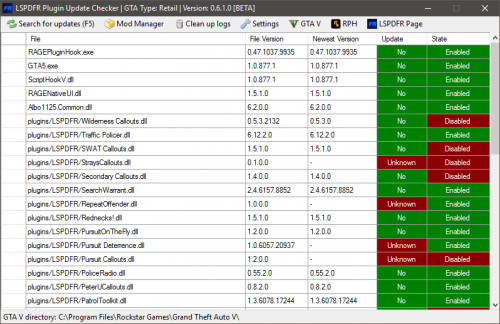
This program does not automatically update plugins or GTA, this program only notify you about new updates. You have to do updates by yourself.
- 136 comments
- 30 reviews
-
Like I asked you in PM, can you provide me the log file? The log file is called : LSPDFR_Update_Checker.log You can find this log file in the same directory as LSPDFR_Update_Checker.exe Can you send the log file to me or upload it on http://pastebin.com/? The log file is called : LSPDFR_Update_Checker.log You can find this log file in the same directory as LSPDFR_Update_Checker.exe
- 136 comments
- 30 reviews
-
-
Somehow Norton removes the Update Checker because of his low reputation. You can undo this by doing the following: https://i.qw0.eu/BQZfgA.mp4 You have to do that on the following files LSPDFR_Update_Checker.exe and BlockGTAV.exe
- 136 comments
- 30 reviews
-
Is the folder in the .ini file also correct, if so, when you restart the program it asks you again to select the folder?
- 136 comments
- 30 reviews
-
You probably have one GTAComesAlive disabled and one enabled, can you check if you can see a file called: GTAComesAlive.dll.disabled ? Does the GTA folder you've selected contains GTA5.exe ?
- 136 comments
- 30 reviews
-
Do you maybe have the old version for me ? Edit: Not needed anymore, I've fixed the issue. There was a problem in my backend. So it should be fixed now.
- 136 comments
- 30 reviews
-
-
- 1
-
-
-
Can you do right click on "Secondary Callouts.dll" -> Propperties -> Details. In this details tab you can see "File version" can you check if that version is also 0.8.2.3? Also can you send me a screenshot of your /Plugins/LSPDFR folder?
- 136 comments
- 30 reviews
-
I've added it! Also the reason why I can't support LSPDFR is that the version number on de LSPDFR website is 0.3.1 but the file version is different.
- 136 comments
- 30 reviews
-
-
- 1
-
-
Weird, something is blocking that URL in the program. Maybe your Anti Virus or something. Also you are the only one with this problem so I guess the fault is not in the program.
- 136 comments
- 30 reviews
-
It says probably unknown because you can't reach the update check server. Can you try to go to: http://lspdfr.p00.nl/test.php
- 136 comments
- 30 reviews
-
Alright, can you check now if you can see LSPDFR_Update_Checker.log? If so, can you upload it to pastebin ?
- 136 comments
- 30 reviews

