OfficerTermin8r
Members
-
Joined
-
Last visited
Everything posted by OfficerTermin8r
-
greathah, it's not siren mastery it's the fucken lightbar
-
@thegreathah how do I get to the carvariations for that?
-
I had this issue when I installed the CVPI. I used the OpenIV Package installation, and I took it out, put it in the police1 (police) slot and the lightbar is so messed up. I installed it all correctly in my patchday9ng, and I have the vehiclemeta and I just need to find that. Help!
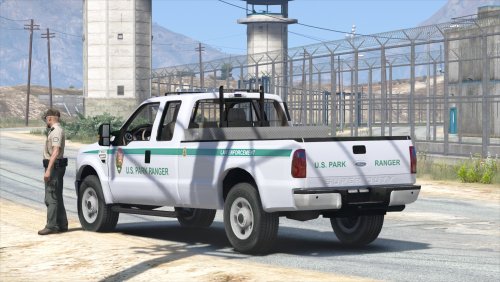 Combined with EUP, this mod makes me want to do park ranger patrols WAY more. Very sexy model.
- 29 comments
- 15 reviews
I have the same problem. It will load as if to display the intro screen but it just displays the black screen for a few seconds then crashes to desktop. I've reinstalled drivers, uninstalled graphics cards, uninstalled the game entirely, deleted em4.cfg and i've even gone into the files to change the resolution. No avail. HELP!I know. I've been there a million time since i've bought the game, man. ;);) Alright, i'm on the nvidia series website (the graphics card I have was made by MSI and Nvidia). I dont know what to doI have Windows 7 64 bit Service Pack 1. I ran as administrator, I went into the cfg file and redid the resolutions and crap, renewed graphics drivers, Nothing. I just put it to my "computer only" and "projection only" and it didn't work. Monitor one: Samsung S4D300B 2016 special edition 4k Monitor two: Dell E2015HVI've just bought Emergency 4 on Steam, and the game installed perfectly fine. The first time I booted it up, it displayed a black screen and looked if it were to load the opening scene. After so it just goes to the main desktop. I don't know what to do. Here are my specs: GPU: MSI GeForce GTX 750ti RAM: 16GB RAM CPU: Intel i7 4770k PSU: EVGA 500w PSU If you need a log file, I'll be happy to post one. Please help. I have seen many videos of it and it looks so fun to play. Thanks. Nate EDIT: I also have two different resolution monitors. Is that a issue?So I was thinking of a brand new callout. It's called the Trains Extra Callout. I'm planning on making callouts in it such as: -Coaster Train -Derailed Train -10-99 aboard a train More to be thought of. I do not have any plans of development yet but I would love if anyone would like to reply to this with ideas and would like to help with this modification. Thanks! The mod would be awesome for me if it would actually load when I ran RagePluginHook.
- 342 comments
- 49 reviews
So I installed 2 LCPDFR plugins, BaitCar and Callouts Plus, but, ever since then, LCPDFR would start up and would say LCPDFR loader.loader failed. Then, I deleted the two plugins. But, no change. LCPDFR still is cutting out and not working. Here is my log file: