OfficerAlexis
Members
-
Joined
-
Last visited
Everything posted by OfficerAlexis
-
.thumb.png.04d34e402e1b5c69bba1e7f450179ac7.png) Understood,If you could improve it it would be great,thanks a lot! Also I can pay if you want,for the time you will spend to make it.
Understood,If you could improve it it would be great,thanks a lot! Also I can pay if you want,for the time you will spend to make it.- 81 comments
- 3 reviews
-
-

- 1
-
-
I think you did a very good job overall, just one note, when I’m in Code 3, I noticed the passenger sometimes has their weapon drawn. Is there a way to disable that? Because they do the hand moves and then suddenly hold the weapon, which looks a bit odd. Also one more thing,is it possible for the motorcycle passenger to make the hand movements more synchronized? Right now, when a vehicle is detected in front, all the gestures play at once. It would be better if they used only the necessary gestures depending on the situation, for example, one set of movements when there’s a car in front that needs to move aside, and different movements when you’re at an intersection and want to stop incoming traffic, like in the photo I sent. Alsi it would be nice to see a gesture like this too https://www.youtube.com/watch?v=xf9xpPK_Lr8 1:36 and 2:26
- 81 comments
- 3 reviews
-
-
I believe in you! 😁 Is it also possible to add, for the motorcycle passenger, an animation where, when passing through intersections they raise their hand to signal approaching vehicles to stop? Like this https://youtu.be/25WmDFoBCh4?si=zcn8_2KboWrZoOLp 0:08 0:32
- 81 comments
- 3 reviews
-
-

- 1
-
-
Looking forward! Thanks a lot! Also how is this going to work? When we are code 3, Ai partner will detect a vehicle in front of us and will make the gesture? And is there gonna be a option how usually we want to see that gesture happen?
- 81 comments
- 3 reviews
-
-
- 1
-
-
It's not of a car,go to 0:25 second and check the gesture of the police officer passenger of the bike.
- 81 comments
- 3 reviews
-
You mean something like this? https://youtu.be/D7BQVRY4ZpE?feature=shared 0:25 it's gonna be amazing... @Mr.KobraX is it possible to add something like this?
- 81 comments
- 3 reviews
-
-
- 1
-
-
-
-
-
-
-
 Sparky you are the best! thanks for your hard work! looking forward for the next updates and your upcoming mods 😀
 -
-
 And something last,is it possible to make the arrive of the police ai better at scene? AI police vehicles often stop right in the middle of the road. It would be much better (and more realistic) if they could pull over to a safer or more appropriate location instead of blocking traffic. It would also be great if AI vehicles could go around stopped or obstructing vehicles instead of just waiting behind them and causing traffic jams. It would make the traffic behavior feel much more realistic. I don’t know if any of these can be done, but it would definitely make the game feel more realistic. thanks!
- 128 comments
- 14 reviews
-
Could you do something for the pursuits too? is it possible? to make them better and more realistic?
- 128 comments
- 14 reviews
-
-
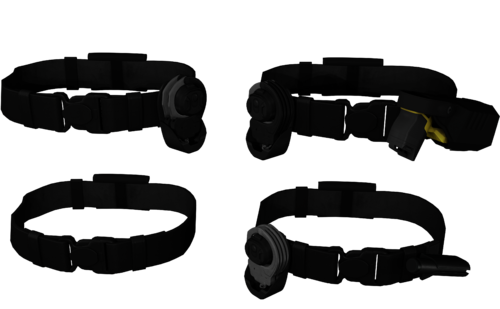 Can you make 1 more versions without the tasers? thanks!
 -
-
-
-
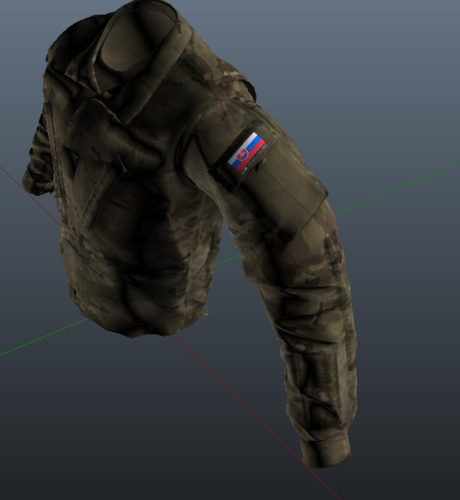 Can you fix the arms? the position is wrong.that's why the 3 star,if you fix it i will change my review to 5 stars. thank you!
 -
 Would be great if the driver/ped didnt instantly drive off after handing the citation.
- 231 comments
- 31 reviews
-
-

- 1
-
-
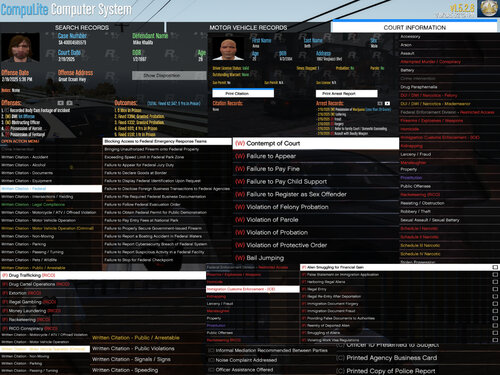 Also could you add more outstanding warrants citations?
 -
Any news?

.thumb.png.04d34e402e1b5c69bba1e7f450179ac7.png)