


BufordT
Members
-
Joined
-
Last visited
Everything posted by BufordT
-
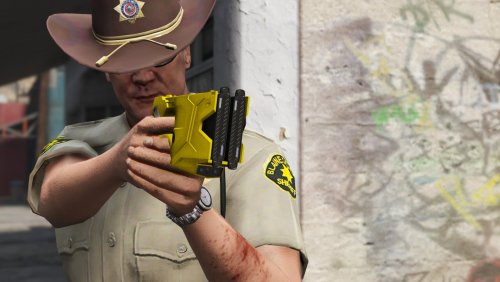 Make sure you're downloading the Taser_X2_by_BufordT_1_0_0.zip and not the other. The other is low res textures for those with performance issues and doesn't include the yft files.
- 21 comments
- 12 reviews
-
 Sounds like you messed up the installation process somehow or you need to give yourself some weapons via a trainer or LSPDFR.
- 86 comments
- 34 reviews
-
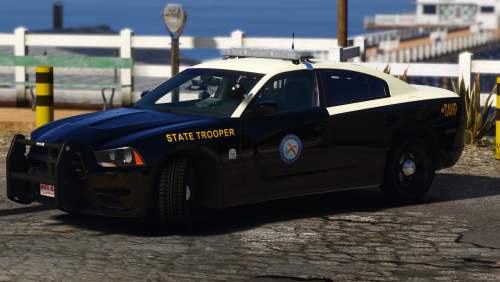 WARNING: FILE IS LARGE IN SIZE. POLY COUNT OF HIGH MODEL IS ~215K. Car is based off the Florida Highway Patrol. Exterior features include Code3 Javelin lightbar, antennas, Setina pushbar, and Unity spotlight. Interior features include Code3 Warrior and Wingman lightning equipment, Kustom Signals radar unit, Setina partition, Havis console & dock, Dell Rugged laptop, Harris M7300, Code3 RLS control unit, HP printer, and Panasonic Arbitrator camera system. If you intend to install this model, at least watch a Youtube video on the basics of installing vehicles and ELS in V before requesting support. Please leave any feedback, suggestions, and encountered issues below in the comments section. Thanks & enjoy! Main Installation Open vehicles.rpf inside of \mods(if enabled)\update\x64\dlcpacks\patchday17ng\dlc.rpf\x64\levels\gta5\ using OpenIV. Click “Edit mode” button inside of OpenIV (right of the path box). Drag police.ytd, police+hi.ytd, police.yft, police_hi.yft into OpenIV. Close OpenIV. Copy the POLICE.XML ELS config file into your ELS configs directory. Start GTA V and enjoy! Note: Installation directions written for patch v1493. Other patch version installation may differ. Credits -2013 Charger SRT8 from Forza Horizon -Converted and textured by Thehurk -Converted to PPV by Thehurk, Modified by BufordT -Templated by Thehurk -Taillight textures by Five0 -Windows templated by BufordT -Wheel by Cyrax, Modified and converted to V by BufordT -Code3 Javelin, Warrior, and Wingman modeled and converted to V by BufordT -Interior equipment modeled and converted to V by BufordT -Setina Pushbar modeled and converted to V by BufordT -SAHP Paint jobs by BufordT Legal I am not responsible for any damaged caused to your Grand Theft Auto V installation and/or computer system. Any ripping, modifying, altering, or converting of this model is strictly prohibited. Distribution This mod shall only be distributed on LCPDFR.com unless otherwise noted by me. Use in FiveM servers is fine.
- 4 comments
- 7 reviews
-
-

- 8
-
-
From the album: 2014 SAHP Charger
© BufordT
-
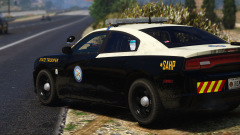
Showcase of my 2014 SAHP Dodge Charger mod for V. Get it now in the downloads section!
-
From the album: 2014 SAHP Charger
© BufordT
-
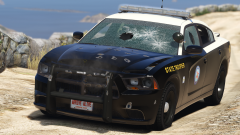
From the album: 2014 SAHP Charger
© BufordT
-
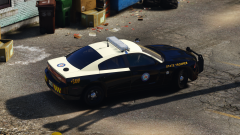
From the album: 2014 SAHP Charger
© BufordT
-
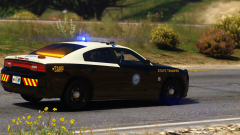
From the album: 2014 SAHP Charger
© BufordT
-
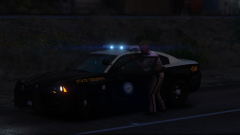
From the album: 2014 SAHP Charger
© BufordT
-
-
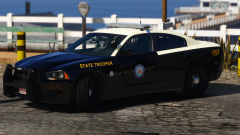
From the album: 2014 SAHP Charger
© BufordT
-
 The result of a failed attempt at ped modding a couple years ago is now being released as a development resource for the community. These models have NOT been UV mapped and certain models are not complete and have been optimized/cut to fit in the holsters. Included models are: PR24 ring Mace holster and mace can Harris P7200 and holster Motorola APX 8000 and holster Taser X26 and holster Taser X2 and holster Glock 22 in holster Glock 22 standalone 9mm clips in holster Cuffs and case Glove pouch Most holsters are Safariland from what I recall No support will be provided for these models. You're expected to know how to rig for ped modeling and UV map the models. Please ensure original credits are included with any release you make with these models. Feel free to convert to other games if you wish! Thanks & enjoy! Credits BufordT – modeling. Legal I am not responsible for any damaged caused to your Grand Theft Auto V installation and/or computer system. Distribution This mod shall only be distributed on LCPDFR.com unless otherwise noted by me.
 -
-
Showcase of my X2 mod for V. Get it now in the downloads section!
-
-
-
-
-
-
-
-
-
-
I’m proud to present the Taser X2 stun gun replacement mod for GTA V. The version 1.0.0 release includes the base X2 model and a variant with the Taser Cam HD attachment. Also included are texture variants for black and yellow gun colors. Please leave any feedback, suggestions and encountered issues below in the comments section. Thanks & enjoy! NOTE: The hands of the peds do tend to go through the model depending on position. This is due to V's default animations when holding weapons, not much I know to do about it. Main Installation Choose a model variant (Base or Cam). Open weapons.rpf inside of \mods(if enabled)\\update\x64\dlcpacks\patchday8ng\dlc.rpf\x64\models\cdimages\ using OpenIV. Click “Edit mode” button inside of OpenIV (right of the path box). Replace w_pi_stungun+hi.ytd, w_pi_stungun_hi.ydr, w_pi_stungun.ytd, and w_pi_stungun.ydr using files from selected model variant above. Close OpenIV and start GTA V. Note: Installation directions written for patch v1493. Other patch versions installation may differ. Installation of texture variants To install texture variants replace the appropriate x2_high.png in w_pi_stungun+hi.ytd and the x2_low.png in w_pi_stungun.ytd. Experience Performance Drops? The main X2 mod includes 2048x2048 textures. If you're experiencing performance drops, download the low res pack zip file and follow the included read me file. Credits Axon – Reference images and drawings. BufordT – X2 modeling & texturing. Legal I am not responsible for any damaged caused to your Grand Theft Auto V installation and/or computer system. Any ripping, modifying, altering, or converting of this model and its textures is strictly prohibited. Distribution This mod shall only be distributed on LCPDFR.com unless otherwise noted by me. Use in FiveM servers is allowed.
- 21 comments
- 12 reviews
-
-
-

- 22
-


