ZADDYSteve
Members
-
Joined
-
Last visited
Everything posted by ZADDYSteve
-
 Hey @opus49 Cannot WAIT for the new update. If you need any beta testing done, let me know. I am willing to help you get the bugs and kinks out, etc. 🙂 Thanks for all that you do!
- 446 comments
- 46 reviews
-
-

- 1
-
-
Question... Is there a reason your trying to change your aspect ratio? How large is your monitor? Have you tried using default or recommended settings? If you cannot get this to work, I could definitely offer some suggestions in place of the vanilla backup menu. Never had any issues after SEVERAL pursuits. Check out my youtube videos of LSPDFR and you'll see what I mean. LMK, I am always glad to help out a fellow gamer. 🙂
-
I'd fix this: Also, the last line on your log specifies it is trying to load the LSPDFR plugin. What's strange is your path. It shows Fortnite prior to the actual GTAV folder. Have you tried moving the GTAV folder out of the Fortnite folder? I would recommend moving the GTAV folder to the Program Files folder. Try that, then see if it works.
-
Awesome sauce! Please mark the post as the solution to your issue. 🙂
-
First set of issues: Although rageplugin hook looks to continue running, it may not be directly affecting performance, however I'd fix that to cross it off the list of potential issues. Other than than, a few other issues in your logs. But before I go any further... Question... The last line of your log is when you put your seatbelt on. Is this when it crashes? Is it specific when the crashes happen? For example: you accept a callout, request a callout, fasten your seatbelt, any other action?
-
Do you have EUP installed?
-
@andresneedshelp Thanks for sending your log. I do see a few other issues... Here is one: [4/30/2023 8:07:24 PM.900] Plugin at path "C:\Program Files (x86)\Steam\steamapps\common\Grand Theft Auto V\Plugins\LSPD First Response.dll" states that it prefers only a single instance of it to be running at a time. It seems like the LSPDFR plugin is trying to run more than one instance. In some cases this can cause a fatal crash. Second issue: [4/30/2023 8:08:09 PM.119] LSPD First Response: ------------------------------ [4/30/2023 8:08:09 PM.119] LSPD First Response: Origin: Game fiber "LoadingSpinner". [4/30/2023 8:08:09 PM.119] LSPD First Response: ------------------------------ [4/30/2023 8:08:09 PM.119] LSPD First Response: Exception type: System.InvalidOperationException [4/30/2023 8:08:09 PM.119] LSPD First Response: Exception message: Cannot load an invalid weapon asset. Have you installed any weapon packs/mods? Also, the very last line in the log says: [4/30/2023 8:13:01 PM.891] Invalid call to console command "CleanUp": Parameter "pluginFileName" of console command "CleanUp" is not optional, but no argument was specified. This command says is is required to run but theres no argument. Meaning, there is no output or data to run the command. Any new mods you've installed recently? What about callouts? If your home, we can screenshare and I can help you?
-
-
 @Trooper Leary Compulite kept crashing on me after installing your citation/charges files. BTW, thank you for making these. It is exactly what I was looking for. I did some digging and found an error in the XML file that was causing said crash. I have since fixed it and Compulite runs flawlessly now. I repackaged the XML file with the fixes. I can send it to you so you can replace the file in your post? LMK
- 11 comments
- 1 review
-
You have to drag your log to the reply when you submit. I need to see your actual log. What you are sending is only where your log is located.
-
What does the message say?
-
I have all except Menyoo installed and don't have this issue. So it's possible that plugin may be causing this issue?
-
Yes, can you please post it?
-
@timed Could you screen record or explain exactly when the crash occurs?
-
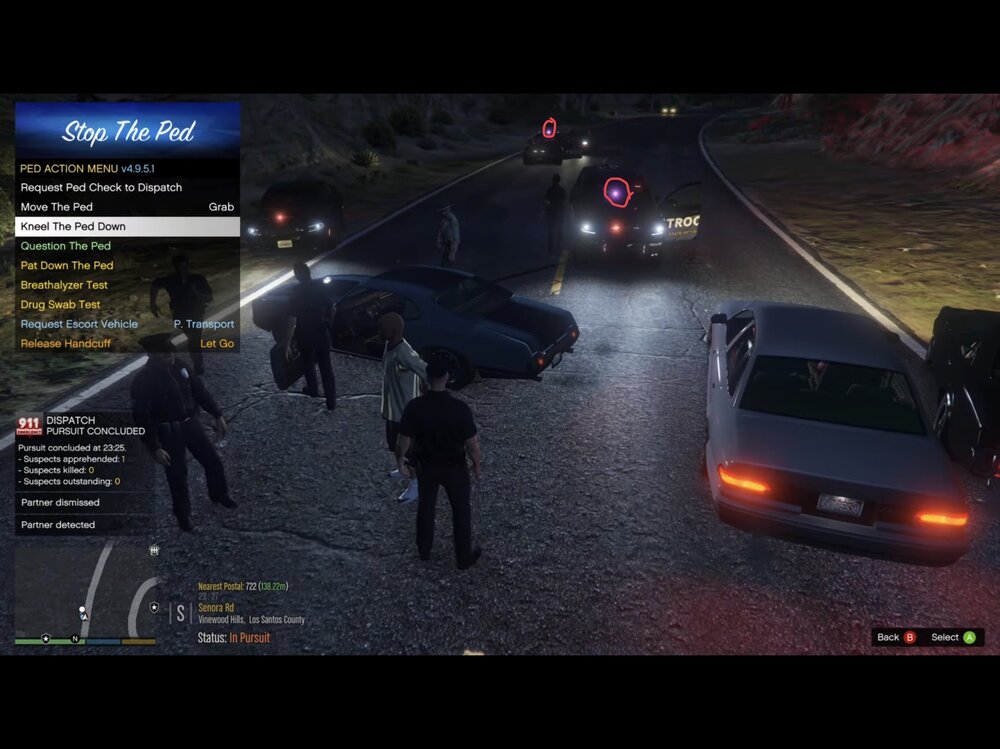
If you look at where I circled it shows led lights, but there is no actual light bar there.
-
If your still having this issue, I could try to help you tomorrow afternoon when I get home from work, if you haven’t fixed it by then.
-
Got it. So I’m assuming these are replacement packs not add-ons?
-
It looks like the only issue I see right before the end of the log is: Which leads me to believe it has to do with your EUP plug-in. try a fresh reinstall of EUP.
-
Is this happening on all ELS models? Did this just start happening? Is this for add-on or replacement vehicles?
-
It’s your HeliAssist plug-in that caused the crash.
-
Add-on packs have their own name so it won’t affect vanilla slots. If you are replacing slots, any files with the same name will be overwritten by what you drop into your patchday folder via OpenIV.
-
Does anyone know how to fix this issue? Look at where I’ve circled.
-
 @Trooper Leary Just wanted to let you know, you'll need to add a ">" on line 164 of the citations XML. I was wondering why my Compulite would stop working in game when I tried to open it. 🙂 It's an easy fix, but thought I'd let you know. Love the fact that it doesn't pause the game in the background now. Such an amazing touch. Keep up the great work! [3/26/2023 9:00:37 PM.239] LSPD First Response: CompuLite: Problem on Loading Citations.xml: System.Xml.XmlException: ' ' is an unexpected token. The expected token is '>'. Line 164, position 37.
 -
So unfortunately, because LSPDFR crashes after the fact of the game loading, it won't show any issues within this log because after LSPDFR crashes, it is no longer logging any messages. As far as your log goes, I don't see any issues within in. So something else is causing this issue. Can you confirm that only the plugin crashes and not the entire game?
-
Just gotta ask... Have you installed or replaced RAGENativeUI with the most updated version available?