



Chris B.
Members
-
Joined
-
Last visited
Everything posted by Chris B.
-
 @TWISTEDSCOPES Hey man. The pack is good, I particularly enjoy your FPI Taurus and have it installed comfortably in Police2. My only query is the lights specific to the 5+6 extra (WRN) on the side passenger doors and the rambar lights built into the Setina at the front. The rest of the lights are absolutely fantastic, bright and awesome, but those I just mentioned are small and very dim at 90% of the angles you look at them. The other 10% they perk up a bit. I was wondering if this is something that you will likely edit at some point or is this a finished concept?
- 93 comments
- 28 reviews
-
@Delco24 Hey man, anyone worth his salt has used this excellent script within LSPDFR, However, ELS is not compatible with it. Is there anyway this can change, I loved the fact Siren Mastery worked hand in hand with this script and would love it if ELS could also. I do recognise the challenges based on how ELS is hooked into main GTA5. But a solution would be phenomenal. Edit: Actually, Scrap that request. I fiddled around, removed the script, removed siren mastery, edited all the ini files and now I have ELS with full controller support and not a single keybinding issue with GTAV/LSPDFR. Sorry to have bothered you mate, keep up the good work.
- 40 comments
- 16 reviews
-
-

- 1
-
-
-
 Hey Bud. Great job. The cars looks wonderful. As above, the 2015FPIU has the same lightbar tint issue. I will trouble shoot with some of the suggestions above. One other little thing I found. I edited the VCF for the Aux Coronas for the reverse lights. Your default is right and left "blue" which is perfect, however when I change them to "11" for strobes, only the left side lights up blue, the right side does not. It does not light up at all which is strange. Any ideas?
- 84 comments
- 28 reviews
-
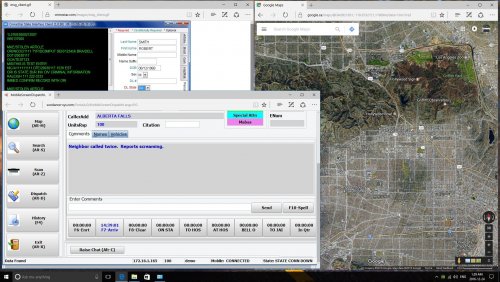 Yeah i saw it yesterday. Didnt realise was back from July. I am making different ones using my own DOJ DCRS/CAD system. But my post in my other file explains my attitude regarding certain aspects of these textures. If u want this pulled i will. I dont care really. Im just giving the community something people might like. Your call man.
- 8 comments
- 2 reviews
-
 Haters gonna hate. JK dude, but I'm aware pd's are not using traditional/modernized MS operating systems. I also know that most people who use this will not be looking at the windows 10 bar at the bottom. Its just a variety background that shows something other than a green screen. I like it, others can use it if they want too. If I had the luxury time the young men like yourself do to create beautiful backgrounds I would. But I have a stupidly busy job, a mortgage, a pregnant wife and my Audi in the driveway. Doesn't leave much time to spend hours creating beautiful backgrounds. I just provided the community with something I enjoy and maybe someone else out there will too.
 -
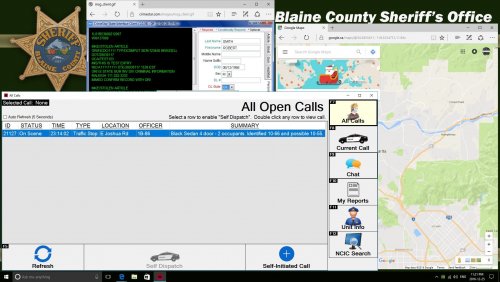
This is another simple jpg background texture I created today. This time it features the BCSO background. I have used the DOJ DCRS system so there is to be no confusion about the uniqueness of this one. Obviously this is Christmas flavoured GPS map version. I will create a plain version shortly. It is designed to be used with PieRGud's LSPDFR Computer+ Plugin. Installation is simple. 1) Download 2) Go to GTAV/Plugins/LSPDFR/ComputerPlus/backgrounds 3) Drop the jpg image in there. 4) Go the ComputerPlus ini located in GTAV/Plugins/LSPDFR and change the vehicle background to [whicheverpolicevehicleyouwant]=BCSOMDT.jpg For example: sheriff2=BCSOMDT.jpg 5) Done! I think it adds a little more computer realism to patrol laptops. I like it, feel free to enjoy it too. Leave a review or comment as well. Please do not re-upload anywhere. Do not edit and repost without providing original credit as due.
-
Can you post a link? I would use yours too if its similar. Honestly mate, I had no idea. Like I said, I free-formed this after seeing the YouTube vid. This is the first thing I've ever made/posted on this website.
- 8 comments
- 2 reviews
-
I saw it on YouTube a few days ago and wanted to recreate something similar for the community. If someone has already made something like this available for download and I have accidentily duplicated, please let me know. I apologise.
- 8 comments
- 2 reviews
-
This is a simple jpeg background texture I created which is similar to the one OfficerFirstThirtyMinutes uses in his YouTube videos. It is designed to be used with PieRGud's LSPDFR Computer+ Plugin. Installation is simple. 1) Download 2) Go to GTAV/Plugins/LSPDFR/ComputerPlus/backgrounds 3) Drop the jpg image in there. 4) Go the ComputerPlus ini located in GTAV/Plugins/LSPDFR and change the vehicle background to [whicheverpolicevehicleyouwant]=yrp.jpg For example: police=yrp.jpg 5) Done! I think it adds a little more computer realism to patrol laptops. I like it, feel free to enjoy it too. Leave a review or comment as well. Please do not re-upload anywhere. Do not edit and repost without providing original credit as due.
- 8 comments
- 2 reviews
-
-
- 3
-
-
 Anyone been playing with ini file yet to enjoy the environmentals ELS offers? I've played a little and it's awesome what it is capable of. I know someone has found the perfect formula though. If you would kindly share your experiences and ideas I would appreciate the input.
- 2,661 comments
- 234 reviews
-
 @Albo1125 Hey bud, did you upload the wrong file? Its showing (OLD Version 0.1.2.0).
- 1,081 comments
- 166 reviews
-
 Just to ensure I post this here. This works perfectly with ELS with the latest information package. Very Impressed.
- 51 comments
- 13 reviews
-
-
- 2
-
-
 @Beren Love your textures bud. Been using for a while. TheHurks 2016 FPIU ELSV released today, cant seem to get any 2016 FPIU skin to fit his model. Just a heads up for future updates. Best of luck in your finals bud.
- 111 comments
- 23 reviews
-
 I'm sure others have the same view as me, the Vehicles meta has police 4 described as below. The reason is I am editing the meta in thehurks file so I can use this FPIU as police 4 instead of police 3. Just want to make sure once I replace this current meta with the newly edited one for the FPIU, it will still work with no problem. <Item> <modelName>POLICE4_OLD</modelName> <txdName>POLICE4_OLD</txdName> <handlingId>POLICE</handlingId> <gameName>POLICE4</gameName> <vehicleMakeName /> <expressionDictName>null</expressionDictName> <expressionName>null</expressionName> <animConvRoofDictName>null</animConvRoofDictName> <animConvRoofName>null</animConvRoofName> <animConvRoofWindowsAffected /> <ptfxAssetName>null</ptfxAssetName> <audioNameHash />
- 427 comments
- 75 reviews
-
Evening all. First off @Lt.Caine @LMS Great work. Your dedicated hours and hard efforts are truly appreciated by the community. Those complaining need to show some chill and respect what you have accomplished. They couldn't do it themselves so congrats boys on this accomplishment. Second, question to the community. Everything is working well as I can tell. @Bxbugs123 ELS vehicle is working well. However, I have no controller function for ELS. I do have free my controller modified into the game as I originally needed it for Siren Mastery which I have removed obviously for the time being (Hey @Albo1125 you know we love you). However with siren mastery removed, I still have no controller function. I don't believe I missed any instructions and I've read all the setups. Anyone got any input that might assist me? Thanks.
- 2,661 comments
- 234 reviews
-
 For now, I will wait for POLICESCO to make a package. Its only annoying because we all know how close ELS is and how these issues will soon become mute. None the less, I can still send the files. I assume that you will need my MPheist carvariations and my current Carcols.ymt? How would you like me to get them to you? Just copy and paste as spoilers (I would like to use "99" as the sirensetting).
- 66 comments
- 13 reviews
-
@Kilyin @POLICESCO Ok so long story short, Trying to install just seemed to break my game. I cleared the carcols of this edit, I redid the carvariations and put the unmarked explorer back into police4. Game works fine again. Therefore, I am clearly not smart enough to make the necessary edits (in the carcols) to make this car work within my existing modified platform. I think if this can become a package installed just like buggz and captain14 with its own carcols. That would be awesome. As of right now. I cant make it work. Shame because I really like the car and would like to use it.
- 66 comments
- 13 reviews
-
I'm too frigging tired to be doing this. I just saved over my mpheist carvariations with a bullshit carvar without making a backup. Damn it! This car better be worth all this blood effort to make it work.
- 66 comments
- 13 reviews
-
You're right. I must have not edited the carvariations correctly ( a mistake i've never made in 2 years) but there is a first for everything. let me look into it.
- 66 comments
- 13 reviews
-
@Kilyin @POLICESCO I must have messed up, game wont even load story mode anymore, the carcols are the only thing ive messed with. Here is a cut out of they way I entered it. Let me know whats up.. In the spoiler I copied out ID 19, ID 990 and the beginning of ID 20. I mean its totally messed me up, I honestly thought it was good.
- 66 comments
- 13 reviews
-
Good man. Cheers. @Kilyin I'm going to make the edits now. Did you place the 990 after siren 20? I assume yes. I personally use Techengage''s custom visuals carcols.
- 66 comments
- 13 reviews
-
As above, I'll need to go in an edit the carcols/carvariations and change the number to something like 723, because, why not right? lol. I never asked, coronas working with this model right? I enjoy environmentals too much to not use them. Hey, can you throw a spoiler up of your edited carcols cut. I can go and change it, but if you've already made one, I would totally appreciate using your copy if its cool? I can adjust the Carviations with it myself. Just don't want to go fishing around the carcols unnecessarily. Thanks mate. With all the hard work put into this model, if it was an OIV package, making it POLICE8 would be bloody awesome as an add on to my current LSPD pack of cars (currently from police to police 7).
- 66 comments
- 13 reviews
-
Cars like this make me even more excited for ELS. Just primed for awesomeness. I still use your unmarked slicktop Taurus you made ages ago. You lighting and quality is always good man.
- 66 comments
- 13 reviews
-
-
- 1
-
-

