



OfficerBeal
Members
-
Joined
-
Last visited
Everything posted by OfficerBeal
-
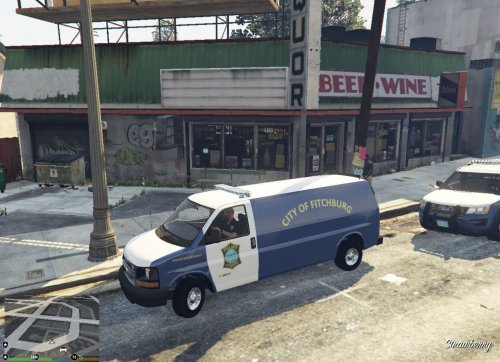 This is a fictional vehicle in the Fitchburg Police Department. Fitchburg, Massachusetts As always with any skin or texture that I upload, please feel free to give suggestions for improvement or upload a version of your own. The only thing I ask is that if you upload a skin that based off of mine, have it be for a different department and at least a little different than mine so that there is not a bunch of the same thing being uploaded. It is always a good idea to make backups before modding ***You will need to download the LSPD Pack (ELS) 1.2.0 by HankVoight *** -Installation- Model 1. Open "OpenIV" - If you do not have this, you will need to download it - http://openiv.com/ 2. Navigate to "Mods/update/x64/dlcpacks/patchday15ng/dlc.rpf/x64/levels/gta5/vehicles.rpf" 3. Turn on "Edit mode" in OpenIV 4. Open the downloaded file that has the police van in it. - If you want to this transporter to take the place of a different vehicle than originally assigned now is the time to change the name of each file to the vehicle you want it to replace. 5. Drag and Drop the files in that folder into OpenIV - OpenIV will automatically save the vehicle into the game. Skin 6. Open the FPD Transport folder and open the Skins folder - If you named the cruiser a different name than policet change the name of the file to match the vehicle. 7. Drag and Drop both .ytd files into OpenIV - OpenIV will automatically save the vehicle into the game. ELS 8. Go to your GTA 5 game directory 9. Open the ELS Folder 10. Open pack_default folder 11. Drag the policet file from the FPD Transport ELS folder into the games pack_default folder Install Complete
 -
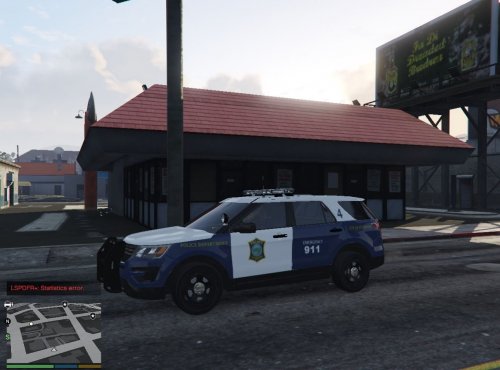 This is a replica of the Fitchburg Police Department. Fitchburg, Massachusetts As always with any skin or texture that I upload, please feel free to give suggestions for improvement or upload a version of your own. The only thing I ask is that if you upload a skin that based off of mine, have it be for a different department and at least a little different than mine so that there is not a bunch of the same thing being uploaded. It is always a good idea to make backups before modding ***You will need to download the "[ELS] [BUST-E-NUT] 2017 Ford Interceptor Utility "Mirror Park PD" by Communist Beach Party *** Mirror Park PD -Installation- Model 1. Open "OpenIV" - If you do not have this, you will need to download it - http://openiv.com/ 2. Navigate to "Mods/update/x64/dlcpacks/patchday15ng/dlc.rpf/x64/levels/gta5/vehicles.rpf" 3. Turn on "Edit mode" in OpenIV 4. Open the downloaded ford explorer file. - If you want to this cruiser to take the place of a different vehicle than originally assigned now is the time to change the name of each file to the vehicle you want it to replace. 5. Drag and Drop the files in that folder into OpenIV - OpenIV will automatically save the vehicle into the game. Skin 6. Open the FPD folder and open the Skins folder - If you named the cruiser a different name than police3 change the name of the file to match the vehicle. 7. Drag and Drop both .ytd files into OpenIV - OpenIV will automatically save the vehicle into the game. Install Complete
 -
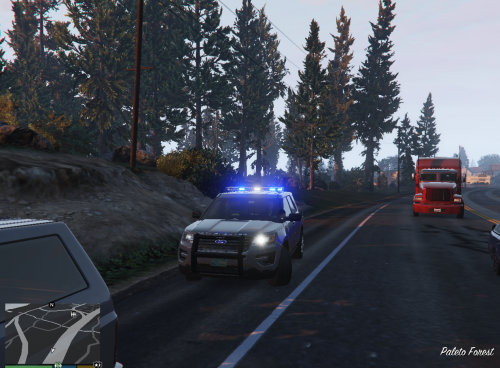 This is a replica of the Groton Police Department. Groton, Massachusetts As always with any skin or texture that I upload, please feel free to give suggestions for improvement or upload a version of your own. The only thing I ask is that if you upload a skin that based off of mine, have it be for a different department and at least a little different than mine so that there is not a bunch of the same thing being uploaded. It is always a good idea to make backups before modding ***You will need to download the Massachusetts State Police model from Pricefield*** This skin is for the fully marked cruiser in his pack. -Installation- 1. Open "OpenIV" - If you do not have this, you will need to download it - http://openiv.com/ 2. Navigate to "Mods/update/x64/dlcpacks/patchday15ng/dlc.rpf/x64/levels/gta5/vehicles.rpf" 3. Turn on "Edit mode" in OpenIV 4. Open the folder where the explorer model is in - If you want to this cruiser to take the place of a different vehicle than originally assigned now is the time to change the name of each file to the vehicle you want it to replace. 5. Drag and Drop the files in that folder into OpenIV - OpenIV will automatically save the vehicle into the game. Skin 6. Open the Groton Police folder and open the Skins folder - If you named the cruiser a different name than what the file is called change the name of the file to match the vehicle. 7. Drag and Drop the .ytd into OpenIV - OpenIV will automatically save the vehicle into the game. Install Complete
 -
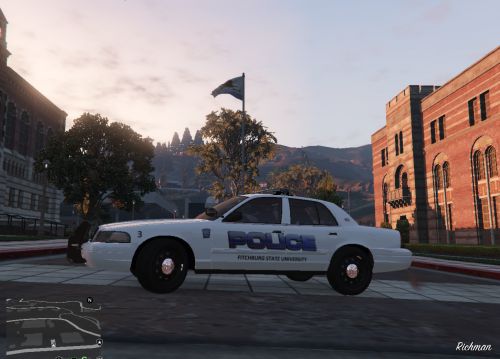 This is a replica of the Fitchburg State University Campus Police. Fitchburg, Massachusetts I recommend putting this car as police2. That car seems to be in the college area of the game a lot. As always with any skin or texture that I upload, please feel free to give suggestions for improvement or upload a version of your own. The only thing I ask is that if you upload a skin that based off of mine, have it be for a different department and at least a little different than mine so that there is not a bunch of the same thing being uploaded. It is always a good idea to make backups before modding -Installation- *** You will need to download POLICESCO's "BCSO Mini Pack [ELS]" This skin is for the Crown Victoria in his pack http://www.lcpdfr.com/files/file/17373-bcso-mini-pack-els/ Model from POLICESCO 1. Open "OpenIV" - If you do not have this, you will need to download it - http://openiv.com/ 2. Navigate to "Mods/update/x64/dlcpacks/patchday15ng/dlc.rpf/x64/levels/gta5/vehicles.rpf" 3. Turn on "Edit mode" in OpenIV 4. Open the folder where the Crown Victoria model is in the BCSO pack - If you want to this cruiser to take the place of a different vehicle than originally assigned now is the time to change the name of each file to the vehicle you want it to replace. 5. Drag and Drop the files in that folder into OpenIV - OpenIV will automatically save the vehicle into the game. Skin 6. Open the FSUCPD folder and open the Skins folder - If you named the cruiser a different name than police2 change the name of the file to match the vehicle. 7. Drag and Drop the .ytd into OpenIV - OpenIV will automatically save the vehicle into the game. ELS 1. Go to you GTA V game directory - Right click on GTA V Desktop Shortcut and click on "Open file location" - If option not shown, *Steam Users Navigate to "Program Files (x84)/Steam/steamapps/common/GTAV" *CD Users Navigate to Program Files/Rockstar Games/Grand Theft Auto V" 2. Navigate to "ELS/pack_defaults 3. Open the "ELS" folder that is in the FSUCPD file you just downloaded ---->>>> MAKE SURE THE ELS FILE IS NAMED THE SAME AS THE CROWN VICTORIA file before putting it into the game directory ELS file, if it is different, change the name now. (example - "police" or "sheriff" or "police2") 4. Drag and Drop the file from the ELS folder into the ELS game directory file Install Complete
 -
 The reason for the switch from the model to the skin is because i only created the skin. I did not create the entire model from the ground up. I was told by another user that even though I did give full credits to the original model maker, I could not post the car as a model. So I changed it to the skin and let people know where they could get the right model for that skin
 -
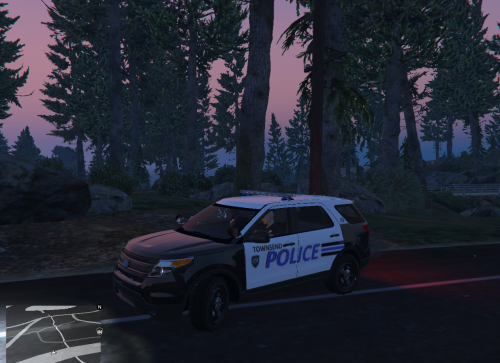
This is a replica of car 43 in Townsend, Massachusetts Skin is made for the 2013 Ford Explorer from HankVoight's "LSPD pack ELS" - Link on bottom of description You will need to download that file and install the explorer using -Installation- *** You will need to download HankVoight's "LSPD pack ELS" This skin is for the 2013 Ford Explorer in his pack http://www.lcpdfr.com/files/file/16021-lspd-pack-els/ Ford Explorer from LSPD Pack ELS 1. Open "OpenIV" - If you do not have this, you will need to download it - http://openiv.com/ 2. Navigate to "Mods/update/x64/dlcpacks/patchday15ng/dlc.rpf/x64/levels/gta5/vehicles.rpf" 3. Turn on "Edit mode" in OpenIV 4. Open the folder where the explorer model is located - If you want to this cruiser to take the place of a different vehicle than "police3" now is the time to change the name of each file to the vehicle you want it to replace. 5. Drag and Drop the files in that folder into OpenIV - OpenIV will automatically save the vehicle into the game. Skin 6. Scroll down and open the file "police3.ytd" - If you named the explorer under another name, open that vehicles .ytd 7. Click on "Import" 8. Navigate to the downloaded "Townsend Police" file and open the "Skins" file. 9. Import all files in that folder into came - When asked click OK and then click save at the bottom of the window ELS 1. Go to you GTA V game directory - Right click on GTA V Desktop Shortcut and click on "Open file location" - If option not shown, *Steam Users Navigate to "Program Files (x84)/Steam/steamapps/common/GTAV" *CD Users Navigate to Program Files/Rockstar Games/Grand Theft Auto V" 2. Navagate to "ELS/pack_defaults 3. Open the "ELS" folder that is in the Townsend Police file you just downloaded - If you changed the name of the Model file before putting it into OpenIV, make sure you change the ELS file to mathc that name 4. Drag and Drop the 4 files in that folder into the ELS game directory file Install Complete

