


Normann
Members
-
Joined
-
Last visited
Everything posted by Normann
-
Sorry. I did not notice the reply. What do you mean by F4 crash. When you pull up the console it crashes?
-
I have a youtube short about this but I am not sure I am allowed to link it so I will not. But I will edit it a moderator tells me I can. Basically, I have the DW mod but I don't see a huge difference. It still takes many shots to get a ped killed. They go on the ground, and get up like a zombie like in Vanilla. I triple checked the mod install. It is enabled in Stop the ped. RagePluginHook.log
-
 I also appreciate the effort. But with this you barely get a speeder on the highway anymore.
- 366 comments
- 32 reviews
-
WorldEvents.MaxNumberOfEvents and those mods prevent the flashlight? I like world events to not trigger. It was posted here to set it to 0. Also, I use those mods.
-
RagePluginHook.logHere is the log. Thanks for the help!
-
Hi, This will be basic. Sorry! But for some reason I am not able to select the flashlight. I have EnableAdvancedFlashlight=yes in stoptheped.ini and in LSPDFR.ini has Ambient.DisablePlayerFlashlightOverride = true I force duty, and I pull up the weapon select wheel, the light is not under the fist or the pistol as I scroll through them. I know I am missing something trivial here. I have tried giveflashlight console command as well. But nothing. Thanks!
-
Hi, I am paying a 3D designer to recreate the typical police car models for me. The reason is, I want full rights to them. Can anyone tell me, or point me to the right direction, about the steps needed to create the ytd, ytf and els files that are needed to use the textures? What would be the work flow to go from having the blender files to actually create a full package? Is there any good tutorial available about this topic? Thanks!
-
Hi, I am trying to install a few things. Fast draw 1.2, SimpleHUD 1.1.9, and In game screenshot 1.1. However, as soon as I install ScripthookVDotNet, I get a crash. I am wondering if anyone has found a working setup for this? Thanks!
-
Mine does work. But not everything. I.e. I cannot make the panic hotkey combo to work. Did you try some of the existing profiles they have here in the download section? The second link has all the icons too.
-
Hi, Two things I would like to see in a future update: 1. Ability to tweak the suspects' running speed. It would be great to do this from the ini. I believe I was reading there is a lower and higher value and the system picks one. It seams that could be pulled down more along with the exhaustion rate. If those values would be exposed in the ini we could play with them the way we like it. 2. Ability to weight individual callouts and turn on/off built in callouts. Most add-on callouts you can select which one you want to be on or off. But not the vanilla ones. Also, some value associated with them would be nice. So i.e. a terrorist attack happens less often than a traffic stop backup. Thanks!
-
I will try that too! Thanks! Though I am looking for more average patrol calls. Not murders, etc. Minor drinking and party and the wanted suspect looks good though.
-
not yet... I am getting it now
-
Hi, I think this is the right forum for this. I don't see a plugin specific sub. I have been having a hard time with add on callouts. Kutchera especially seams to be broken, but others too. It seams many of them crash or don't finish or just plain don't work. The built in ones are good. I also have beljojo's, those seam to work fine. What else is out there that is stable? Preferrable ones with ini files where you can toggle individual calls on/off. Thanks!
-
Hi, I know you can set "real time duration" in most trainers. But is there anything out there where you can set a specific ratio? Like 1h real time will be X hours of game time? Thanks!
-
Solved! yay!!!! I had to change the LOD distance in the vehicle.meta for the model to 500. This video demonstrates the problem and has a walkthrough how to edit the meta file.
-
Ok. I did that. Did not work. But thanks anyways! So for your setup none of this happens. Right? EDIT: In the meantime I did some testing. Changing graphics settings mostly. Updated drivers, etc. Frame Scaling Mode, and Extended Distance Scaling has a huge effect how far the car renders in and out. Also noticed that some elements like the spotlight and some other things on top of the car, I think LPRs do not render out... I think this is something specific to my computer and my settings, and not so much the mods I have installed.
-
Where do you put the fwBoxStreamerVariableSizePatcher? Main GTA folder?
-
I guess I can link it since it is this site. Very nice pack btw. I have installed them all. Add on and also replacement ones. Try to spawn the Tahoe replacement. That one is glitched. I did not test the rest. Somehow I do not think it is the pack. There is another pack which is pay for so I will not link it that does it too for certain vehicles but not all. In this pack for example I have the charger for sheriff slot (not the undercover but the normal) and that one is fine. Thanks! I feel like I have some loading distance value messed up somehow. Maybe some mod changed it.
-
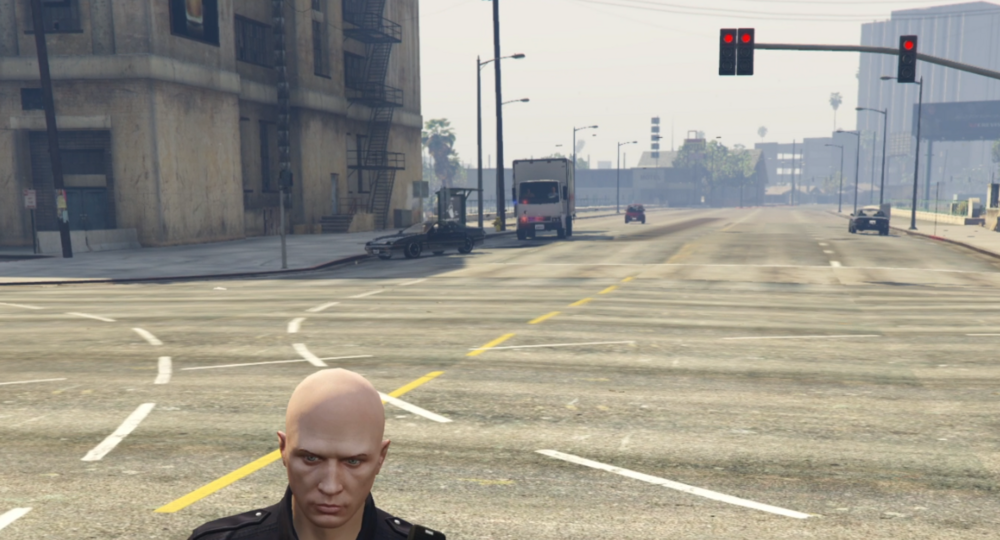
This is not going to help probably. The not rendering car is just in front of the truck. I can't get a better picture because when I get closer the car renders in normally. When not fully rendered you can see the lights, and if there is a character in it, you see that too. So basically you will see one or two dudes floating above the ground, sitting, and all the lights turned on. You can also see some parts sometimes, like the rambar. In this image I am exactly at a distance where it renders in/out. If I go closer the car renders, if I walk just a bit farther you see what you see here. I can repeat it as many times I like walking closer and away again and it will render in/out.
-
I will tomorrow! I will see if I can attach a screen recording even.
-
Thanks for trying to help! I did have the +hi.ytd. I did reinstall them though just now. Just in case. Still the same. Some of the cars that do this don't even have a +hi file. Not every car does it though.
-
Well. I did downscale the textures. Did not help. They were 2k to begin with not 4k. So this is something else.
-
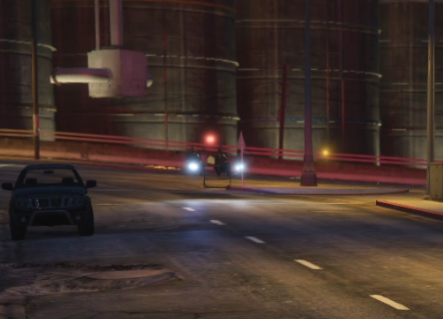
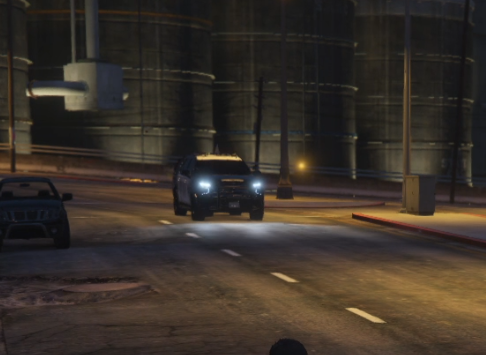
Hi, Please refer to the images. As the vehicles are moving closer, at a given distance they are loading textures. That distance is a bit too late. The three files of this specific vehicle are 2x10MB for the yft files and 1x14mb for the ytd file. My question is: Is this because the total of the three files is well over 25MB? Other than resizing the textures, can I try anything else that might solve the problem? I have gameconfig v33, heap adjuster set to 900, and also the pack file limit adjuster installed. The computer is a i9 13900K, 32G, 4080 super with 16GB win 11. The game is mostly maxed out. Except for this, everything loads and runs smoothly. I would like to make sure there is nothing else that I can do, before I start to modify the files. Thanks!
-
unitedOrange66, Thanks! I even modified the ini file but never noticed the setting for auto lock. Here is another question about the radar. I had some locks today. The car gets the orange blip. But when I try to pull the car over it does not pull over. It just stops. I hit left shift, the sirens... but they do not pull over. I have to hit LShift one more time. So I am getting the feeling that if there is a blip already, it needs to get canceled before I try to pull the car over. Same thing in ALPR.
-
I was told to create new topic. So here it is. I have installed this plugin, and read the manual, and also watched some how to videos. Still, one thing is not clear. What triggers the radar to lock on to a vehicle? Is there a preset speed? Do you lock on manually by pressing Fast or Strong? I have been trying to use it and this is what I have done so far: Park along a main highway, same direction as the traffic. Set it to SA and Front. I see a high red number (fast) and hit F. The radar will lock and a red blip is created. But often the red number will be there for a fraction of a second and then I lock onto a different car. Hmmm... so what am I doing wrong? Thanks!

