


Izhevsk
Members
-
Joined
-
Last visited
Everything posted by Izhevsk
-
Yes, anything that requires you to have an internet connection in relation to SINGLEPLAYER GAMEPLAY is shit. Period. Of course I have the lastest versions of GTA and Scripthook and RPH, you fucking retard, otherwise how I would I be playing LSPDFR in the first place?
-
HOW???? Why even make that comment if you aren't going to offer help or instructions on how to do it? Did you watch my video? RSC never remembers my email or password, it never lets me play in offline mode. So what I'm asking for is HOW DO YOU PLAY OFFLINE WITH NO INTERNET!!!!!!!!!!!!! IT IS NOT FUCKING WORKING!!!!!!!!!!!!!!!!!!!!!!!!!!!!!
-
CAN NOBODY HELP ME??????? I. CANNOT. PLAY. GTA. WITHOUT. INTERNET. THIS IS BULLSHIT!!!! I PAID FOR THIS FUCKING GAME!!!! WHY IS THERE AN "OFFLINE MODE" IF IT DOESN'T FUCKING WORK????????
-
I asked a similar question and didn't get any help. All the audio files are named a bunch of gibberish like 00xec1002 or whatever. No way to tell what's what.
-
Albos mods are shit. I just got my game to work for an hour without internet.... and you need a fucking Internet connection to run lspdfr plugins.... yeah. Way to go. A fucking plugin that requires 24/7 Internet connection....
-
CAN SOMEONE TELL ME WHAT IS GOING ON???????? PLEASE FOR THE LOVE OF GOD THIS IS GETTING RIDICULOUS!!!!!!!!!!!!!!!!!!!!!!
-
Re-download RPH and reinstall it. I think they had the wrong one on the download list. I just re-downloaded it and installed and it worked. But LSPDFR crashed on my first callout lol. EDIT: Ok literally 5 minutes ago I started my game with RPH and LCPDFR crashed during a callout, so I installed a new version of LCPDFR since I had the old one, and now RPH is telling me the game version isn't supported.... WHAT THE FUCK!!!!!!!!!!!!!!!!!!!!!!!!!!!!!!!!!!!!!!!!!!!!!!!!!
-
Rage Plugin Hooks website says the latest game patch is 1032 and RPH supports 1032. (I registered for their forums to ask for help and they have yet to send me a confirmation email to register my account) Well I downloaded it and it's telling me version 1.0.1032.1 retail not supported. On top of this I can NEVER play offline mode because RSC never remembers my login info. I'm seriously getting sick of all this bullshit. I haven't been able to play GTA since I got my laptop back. I'm about to just call it quits.
-
RPH has not been updated. They say the latest patch is 1032 but my game says it's version 1.0.1032.1
-
Ok, so I guess I'm the only one that has this problem. That's cool. Forced online mode... that wont let you play a game you paid for... even though you're clearly connected to the internet. 2017 and this is still an issue. Why don't they get rid of that fucking RSC shit FFS
-
Yeah, I'd say it's pretty ridiculous that you cannot play a singleplayer game without being connected to the internet 24/7/365. As an example, I can turn off my internet and fire up Arma 3 and play till the end of time, no forced always online crap. What's even more ridiculous is the stupid RSC won't remember my login info, even though i click the "remember me" box. So not only do I have to have an internet connection to play singleplayer, I have to sign in with an email and password... every... single... time. And that only works half the time. Half the time it will tell me "offline play is unavailable" and that I must have signed in from this machine before.... which I have about 30 billion times now. But hey, lets all pretend this useless, intrusive DRM crap is just A- Okay!So I've got the Declasse Premier by Lundy in my sheriff and police3 slots, and I don't like the engine sounds for them. I was playing around and decided the Tornado might sound the best. Maybe. Anyway, I know if I just change the handling ID for the cars to Tornado, they will sound like it.... but also handle like it and no longer have sirens. Not cool. So does anyone know a way I could do this? I looked at the vehicles.rpf or whatever it's called that has all the car audio. The file names are a bunch of gibberish. No way to tell which is which.My game is telling me offline mode is unavailable, even though I've signed in 10 billion times, checked remember me and auto sign in. WHAT IS GOING ON???? HOW CAN YOU GET RID OF SOCIAL CLUB?!?!?!?!?!?!?!??!?!?!?!???!?!? THIS IS REDICULOUS!!!!!!!!!!!!!!!!!!!!!!!!!!!!!!!!!!!!!!!!!!!!!!
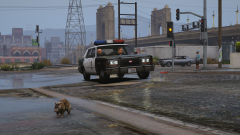 I'm glad to hear that! I'm replacing all my emergency vehicles with non-ELS lore cars.I have no idea what that means. Is there seriously no way to get rid of this forced online crap? To completely bypass social club? This is rediculous!Hey, could someone point me in the direction of some 80s/90s replacements for the following vehicles: LSPD Buffalo, FIB Buffalo, FIB Granger, Unmarked Stanier. I'm specifically looking for NON-ELS VANILLA vehicles, so basically anything from GTA San Andreas and up. I've already got Lundy's awesome Vapid Stanier and Declasse Premier for my LSPD fleet, but cant find anything for the unmarked stuff and that LSPD Buffalo And does anyone know of a mod that slows down the rotator lightbars and also ads wigwags? I'm trying to make all my cop cars old school. Thanks!
Is this a work in progress? Looks amazing! I hope it gets released soon! I love your mods, the classic 80s/90s take on vanilla GTA cop cars.
I'm glad to hear that! I'm replacing all my emergency vehicles with non-ELS lore cars.I have no idea what that means. Is there seriously no way to get rid of this forced online crap? To completely bypass social club? This is rediculous!Hey, could someone point me in the direction of some 80s/90s replacements for the following vehicles: LSPD Buffalo, FIB Buffalo, FIB Granger, Unmarked Stanier. I'm specifically looking for NON-ELS VANILLA vehicles, so basically anything from GTA San Andreas and up. I've already got Lundy's awesome Vapid Stanier and Declasse Premier for my LSPD fleet, but cant find anything for the unmarked stuff and that LSPD Buffalo And does anyone know of a mod that slows down the rotator lightbars and also ads wigwags? I'm trying to make all my cop cars old school. Thanks!
Is this a work in progress? Looks amazing! I hope it gets released soon! I love your mods, the classic 80s/90s take on vanilla GTA cop cars.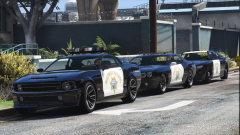 Sweet! link?I'm at work. I'm pulling a 16 hour shift. I have my laptop. I cannot start GTA in offline mode. It tells me "offline mode unavailable" and "offline play is only available for accounts that have previously signed in on this machine (with remember me ticked)... blah blah blah. Guess what? I've done that. Multiple times already. Guess what else? I already put "-scOfflineOnly" in my commandline.txt file. Anyone have any ideas? Has some modder/hacker figured out a way to bypass this godforsaken Social Club/verification bullshit? I'm assuming someone has, damn games' been out for 3 years now. I mean if someone can hack into State Department emails I'm sure someone can trick a video game into thinking it's online. Ffs.That was just a repair price, since I fell down the stairs with it and it got all busted up lol. I can run ARMA 3 on high settings no problem. It's an ASUS G75VW.Alright I'm sorry, but I've been out of PC gaming for a year and I'm rusty. I literally just spent $450 and got my laptop back 4 days ago, and I'm hella frustrated with GTA right now. I'll try that gameconfig from today. The other one people have been passing around didn't work. Edit: Still no good. Used new gameconfig, removed sixthstar folder and sixthstar.dll No cops responding. Spawned an LAV-25 and drove around for about 10 minutes, memory crash.Using the custom gameconfig does not fix the memory crash issue, and something is causing the wanted level scripts not to run (no police spawn). Even when removing the sixthstar related files, still nothing.Where? I've checked here and gta5mods and see nothing. What are you talking about? I've been trying to get this to work for the past 3 days dude.... couldn't find any forum posts about it.Currently the first mod you see on the front page of the site being showcased is "Realism Dispatch Enhanced". This mod is completely broken (as of April 25th) and hasn't been updated in 4 months, with no word from the creator. I don't think it makes this site look very good to be showcasing broken/abandoned mods.

