



EP34FR
Members
-
Joined
-
Last visited
Everything posted by EP34FR
-
 I dunno. One of us is doing something wrong....I just re-downloaded the vehicle, installed the texture, and it worked fine.
- 29 comments
- 18 reviews
-
Are you using the 2011 Dodge Charger, by martinct, that I provided a link to in the description? It works for me.
- 29 comments
- 18 reviews
-
.thumb.jpg.61de846de400ca98f85d205992527de1.jpg) Yea, I don't know what the issue is. Same thing happens with your CVPI (the "non-slicktop" version). I reinstalled the charger, but it crashed again
Yea, I don't know what the issue is. Same thing happens with your CVPI (the "non-slicktop" version). I reinstalled the charger, but it crashed again- 265 comments
- 83 reviews
-
Great looking model. Replaced police2 with it, but every time I load it up, I get a Game Memory Error, and GTAV crashes :(
- 265 comments
- 83 reviews
-
 Great model! Have an issue with the vehicle being invisible, from about 50' away though. Is that an issue with the model, or GTAV?
- 202 comments
- 51 reviews
-
-

- 2
-
-
-
Yea, like Hysery mentioned, I can't provide the files that another developer did. You can click on the links I provided in the description, to download the vehicles, and they developers provide pretty good instructions on how to install them.
- 29 comments
- 18 reviews
-
I have Virzza's CVPI as police, the Charger as police2, the Impala as police 3, and in mpchristmas2 (add-on vehicles), I have Bxbuggs slicktop CVPI as lspdcvpislick, the Charger with skyline livery as skylinecharger, and the Explorer as lspdexplorer.
- 29 comments
- 18 reviews
-
4K LSPD/LSFR Textures Pack This "mega" pack includes LSPD liveries for multiple vehicles, as well as LSFR (Los Santos Fire/Rescue) liveries for the Fire Engine and Ambulance. Use any or all of these to personalize your LSPDFR experience. The 2015 Charger includes a special, "Skyline" livery (chgr_sign_2) that can be an additional livery, or can be renamed to chgr_skin_1 Vehicle mods required: CVPI (any/all of the following): - Ford Crown with Federal Signal Valor lightbar By PimDSLR (use cvpi_sign_1) - Blaine County Sheriff CVPI 3.0, by Virzza (use cvpi_sign_1) - 2011 CVPI by Bxbuggs (use vicz_sign_1) Charger (either/all of the following): - Dodge Charger 2015 LSPD by F5544 - 2011 Dodge Charger, by martinct - 2014 2014 DODGE CHARGER MARKED RX, by Carperino (you can also use his unmarked charger, with this livery, as a slicktop unit) - 2014 Dodge Charger Pursuit, by Bxbugs123 Impala: - 2014 Chevrolet Impala, by Bxbuggs Taurus: - Ford Police Interceptor 2012, by F5544 Explorer: - Ford Explorer (INTERIOR) Fedral Signal Valor lightbar By PimDSLR Fire Engine - Firetruck, by nicks0112 Ambulance: - Ford E450 Ambulance, by PimDSLR Helicopter: - Police Maverick Mapped, by Yard1 To Install textures, use OpenIV to install the vehicle mods as directed, open the .ytd (and sometimes also the +hi.ytd file), and replace the texture. If the model has multiple textures (i.e. cvpi_sign_1, cvpi_sign_2, etc.) you can delete the all but cvpi_sign_1 to ensure only these textures spawn. Enjoy! And if you have any questions or issues, let me know.
- 29 comments
- 18 reviews
-
-
- 12
-
-
I've installed the 2008 Tahoe, but would like to make it an add-on vehicle, with no vehicle graphics, and use it as an unmarked, slick-top vehicle. I've added it to mpchristmas2, have all of the carvariation and vehicle.meta info in there, but can't seem to get the ability to change vehicle color through the trainer. I've tried removing the tahoe_skin.dds file from the .ytd files, as well as creating a transparent tahoe_skin file...and neither seem to work. I created a .dds file in a color I like, but it comes across as flat, like someone used a can of flat spray paint to paint the vehicle. Any way to do this (if what I'm asking makes sense). Tried pulling some carvariation data out of a couple other mods that I can change vehicle colors with, but nothing seems to work.
-
Had this issue a while back, so I upped my vram, and the issue was resolved for a while, but now it's back again. Vram has been upped as much as it can be. I'm running an Nvidia GTX 980 Classified Gaming ACX 2.0, i5-4690, 16GB RAM, game settings pretty much maxed out with a good amount of memory still left over. Any other suggestions on how to remedy this error?
-
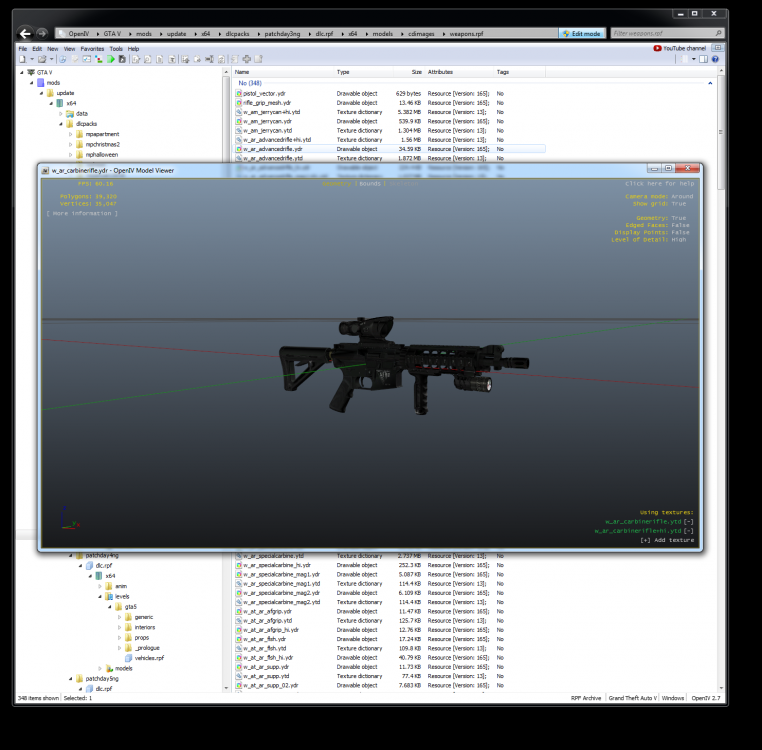
I am placing them in the updated DLC. I've had to re-install GTA V since the update, so my mods folder is brand new. here's a screenshot of the mod'ed carbine, and you can see it's location in the mods folder, but launching the game, and spawning the carbine, still brings up the default one, not this one.
-
Anyone else having mod issues after the recent update? Vehicles seem to be working, but I added 4 new weapons, and none of them are working...the original, default, GTA weapons keep spawning (combat pistol (tried two different ones), carbine and sniper rifle). Even installed the color weapons wheel mod, and it didn't worrk either. Followed all install instructions to the letter, putting everything into the mods folder.
-
I recently just installed a clean version of GTA V (no mods), and of course it updated. So while waiting for Rage to get working right, I went in game and was messing around, but something is screwy... As I was "target practicing" None of the peds seemed to panic like they normally do; and when the police spawned, they pretty much did nothing. It was like their cars were frozen (a few times they'd spin tires, and the tires would smoke, but the cars wouldn't move). The cops wouldn't shoot at me or anything...even with 5 stars. I could walk right up to the cop car and they'd just sit in the car, almost like I wasn't even there. No chase when I was in a vehicle either. I even went into the gang neighborhood and wrecked havoc, but no one ever attacked me. Anyone else experiencing this? Again, this is a clean install of GTA V, with no mods. God Mode wasn't on, Ignore player wasn't on, I had no settings that would cause me to not accumulate stars, or to be invisible.
-
-
 This is an AWESOME add-on! Many thanks to the hard work y'all have done to put this together!! I too am running into a bit of an issue with the coordinates. They don't seem to be matching up. I've tried it twice, with Ft. Zancudo and around the University. Followed the video instructions exactly, but the coordinates are off. Attached is a PDF showing the differences on the map, as well as the coordinate information gathered from GTA V for the University and how it was entered into the INI Editor. Same happened with Ft. Zancudo...coordinates put the unit out in Sandy Shores Any idea what the issue is? LEJSCoordinateError.pdf
- 270 comments
- 19 reviews
-
Yup, that's exactly what I did.
-
I allotted more virtual memory, and it seems to have resolved the issue.
-
got the error again this morning. It's a "Game Memory Error".
-
well, just tried to reproduce it, and couldn't get it to crash...maybe I had something running in the background that was causing it? If it happens again, though, I'll post it.
-
Yea, everything works like a champ if I load the game, but don't "go on duty". As soon as I jump/F9, I get the error and crash. I have the same model in the police2 slot (with a LSPD skin) and don't have any issues with it.
-
I'm using F5544's Charger w/ Valor lightbar. I created a Blaine Co. Sheriff texture for it, renamed the files to bcsocharger, and placed it into mpchristmas2. Every time I spawn this vehicle (through the trainer, by name) it loads fine, but as soon as I load LSPDFR, and the vehicle is in view (i.e. I turn to look at it) GTAV grashes with a graphics error message. Seems I recall Jeff Favignano mentioning this in his latest video, but anyone know what's causing it? I like the being able to add custom vehicles to mpchristmas2, that I can spawn by name, and then have my backup in Blaine Co show up in the same vehicle, but can't figure out why it's crashing all the time.
-
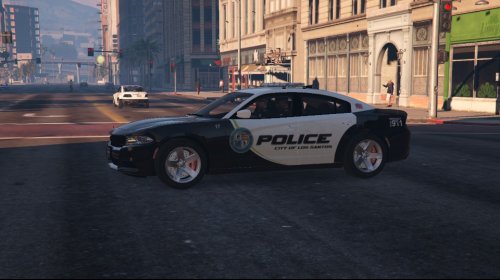 At first glance, there doesn't appear to be a .dds export option for Adobe Illustrator, so .png is the best I can do right now. If you can assist in finding a solution, so I can provide you better quality textures to download for free, it would be greatly appreciated. Also, thanks for the feedback about the reversed seal on the passenger side of the Impala. Fixed now.
- 18 comments
- 6 reviews
-
Thanks for the comment. Unfortunatly, I'll probably just stick with the charger skin for F5544's 2015 Charger. I'd suggest installing that charger mod...It'd probably take less time for you to install that than it would for me to design the skins for it
- 18 comments
- 6 reviews
-
Not the readme included in my file... Scroll back to the top of this page, and in the description of this mod, there are links to each of the vehicles you need to download...the vehicles these skins are made for, Check out the readmes for those vehicles after you download them...not my readme. The vehicle's readme will tell you the file path, through OpenIV, that it needs to be installed. Some folks install the vehicles into a different location, in lieu of replacing police, police2, etc., so I did not include file paths in my readme. correct...you need the .asi plugin installed. If you've never used OpenIV, check out this video. Around the 2:25 mark, he shows how to install the plugin... http://youtu.be/PIkqMLUWxw0
- 18 comments
- 6 reviews
-
-
- 1
-

.thumb.jpg.61de846de400ca98f85d205992527de1.jpg)

