




Splendid
Members
-
Joined
-
Last visited
-
-
-
-
-
-
What Illusionyary said. If you have a backup ready, which is unlikely since you bought it recently, you could revert, otherwise, it's just a matter of a day or two, hold tight :)
-
-
-
-
-
Or just use my Backup utility which covers both LSPDFR & GTA5? Is that an option? Yeah, I think so.
-
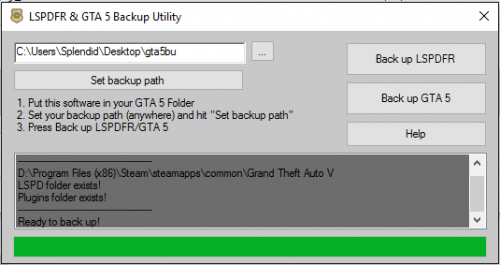 LSPDFR & GTA5 Backup Utility If you're tired of having to manually back up your LSPDFR/GTA5 Files, whether if it's for a general backup, or just to revert to an older version, I created this software to ease the entire process and create sane, organized backup hierarchies, including timestamped folders in whatever path you feel like backing up your files at. All you need to do is access your backup folder, and drag and drop. (Probably going to make that automatic as-well). Advise with the documentation file for more information and instruction, though the software is pretty straight forward. The should be mandatory VT Scan, for the paranoid: https://www.virustotal.com/en/file/0dea2bd785967938dd2694fc73d103d7cd2aeb6fbd706886496baa383d725197/analysis/1468374874/ Genuinely hope this helps you out.
- 4 comments
- 1 review
-
-

- 1
-
-
-
 Oh, I wasn't implying it, I was simply inquiring, because I've literally done everything from A to Z to try and solve this issue to no avail. Do you think this can only be fixed by LSPDFR Devs, as an issue? Thanks man.
- 54 comments
- 22 reviews
-
Splendid changed their profile photo
-
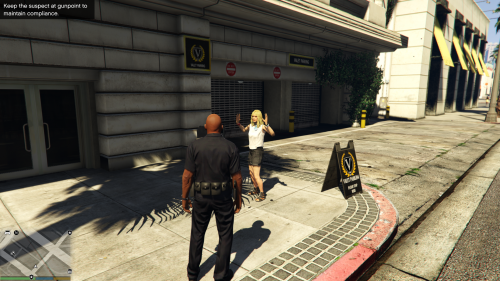
Hey @Albo1125, I have a question regarding Unarmed Arrests (Not the mod you made, but the integrated feature) Do you have any idea if one of your plugins is interrupting it? Many many people have been having issues with unarmed arrests and interacting with peds after asking them to leave their vehicle, if you think there is no compatibility issue, do you have any idea what it might be? Truly kills the experience for me to have to point a gun to a ped to cuff them, huge immersion killer. Thanks man.
- 54 comments
- 22 reviews

