


exie
Members
-
Joined
-
Last visited
Everything posted by exie
-
Can you screenshot plugins folder plugins\LSPDFR folder
-
Can you screenshot the following: Grand Theft Auto V folder lspdfr folder plugins folder plugins\LSPDFR folder
-
I'm using it right now, the only problem I've seen is that some lights seem to be always turned on, other than that it seems to work fine.
-
I can't figure anything out from the log. Try going into your rage settings and go to the "game settings" tab tick "direct x11" tick "force windowed mode" If that doesn't work, try opening up GTA V normally and then once it has loaded into the main menu, launch Rage Plugin Hook.
-
Try opening Rage Plugin settings and changing your plugin threshold to 60000, it's possible your game is taking too long to load the plugin so Rage forces it to quit.
-
except for lspdfr+ your mods looks fine, I use them all (and more) without crashing. Can you upload your RagePluginHook.log when you next crash. (it's the second file under the RagePluginHook.exe) Your current log doesn't appear to have any crash in it.
-
This exact message appears if you don't install Law & order. (or incorrectly). So no, I wouldn't think that Make sure you have installed ASILoader and OpenIV.asi.
-
You need to download EUP Menu and the Clothes pack Make sure they are both updated to the latest version, 8.1 was just released.
-
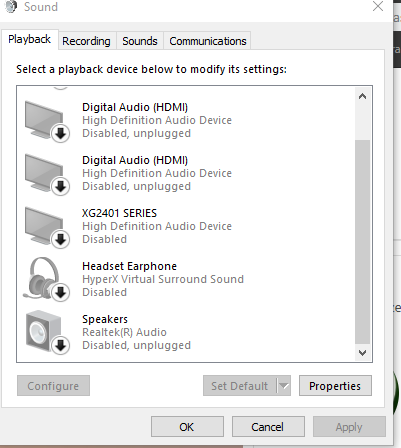
Right click RagePluginHook.exe and click Run as Administrator your log says it has problems with SlimDX.dll, make sure that file is in your Grand Theft Auto V folder. next try: downloading .NET 2.0 and .NET 4.0 from here: https://slimdx.org/download.php also try: I know this sounds really stupid but can click the Windows volume button click "sounds " right click all your audio devices and disable ALL of them and try again? (yes you will have no sound) it will look like this. Just temporarily so I know what the issue is.
-
Your computer might be running out of memory and crashing Go through this list: https://www.lcpdfr.com/downloads/gta5mods/scripts/ of plugins You can use Stop The Ped and Police SmartRadio to get coroner and tow truck. you can get Better EMS for fire truck and EMS services
-
go to Grand Theft Auto V\LSPDFR\audio\scanner and delete Arrest Manager folder go to Grand Theft Auto V\Plugins\LSPDFR and delete Arrest Manager.dll and Arrest Manager.ini and delete Arrest Manager folder
-
You might need Native UI? Otherwise I'm not sure.
-
at first glance it looks like it's spawning your modded car and crashing.
-
Can you post your RagePluginHook.log (it's in the base game directory) Try running RagePluginHook.exe as Administrator
-
My bad. You'd need to install Script Hook and Script Hook dot net. The scripts folder, you need to create yourself, then add mods using script hook in that folder.
-
Wait so you want to install mods? like better EMS? go to Grand Theft Auto V\Plugins there should be a "LSPDFR" folder, and you put mods inside the LSPDFR folder.
-
The lspdfr servers are down so your screenshot isn't loading ;( I know about this mod which might help you figure it out.
-
exie#9625
-
Those are normal I can't replicate this bug, can you list the plugins you use? I don't currently use ELS, so it could be that. I use: LSPersistenceD5 ComputerPlus Interaction+ LSPDFR+ StopThePed Traffic Policer UltimateBackup try removing any plugins I don't use one by one to see if it happens. You could also try temporarily changing your computer+ keybind to something else to see if that works.
-
Does it look like this?: [3/30/2019 6:53:31 PM.447] LSPD First Response: [WARN] No name for outfit variation at line 764 That's normal (i think) at least I get it.
-
I have most 4.1 plugins installed, So i'm gonna constantly do traffic stops and see if it happens to me and let you know if which plugin is causing it. Doesn't computer+ have the option to pause the game? Use that temporarily.
-
Strange, this doesn't happen to me. LSPersistenceD 5 was the only reason this happened for me (and others) I believe. Next time, when you put a suspect in the car and they leave, instantly open F4 and see if there is anything in that text which shows any clues.
-
Did you install all the requirements for rage plugin? https://ragepluginhook.net/Requirements.aspx I highly doubt this is the reason but you are running an older version of Windows 10, You have 17134 and the latest build is 17763
-
I doubt this will work but some people said it has: try turning off "game mode" in the windows settings (found under Gaming) I noticed you don't have "steam_api64.dll", is this a cracked version, or did you purchase it from Rockstar directly? Your game folder is "GTAV" but it should be Grand Theft Auto V see if that helps.
-
Try removing LSPDFR+ temporarily. See if that helps.


