


davelaric
Members
-
Joined
-
Last visited
Everything posted by davelaric
-
Never buy pre built. Also that GPU barley cuts it for GTA V and newer games. You can buy your own parts and assemble it yourself for much cheaper and better performance. It may sound scary but it isn't that hard and it's a great experience.
-
As people already said, the AMD does get bottlenecked on single core games. Going from an FX6350 oc @ 4.5Ghz to an I5-3570k made a huge difference in games such a GTA V, Arma 3. I personally would try to find an used I5-3570k so you can overclock it and the performance is better than the 4460 but this is an old chip so upgrade potential isn't the greatest. Also, this is strictly my experiences, I would go for the GTX970 if you are playing at 1080p as it overclocks way better than the R9 390 and we see a more lean towards Nvidia in terms of optimization for games. If you are playing at higher res, go for the R9. http://uk.pcpartpicker.com/part/gigabyte-video-card-gvn970g1gaming4gd
-
600$ is a tight budget so building a rig is probably the only way to go. Get an used I5-3570k or 4460 with a R9 270X. If you are willing to build, I can teach you and put together parts and walk you through the process. It's not that hard and actually quite simple. Feel free to PM me :)
-
Why 16GB? There's no need for that especially when you could put more money into other parts unless you are doing hardcore rendering even though with the FX, isn't that much.
-
Same memory, just different speeds. If there are no price differences, get the 1866Mhz, if there is, go with 1600Mhz. You don't see gaming performance differences between the two. In simple terms, get the cheaper one.
-
sounds like a driver failure. Use this to remove all your graphic drivers http://www.guru3d.com/files-details/display-driver-uninstaller-download.html And reinstall. Make sure its the right version.
-
Looks solid! One question though, do you plan on upgrading in the future to a higher end I5 or I7? And a couple things I would change is one, the GPU brand. Zotac doesn't have the best cooler/overclock head room out their for the 900 series. If you can pick up a Gigabyte 970 G1 Gaming or Asus Strix 970, they'll perform nicer just because overclocking can give you that extra 10-20FPS. And also I HIGHLY recommend getting a cheap and small 120GB SSD. You can pick em up for like 40 bucks on amazon and trust me, once you go SSD, you can't go back. Other than that, looks great! *and why a micro ATX board...? Doesn't look as pretty in a the S340 :(
-
Very very limited, usually only SSD's as laptops have soldered parts. To OP, as others have said, building is the best way to go. You can build a decent rig for 500-650 bucks that'll out perform any prebuilt store PC. If you are willing to do that, that's the best way. If you are really on a budget, depending on your specs, you can pick up a GTX750Ti or R9 270X that'll run GTA V decently but as mentioned before, depends on the other specs you have. Alienware is way overpriced. Literally the Apple version of PC gaming xD
-
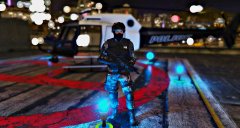 No ENB. Custom timecycle and visualsettings I made that consists of bokeh DOF and lighting affects.
 -
FIB S.W.A.T ready for deployment on the helipad roof in downtown Los Santos. Armed with a M16 Assault Rifle along with two attachments. A tactical searchlight and Nylon Fiber Handguard. W.I.P model, scope doesn't work as it overlays.
-
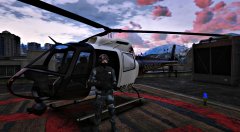 FIB S.W.A.T ready for deployment on the helipad roof in downtown Los Santos. Armed with a M16 Assault Rifle along with two attachments. A tactical searchlight and Nylon Fiber Handguard. W.I.P model, scope doesn't work as it overlays.
 -
Build a desktop. PLEASE. It isn't that hard and the performance for the price you get will beat everything in a store. Along with what other's have said, laptops aren't meant for gaming so might as well get a desktop and maybe a cheaper laptop for whatever uses you need it for. If you need any help getting started on the PC building field, PM me and I'll be glad to help you out :) *And that envy isn't that good for gaming, especially with what you can build for 700 bucks*
-
http://www.gta4-mods.com/misc/cryenb-v3-1070eflc-f30597 Use the mid-end preset.
-
See if you can get an Intel 4460 and a decent mobo. Both GTA V and IV are somewhat weirdly optimized for AMD CPU's with GPU usage being low. Also if you get that intel, you would be getting a LGA1150 chipset allowing for much better upgrade potential down the road.
-
Both of those cards are very old. There's no point in getting them. Your best bet is getting a GTX 750 Ti Boost. I actually have one lying around, PM me if you are interested but those two cards are very weak. You won't see that much of a performance boost.
-
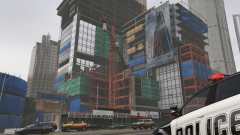 Quality is really bad due to a bad screenshot program :P
 -
The director mod is being weird for me so still messing around with it. I'll do some if it feels like cooperating :P
-
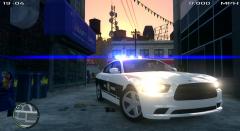 What ENB? Nic pic btw!
 -
Thanks! Got myself never wanted so now I can get out and assist officers with lethal force if necessary (and stun gun) :D Gonna put out couple more episodes this week so stay tuned ;)
-
GTA 5 PC Max Graphics (60FPS/1080P|Police Patrol Part 2 (LSPD)| Escort & Pursuit!
-
So he asks for a mod? w0t
-
Same as my post bud. At least I have news that other people might have not known.
-
Okay? You posted it 22 minutes ago. I posted this 22 minutes ago. Yours wasn't up yet when I posted mine. And like I said, I am calm. Some people don't know and I'm just saying the news.
-
I was just stating a break in mod development. Script hooks might not be needed for vehicles mods or such. And I wasn't screaming with all caps about LPSDFR or a bunch of mods coming out so I am calm :)
-
So a modder has successfully decrypted the common.RPF. Get ready for mods in the future? LSPDFR? ;) Official Thread: http://gtaforums.com/topic/714694-v-pc-modding-discussion/page-40


