


SHOME95
Members
-
Joined
-
Last visited
Everything posted by SHOME95
-
-
relastic time cycle v4 or 5 can do no better
-
ScriptHookDotNet v1.7.1.7 BETA try to upgrade to this
-
i got it to work first try i like it a lot even the livery thingie in the controls rocks and i love the siren control
-
check first post ayanpati your cars are ready
-
its a seconed car img file add like u would normally
-
http://www.newegg.com/Product/Product.aspx?Item=N82E16814125444
-
-
yup
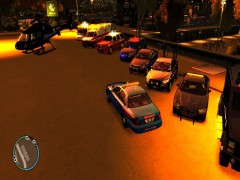
From the album: EROLE clan
new EROLE clan cars we've been upgrading 2013 CAPRICE 2012 CHARGER 2013 TAURUS 2012 EXPLORER LENCO BEARCAT CVPI FIRE/EMS TAHOE FIRE CHEIF AMBULANCE FIRETRUCK AND NEW NOOSE CHOPPERS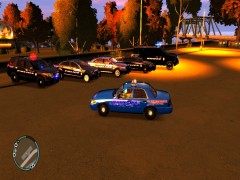
From the album: EROLE clan
new EROLE clan cars we've been upgrading 2013 CAPRICE 2012 CHARGER 2013 TAURUS 2012 EXPLORER LENCO BEARCAT CVPI FIRE/EMS TAHOE FIRE CHEIF AMBULANCE FIRETRUCK AND NEW NOOSE CHOPPERSim down bud here my coordinates from the last versionceleron d and no ram (nope) get yourself a older quad core amd with at least ddr3 ram if u are goin cheap200ish horses of fury lolhow bout this one to go with it waterford wiford all dayomg dude did u read my post at all KeyCones = Z(or whatever u make it) // set a key for deploying road barriers (CTRL + key), road cones (SHIFT + key) // and road flares (ALT+key, or CTRL+key at night) if they are installedread the ini for policehelper but here [ SETTINGS ] HardcoreMode = no // In hardcore mode you won't see blips of suspects (doesn't work) Units = 1 // 0 - imperial units (default), 1 - metric units DrawScale = 1 // Set scaling of PoliceHelper device (recommended values between 0.8 - 1.15) KeyYES = X // set a key that will trigger PoliceHelper device (Alt + key = fire extinguisher) KeyNO = C // set a key that will trigger PoliceHelper device KeyCones = Z // set a key for deploying road barriers (CTRL + key), road cones (SHIFT + key) // and road flares (ALT+key, or CTRL+key at night) if they are installed KeyID = None // set key that will trigger id check while on foot, leave blank if you don't want to use it // (can be triggered in bait car menu) KeyEngine = None // set key that will turn on/off your car engine, leave blank if you don't want to use it // (can be triggered in bait car menu)

