



Run and Hide Gamer
-
Joined
-
Last visited
Posts posted by Run and Hide Gamer
-
-
-
-
Edited by Run and Hide Gamer
I have the GTAV and LSPDFR files backed up to another location so I have restored everything to pre-update status.
however every time I try to pay LSPDFR it tries to update GTAV..... even if I hav e steam in offline mode.
Is there no way to play LSPDFR using GTAV which has not been updated?
Update
I managed to get LSPDFR working again.
I had to first update GTAV to the new version.
Then when I started Rage it told me GTAV was updated and do I want to revert to the backup Rage did for me months ago.
Once reverted LSPDFR worked again because I was reverted back to prior to the update.
I couldn't get the revert thing happening before because i didnt allow GTAV to update to the 20th July version.
-
Edited by Run and Hide Gamer
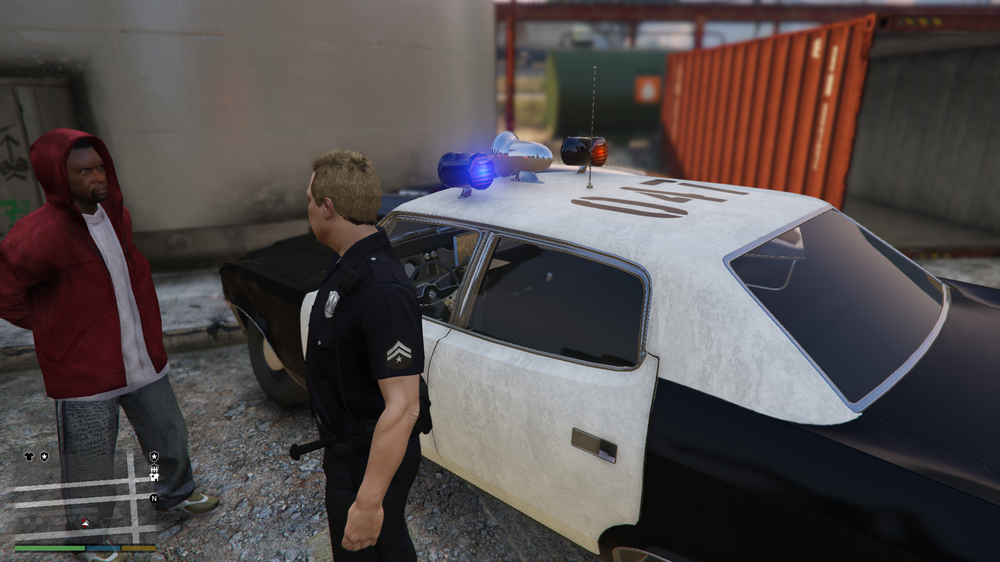
OK... spent all day on this and have added the police cars, ambulances, fire trucks and so on.
Have just added the gangs and am about to add the flower children hippies of the 70s.
This guy in the picture is a gang member I just arrested....... love the dirt on the police cruiser
-
-
Edited by Run and Hide Gamer
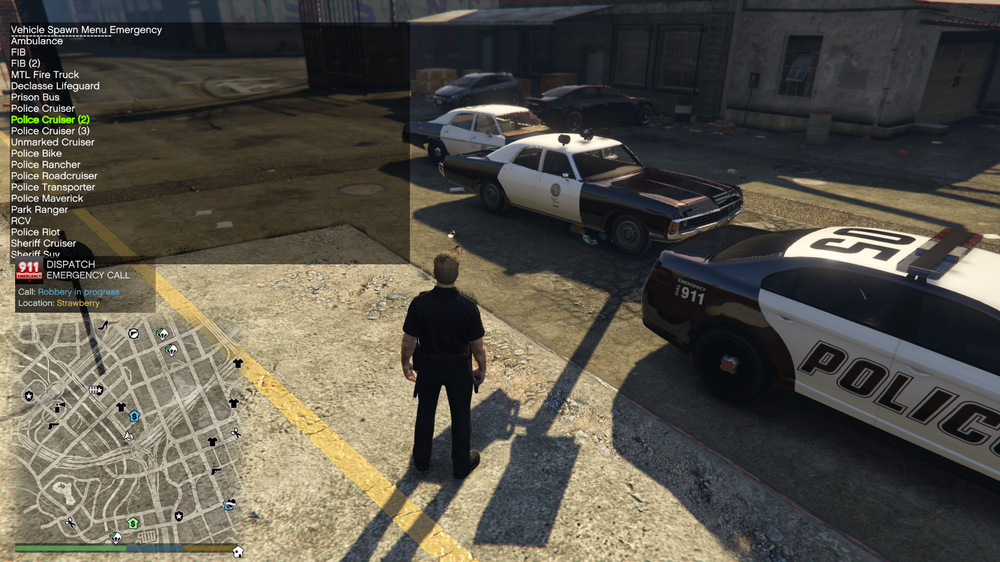
Have made some progress and have been able to get my police vehicles to look like the following image.
I have the police cruiser, police cruiser (2) and police cruiser(3)
police cruiser(2) is the only one I want so how do I copy the model and textures of police cruiser(2) to replace the other 2.
I also have the sheriff cruiser and the sheriff SUV.
The sheriff cruiser is a perfect 70s model but I wanted the models and textures for the sheriff SUV replaced by the models for the sheriff cruiser.
I know my way around openIV but just need help with how to replace one police or sheriff slot with another.
I heard somewhere all I need to do is to replace what is in an xml file and I can have a cruiser pointing to either of those models and textures.
Run and Hide Gamer
-
I have a youtube channel and i have an idea for a new series for LSPDFR.
For this I need to change my police vehicles from the vanilla police and sheriff to those from the 70s or 80s.
I have tried a number of packs and vehicles but they either crash the game or in one case I am copying the files over via openiv and then the instructions tell me to get the car model from the download section and with the link given I get a message nothing found.
Can someone give me a link to a 70s or 80s car that works.....am happy just to have one police car if need be
Run and Hide Gamer
-
Edited by Run and Hide Gamer
Thanks Joe........ I just found what I was looking for.
The mod is ALPRlite.... one of the .bejoijo plugins.
There is an option at the end of the ini file where you can add a red blip to cars whose license plate you have scanned which have the following issues.
// ALPR hit categories.
Registration Issue
Insurance IssueStolen Vehicle
Owner Wanted
Owner License Issueby default 20% of cars you scan will have an issue.
I reduce that probability to 3 or 4% or less to make it more realistic.
So if no calls come in over the radio I can pull over any cars I find flagged with a rego or insurance issue or the vehicle being stolen or an outstanding warrent on a driver in the car.
It was hard to find as there are no screenshots on the net showing the cars blipped on the map.
-
Edited by Run and Hide Gamer
Earlier this year I had a mod which showed me on the map any vehicles which passed me whose number plate showed they had outstanding warrents, an expired rego or no licence.
can someone point me to what mod that was. This mod would put red blips on the map for vehicles I scanned that had warrents outstanding.
-
-
-
-
-
-
-
A clown tries to run away..... but he is up against Adam-12 and not some ordinary cops. Later we join a pursuit and block a car trying to escape. A crash occurs between 2 vehicles. I arrest the driver and passenger and find out later that these 2 were not the ones in the pursued car...CCTV shows that car drove away while we arrested the wrong people. However, the wrong people were not so innocent and went to jail after what we found on them.
-
Edited by Run and Hide Gamer
When you are pursuing a driver who refuses to stop you need to stop him before he kills an innocent civilian. I become the lead vehicle and wait for that precise moment where I can take him out without endangering others. The bus shelter is the only one injured in this episode.
-
18 minutes ago, NeyKoss said:
Hello, when I start the game, he was block after "Loaded plugin "LSPD First Reponse""...
If somebody know why can he help me please ?
You have a few threads open for the same issue.... you need to reply here instead of in new threads.
The file command.txt has a lot of repeat commands in it
[12/28/2020 4:57:50 PM.401] Command line option "scOfflineOnly-disableCustomLoadingScreen" is specified twice. Please remove one.
[12/28/2020 4:57:50 PM.401] Command line option "DX11" is specified twice. Please remove one.
[12/28/2020 4:57:50 PM.402] Command line option "windowed" is specified twice. Please remove one.Removing the duplicates from command.txt in the GTAV main folder is a good place to start
-
Edited by Run and Hide Gamer
In your logfile it shows the following
[12/28/2020 12:09:04 PM.278] Command line option "disableCustomLoadingScreen" is specified twice. Please remove one.
[12/28/2020 12:09:04 PM.278] Command line option "ignoreDifferentVideoCard" is specified twice. Please remove one.
[12/28/2020 12:09:04 PM.278] Command line option -disableCustomLoadingScreen is specified; disabling custom loading screen rendering.in the file commandline.txt in the main folder all I have is one line
-disableCustomLoadingScreen
This may help you.
-
9 minutes ago, LSPD Snow said:
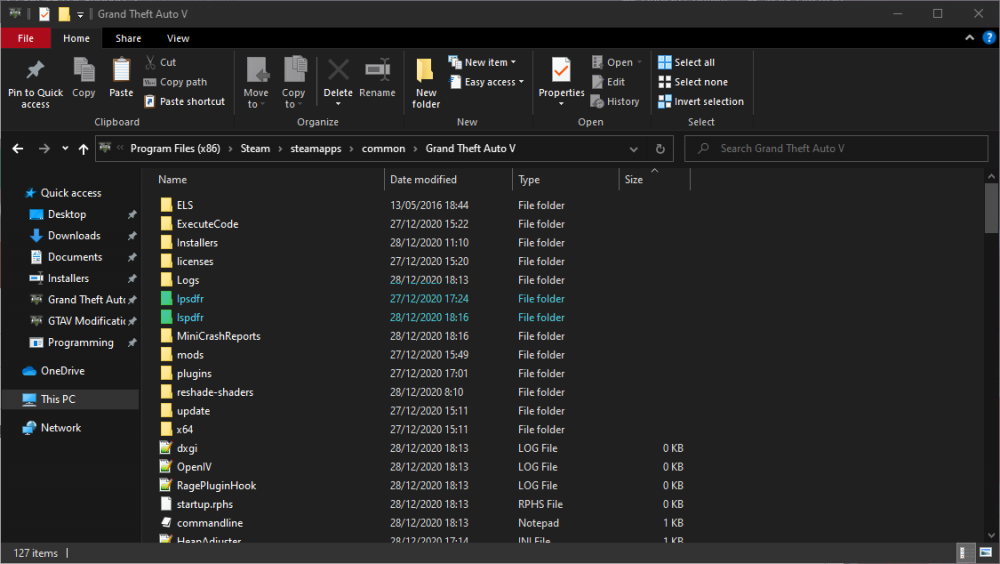
In one of the folders theres the normal stuff, in the other there is a patterns.dat and stats.dat, i deleted the patterns & stats.dat folder, and then attempted to load LSPDFR (cause it cant otherwise, it does not find the neccesary files) but it just creates a new one!
One folder is called lpsdfr and the other is lspdfr.
lspdfr is the one that should be there....
When you originally installed LSPDFR you installed it to lpsdfr instead of lspdfr.
-
-
Edited by Run and Hide Gamer
12 hours ago, Charlie686 said:The issue isn't with LSPDFR, RAGE or ScriptHookV.
They don't go in your mods folder.
Not sure why Matteov suggested that. Automatic Siren Cutout wasn't even mentioned at the end of the log. Would be interested to know why
My post was actually to MitchRandell and I was letting him know what I did to fix crashes ....... first rule out LSPDFR, RAGE and Scripthook because they have all just had updates and there are a lot of posts out there that LSPDFR is crashing since then.
What I was saying to Mitch was that if you have no plugins or mods and LSPDFR works then you know the problem is in the plugins or the mod folder.
His RagePluginHook log is showing a lot of errors with unforms and other things so any one of those could be causing an issue.... and if he has a mod folder then any of those changes in the files added to the mod folder could also cause the crash.
When I use OpenIV to install mods I am very careful with what I am doing there because one mistake and LSPDFR will crash.
If I use a plugin such as a callout that has a bug in it then LSPDFR could crash.
All I was saying is rule out LSPDFR, RAGE and Scripthook first because those have been updated in the last week or so....then look at the plugins and the mod folder.
-
-
Edited by Run and Hide Gamer
16 minutes ago, MitchRandell said:Hi Rich I do love your mods 🙂 Thinking my issue must be mod folder related though due to it working fine when i renamed it to mods_. So am trying to figure out what could be causing it but no luck yet.
While it will be a pain what I do in a situation like this is to add in the mods again into a new and empty mods folder. Starting with LSPDFR, Rage, Script Hook V and LSPD First Response. Make sure those 4 are working fine on their own. Then add in the other mods one at a time until you find out what is causing the issue.



LSPDFR Crash
in LSPDFR 0.4 for Legacy Edition Support
When you play online a check is performed to make sure you have not got any modded files installed in the game folder. With being banned from online play it sounds like the game has detected that the game files have been altered. Removing all the modded files and doing a steam validity check should get you back online again.
If you are runing LSPDFR and therefore not online, does the game work?