


OfficerArk
Insiders
-
Joined
-
Last visited
Everything posted by OfficerArk
-
 I've tried working on it. The problem is, if you want the spotlight to work and function properly you can't have takedowns. I have provided alley lights with extra 12.
 -
Made an update, should be uploaded soon. I can do just that. I am not a livery Developer nor do I want to be one haha. I made these liveries for the sole purpose of uploading to the site. You are free to use your own liveries! Space101’s liveries do fit on this if you like those!
-
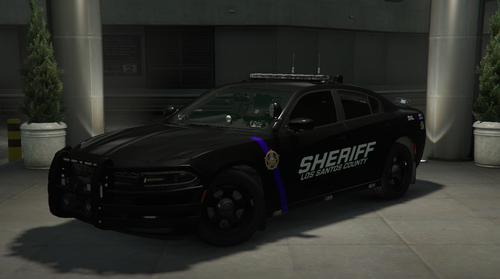
Rolled your new Tahoe taking too sharp a turn? Luckily the department has some spare funds to acquire this 2018 Dodge Charger Pursuit. Features: -External AVIWEST Quad Antenna so Nancy in dispatch can watch you from across the state -StarChase GPS Launcher -Dual Fenix Tritron Speakers -Toggleable trunk mounted ALPR's (Extra 11) -ELS Controlled Laptop Screen -Working Rear Trunk Compartment As always please enjoy 🙂 Feedback is always appreciated! (Problems? PM me before commenting) Space101 Livery Compatible
-
 Thank you for posting this. It’s a simple fix and for some reason I don’t have issues with these vehicles flipping. Seems like it’s 50/50 for some people. It’s hard for me to figure out what problems you’re having when I don’t have the issue haha. I’ll attempt sharp turns going 60-80 in-game and no flipping. I’ll pm you.
- 61 comments
- 12 reviews
-
Change the Vehicle Gravity offset(Z) from 0.00 to -0.30 -0.03 is not enough for this vehicle to keep it from rolling.
- 61 comments
- 12 reviews
-
 Keep an eye out 🙂
 -
Of course. Happy Patrolling!
-
Download Simple Native Trainer and go to the added vehicle menu and you’ll find them there! Any trainer will work 🙂 RAGE plugin hook can also spawn them but I have never attempted that so I will not comment on how that works.
-
This is a problem with ELS and how the lighting system works. They would have to be two separate extras from the main set and attached to the trunk. I do not prefer this as it wastes two extra slots for two single lights. The doors are the same way when opened.
- 61 comments
- 12 reviews
-
You’re good! Thank you for trying the vehicle out! Let me know if you enjoy 🙂
- 61 comments
- 12 reviews
-
The file and description both include/indicate a version with rolled up rear windows.
- 61 comments
- 12 reviews
-
You are absolutely correct, I have hunted down the missing polygon(was just a single guy). I will be releasing an update shortly.
- 61 comments
- 12 reviews
-
-

- 1
-
-
-
Like flipping in game? The livery caused issues with some people and I was reported for it. It was not mine to share and I changed it because of that. You can purchase the liveries from Space101!
- 61 comments
- 12 reviews
-
It's something I see some of the officers near me do. I'd imagine it helps provide air circulation without a direct path to you and also helps keep anyone in the back cool even when the A/C is on. Also read somewhere someone did theirs so they could listen for things you normally wouldn't be able to hear with them up. Even so, I have included a file, in the update releasing in a couple minutes, with the windows rolled up for this exact purpose! I'm happy to see everyone is taking a liking to the vehicles!
- 61 comments
- 12 reviews
-
-
The YTD files are less than that along with the YTF car file, unless you’re seeing something I’m not. I’d love to help fix this for you, please pm me. There’s nothing special done with the lights! If they are too bright i’d recommend changing your visual settings in OpenIV.
- 61 comments
- 12 reviews
-
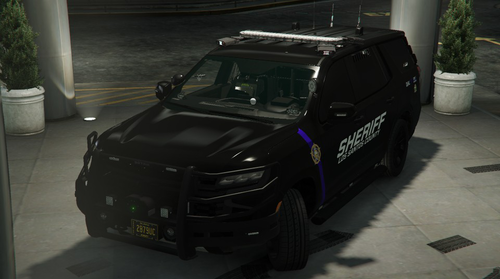
This is something I've been working on and I believe it is ready for its public debut! Planned Updates: _______________________________________ 03/??/2023 - Unmarked Release Current Status: Not Updated _______________________________________ As always please enjoy 😉 Features: Working spotlight. Equipped with Star Chase GPS Launcher. Toggleable ALPR's Fully tinting windows. ELS controlled laptop screen. Working rear trunk cabinets. Version with rolled up windows included. QOL Features: Livery with changeable background color. YTD file optimized for texture loss. Equipped with 265/60R17V All Season Tires rated for 149 mph. Planned Features: Working dome light Slicktop (partially complete) Maybe K9 Would love to hear feedback!
- 61 comments
- 12 reviews
-
-
-

- 16
-
-
Just rename the files to whatever vehicle you'd like to replace! I'll bring back the addon version in the future. They are toggable! Please read the ReadMe
-
You can use either, someone offered one and I wasn't going to say no. It's the exact same.
-
Unmarked can be achieved with changing the livery!
-
Make sure to download the proper gameconfig for add on cars, Heap adjuster, and there’s another one I can’t think of off the top of my head that you also need.
-
Pm me your username and I’ll add you. Thank you! I can’t wait to take a look once I get home from work today!
-
Thats weird, I am not running the spotlight plugin and I am able to get my spotlight to work. I am going to switch some of the meta files around and see if that fixes some of the issues like the spotlight and window tinting. I can't wait to see the video! 🙂 These vehicles were fully tintable before the addon release. I will be fixing that later today! I was able to fix the spotlight. Still working on tinting.
-
Switching it to a DLC pack messed some stuff up. I will look into it. What exactly is happening with the spotlight? I spawned all the cars and the spotlight works going left and right.
