


TATERx
Members
-
Joined
-
Last visited
Everything posted by TATERx
-
Just tried that no luck. Should I try an earlier patchday or would that not matter. I think im done trying to find a solution their not worth this huge of a headache lol
-
Thanks for your help. I forgot to put sheriff 2 works. Forgot to remove that before I posted lol. Its just the sheriff3 sheriff4 and sheriff15 files that just won't show up in rageplugin/simple trainer. But basically what I mean not spawnable is the vehicle title is not spawnable. In rageplugin I type in console spawn sheriff and the list pops up of available sheriff models that I can spawn and that list only shows 2 vehicle models and 2 ped models. I can then go to simple trainer and try to find the new vehicles in all categories under vehicle spawning and its not there. Under the vehicle spawn menu at the bottom search for vehicles. I can type sheriff and it lists sheriff vehicles. I can search for police vehicles. The modded vehicles do not appear there. This is the first time ever trying to install and use any modded vehicles outside of police 1-4 and sheriff 1-2 and fbi 1-2 so not sure sure the process if there is any.
-
Sure. I downloaded the mod Unmarked_Durango_and_Challenger and using the challenger vehicle which vehicle file is sheriff15. Instructions say to install in patchday9. Next I downloaded the mod BCSO_SUV_Pack and i installed 2 Tahoe's and 1 Explorer . Explorer is sheriff2 and both Tahoe's are sheriff4 and sheriff3. These did not have instructions where to install so I installed them into patchday22.
-
Hello I installed some vehicle mods and they're not coming up when I try to find them in both simple trainer and rageplugin. These files are sheriff3 sheriff4 sheriff15. Do I have to do something special to get those to appear to make them spawnable through simple trainer or what? I installed 2 vehicle models in latest patchday. Their pages didnt specify which patchday to put them. And one in the patchday they told to install THANKS
-
Hello having game crash issues. Was wondering if someone with some knowledge could help me. Thanks
-
-
 Hello. Getting crashes doing ped search in the computer here is the crash report generated. New Text Document (2).txtNew Text Document (2).txtNew Text Document (2).txtNew Text Document (2).txt
- 1,743 comments
- 172 reviews
-
That was my issue thanks for the help
-
yea I have modded police vehicles but all the vehicles installed I have used before not sure why they're not working now.
-
I saw several people post about the same issues. I looked around in the RPH log and nothing jumped out to me as what actually caused the issue. I had plugin issues so I erased all my LSPDFR plugins and re-installed them now I get the on duty crash RagePluginHook.log
-
I had the same issue. What I did to fix my issue was to launch rageplugin forced windowed mode https://gyazo.com/efc1d51f2f3f0d1b9b479de8f33e5936 If that doesn't work you can launch rageplugin once your in game and it should hook just like you was able to normally launching rph.
-
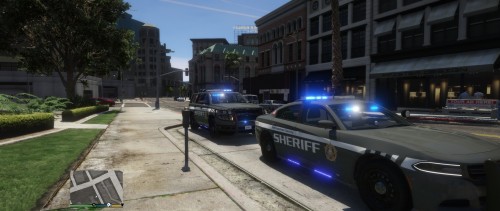 I love the pack but to many lights hurts my eyes lol. But overall its great. The Tahoe's lightbar doesn't light up at all.
- 31 comments
- 7 reviews
-
 Hello im getting a LSPDFR crash when I ped check and sometimes when I plate check. Other times when I plate check I get a pop up error. Below is my RPH. You may have to scroll all the way down then back up a bit to see the crash as I restarted lspdfr and went back on duty. RagePluginHook.log
- 1,196 comments
- 127 reviews


