Skip to content
View in the app

A better way to browse. Learn more.

LCPDFR.com

A full-screen app on your home screen with push notifications, badges and more.

To install this app on iOS and iPadOS
  1. Tap the Share icon in Safari
  2. Scroll the menu and tap Add to Home Screen.
  3. Tap Add in the top-right corner.
To install this app on Android
  1. Tap the 3-dot menu (⋮) in the top-right corner of the browser.
  2. Tap Add to Home screen or Install app.
  3. Confirm by tapping Install.

Piimentaxx

Members
  • Joined

  • Last visited

  1.    MilitaryGamer reacted to a gallery image: BOPE BRAZIL
  2.    tiago157 reacted to a gallery image: BOPE BRAZIL
  3.    iFeatz reacted to a gallery image: BOPE BRAZIL
  4. Please Help me, I was combining ped meshes (beret) and I got this... The Beret is not in the head, I need to put the beret backwards to fit in the head, please help me... how can I move the meshes in the axis ?
  5. I'm having problems on playerped, I've downloaded some playerpeds but when I apply the character stay weird, like his eyes stay out of his head, and some times the head is mangled, but the clothes stay perfect. I use EFLC, do I need to download the skin special to EFLC or can I download a normal GTA 4 skin ? I'm dowloading from this site http://gtaiv-skins.blogspot.com.br/ Thanks.
  6. Images added to a gallery album owned by Piimentaxx in GTA IV Galleries
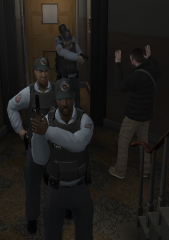
    Algumas skins de policias brasileiras
  7. Dandado started following Piimentaxx
  8. Piimentaxx started following Dandado
  9. Images added to a gallery album owned by Piimentaxx in GTA IV Galleries
    Album designed to the brazilian police - álbum projetado para a polícia brasileira
  10. Piimentaxx started following rock3rboy
  11. rock3rboy started following Piimentaxx
  12. NickieB started following Piimentaxx
  13. Piimentaxx started following NickieB
  14. Hey guys this is my first skin, it's simple cause I was just testing. I'm brazilian and it's a brazilian police, Do you like that ? I want to know if the swat man can stand up or not, how ? Thanks

Account

Navigation

Search

Search

Configure browser push notifications

Chrome (Android)
  1. Tap the lock icon next to the address bar.
  2. Tap Permissions → Notifications.
  3. Adjust your preference.
Chrome (Desktop)
  1. Click the padlock icon in the address bar.
  2. Select Site settings.
  3. Find Notifications and adjust your preference.