dilapidated
Members
-
Joined
-
Last visited
Everything posted by dilapidated
-
 New showcase teasers: https://www.youtube.com/watch?v=tHXArhZuU6g https://www.youtube.com/watch?v=Pegtz0QXYJo https://www.youtube.com/watch?v=oP_3EklovlE Introducing a first look at RDE 4.0's 10 Star Wanted System (red star) https://www.youtube.com/watch?v=Sh9yB31rccc
- 1,524 comments
- 85 reviews
-
-

- 2
-
-
Newest 4.0 trailer. https://www.youtube.com/watch?v=dV7Sj7bPyrc&feature=youtu.be
- 1,524 comments
- 85 reviews
-
-
- 1
-
-
Teaser trailer for 4.0: https://www.youtube.com/watch?v=8Cb3xhxj4aE We're still accepting applications for beta testing and would love to hear from those willing and qualified to assist with RDE's production. You can submit your application here: https://goo.gl/forms/ON5kApE2JTh0NVAI2 We look forward to sharing more exciting news as it becomes available. Thank you, The RDE Team
-
Teaser trailer for 4.0: https://www.youtube.com/watch?v=8Cb3xhxj4aE We're still accepting applications for beta testing and would love to hear from those willing and qualified to assist with RDE's production. You can submit your application here: https://goo.gl/forms/ON5kApE2JTh0NVAI2 We look forward to sharing more exciting news as it becomes available. Thank you, The RDE Team
- 1,524 comments
- 85 reviews
-
-
- 2
-
-
I'm happy to announce that development of RDE 4.0 has begun! At this time we're accepting applications for beta testing and would love to hear from those willing and qualified to assist with RDE's production. You can submit your application here: https://goo.gl/forms/ON5kApE2JTh0NVAI2 We look forward to sharing more exciting news as it becomes available. Thank you, The RDE Team
-
I'm happy to announce that development of RDE 4.0 has begun! At this time we're accepting applications for beta testing and would love to hear from those willing and qualified to assist with RDE's production. You can submit your application here: https://goo.gl/forms/ON5kApE2JTh0NVAI2 We look forward to sharing more exciting news as it becomes available. Thank you, The RDE Team
- 1,524 comments
- 85 reviews
-
-
- 4
-
-
You must extract all the contents from the folder not just the exe.
-
No, RDE has developed its on peds. EUP uses MP peds based on those seen in RDE Join our discord, you'll get quicker help there
- 1,524 comments
- 85 reviews
-
Looks like you never extracted the RDE 3.1 folder and ran the installer from the .zip file itself. Extract your files to a folder somewhere then try again.
- 1,524 comments
- 85 reviews
-
Please post a picture of your scripts folder Please post a picture of your game folder (I need to see all your ASI scripts and your GTA5.exe/GTA5Launcher.exe Are you on the Gun Running update?
- 1,524 comments
- 85 reviews
-
Please see the comment from The Loot. Once you deactivate RDE you shouldn't have any issues using LSPDFR. If you want to play the vanilla game then reactivate RDE. Think of it this way. These scripts aren't really meant to be used at the same time and serve two totally different purposes. Use just LSPDFR if you want to roleplay as a cop. You wont need the SSR script which is meant to only function when you're playing as the 'bad' guys. (turn off SSR = Control + F9) In the future we may come up with a way of checking if LSPDFR is loaded and auto deactivate SSR when that happens. But really as I've said these scripts are polar opposites and aren't meant to run in conjunction of each other. Just to clarify I only mean the scripts. RDE's vehicles, meta changes, etc. are perfectly fine to use with LSPDFR.
- 1,524 comments
- 85 reviews
-
Are you positive of this? There's an easy way to confirm. Extract the .OIV then go to the following path: Content/Scripts Inside of the Scripts folder is all the optional XML choices (Arcade, Realistic, Balanced, etc) compare the xml files there with what you have in your GTA5/Scripts folder after installing. In my results they are successfully changed. Try installing all the options and see if you get the same result of if its a problem with just a specific XML. If something is off I need a way to replicate it.
- 1,524 comments
- 85 reviews
-
Of course, I helped create the new install method for EUP to ensure there would be 0 issues once RDE released. But aside from that Ashfold is part of the RDE team :P
- 1,524 comments
- 85 reviews
-
https://www.youtube.com/watch?v=Nut3MjdzGTI The wait is finally over! RDE 3.1 will be released August 10th. We hope that you will enjoy what we have in store for you. 3.1 brings not only bugfixes, but also a huge number of new content, features, improvements and performance enhancements. We have worked hard to make sure RDE is even better than before! We've heard from multiple sources that they wish for more transparency and communication from us going forward. Your voices have been heard! The private RDE discord server will be going public on release day. This will be your opportunity to stay connected with our team and get special sneak peaks on what we have in store for the future.
- 1,524 comments
- 85 reviews
-
-
- 9
-
-
-
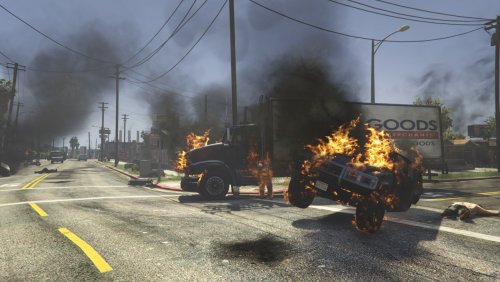 Ideally I think this mod would be great for those who role play as fire fighters. Or if you just want to be a maniac and destroy everything lol
- 17 comments
- 12 reviews
-
Ambient FX is a mod that seeks to enhance the effects used across the game in a very natural way. This first version has enhanced fire/smoke/smog effects for vehicles. These effects (both looped and non looped particle effects) will apply to ALL vehicles, not just the players. Smoke trails can now be seen blocks away, fire and embers effects have been enhanced, and a neat smog effect that grows depending on the amount of vehicles on fire as well being contained to that given area. I will be open to ideas and reasonable suggestions so please feel free to leave a comment. Keep in mind that most of my time is dedicated to RDE and so this is just a side project I cooked up. Required files to run Ambient FX: https://www.gta5-mods.com/tools/script-hook-v https://www.gta5-mods.com/tools/scripthookv-net To install just drag Ambient_FX.dll to your scripts folder.
- 17 comments
- 12 reviews
-
-
- 23
-
-
Did some stress testing while also showing off some of the new effects for you guys. Here's the daytime effects: And my personal favorite the night effects:
-
Thank you!
-
Ambient FX is a side project I've been working on for the last few weeks. This mod will seek to enhance effects used across the game in a very natural way. In the first rendition that will be released tomorrow I have enhanced fire/smoke/smog effects. These effects (both looped and non looped particle effects) will apply to ALL vehicles, not just the players. Smoke trails can now be seen blocks away, fire and embers effects have been enhanced, and a neat smog effect that grows depending on the amount of vehicles on fire as well being contained to that given area only. I will be open to ideas and reasonable suggestions so please feel free to leave a comment. Keep in mind that most of my time is dedicated to RDE and so this is just a side project I cooked up. Here's some more eye candle. For disclosure all of these screens were taken with a completely vanilla install. I cant wait to see them with VisualV installed. For those curious about performance. I have a fairly old processor (AMD Phenom X4) and if there's a fps loss its unnoticeable to me and those I've had testing. Here's a video of it in action:
-
@Izhevsk moved the reply here to its proper channel. So first off why did you remove the SSR folder and .dll? Without this practically nothing will spawn. Dispatch.meta is set to only spawn police helicopters and roadblocks. Everything else is spawned via the script.
-
The newest gameconfig hotfix has been released and can be found in the pinned topic or you can grab it directly from here: http://www.mediafire.com/file/jw7jw6jb7iu1vw8/gameconfig.xml
-
@Izhevsk It's been 3 days.... I understand this mod is a big fan favorite and it can be disappointing not to have things fixed the very same day a DLC releases but could you please stop posting false information, giving bad reviews, and being so demanding across multiple sites. We put a lot of time into this mod and I can tell you it's nowhere close to being inactive. There's no reason to be so petty about having to wait 3 days. P.S. The gameconfig fix has been released and you can find it on all of the pinned topics or simply grab it here: http://www.mediafire.com/file/jw7jw6jb7iu1vw8/gameconfig.xml
-
-
Best answer I can give is to replace every file one by one with the vanilla files except the following 3 (Dispatch.meta, gameconfig.xml, and dlclist.xml). Once you've done this if you still have issues I'll be more convinced it's gameconfig. If it is trust that I'll go out of my way to support you in developing a compatible gameconfig. Let me know after replacing these one by one back to vanilla. I know this is a lot of work but the only way we'll know for sure.
- 1,524 comments
- 85 reviews