CQoute
Members
-
Joined
-
Last visited
Everything posted by CQoute
-
-
-
 If you read the exception down the bottom, it gives you a clue to what the problem is, even points out the line number where your syntax problem lies. You need to encapsulate in qoutes... So Color=Red is Color="Red" PLEASE try to follow the same rules that the other predefined elements (MenuItem, Menu etc.) have.
 -
-
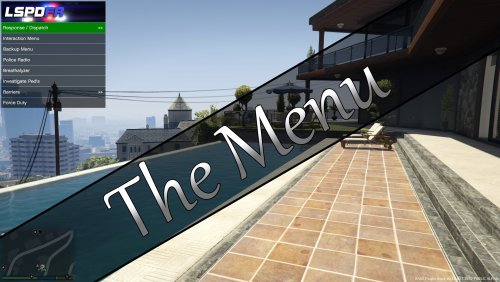
@CrashEight Thanks for your input and addressing people's issues, much appreciated! Unfortunately I don't have the time and luxury to work on this mod as continual development, so it could take months for me to tweak and tinker with the code and update. I do try to fix issues if there are anything regarding a RagePluginHook update and make sure its compatible etc. but because I don't play GTA V as much as I used too, I won't know if there's been an update and whether my mod/plugin is still compatible. Given the design of "The Menu", there isn't really much that it depends on, so I assume it's future proof, unfortunately there are a couple dll files that my mod relies on which could break "The Menu" if these dll's happen to be updated by other plugins as such. @Quakex64, I understand xml may be confusing to you and might be intimidating, but I chose this format to get the most out of The Menu due to nesting which makes sense for a dynamic menu like this (a ini file just wouldn't cut it). I could write a GUI which would generate the xml file for you, but I would find this overkill and a lot of time taken away from work etc just to accomplish. Even just doing a simple YouTube video on how to edit and manipulate the xml is hard to find time to do. So for now, I just hope people who don't understand xml to just look at the presented ones either here or in the zip and try to understand what its doing and why.
-
-
-
-
-
-
Indeed I am busy atm with other things. This mod doesnt add "mods" nor does it use other mods functions... It purely just uses key presses. You should read and review the xml file as that is the file where you design your menu. If you have a previous version, then just look at that xml file then copy and paste then tweak as you need. Once you learn the basics of xml, then it should be pretty straight forward in how to use this mod.
-
-
I'll try to find some time to look into this more, but the flag None would just mean nothing, I wouldn't even think it would execute it. if you look at the log (F4), you'll see what animation is playing or what has played.
-
-
@liberto Thats possible, I just did another test using your method <MenuItem Title="Lean on car"> <Animation>amb@world_human_leaning@male@wall@back@legs_crossed@enter|enter_back</Animation> <Animation flags="Idle">amb@world_human_leaning@male@wall@back@legs_crossed@idle_a|idle_a|idle_b</Animation> <Animation flags="Idle|Loop">amb@world_human_leaning@male@wall@back@legs_crossed@idle_a|idle_c</Animation> </MenuItem> This played one after another for me, also note that I put the loop on its own because a loop would never reach the next animation ;) try the version I just put up as it may had been the old version packaged previously.
-
Do you have SlimDX in the root of your GTA folder? this issues seems like a conflict in one of the libraries my mod depends not being a x64. Also make sure you're running atleast .NET 4.6 which I believe rage hook requires anyway.
-
@imaggot6sic6 I had tweaked a setting in how the controller should be handled after selecting a menu item, this maybe the reason why its not cancelling the traffic stops. Also note that capitol t and lower case t are the same in regards to key press, you will need to emulate it like a keyboard, eg. +t or {CAPSLOCK}t etc.
-
-
Unfortunately the problem with the "A" button is that other plugins are hooking into this eg. LSPDFR Traffic Stop, Unless our plugins can find a way to tell the other plugin to ignore the button, then we have to find alternative. I will continue to tweak the button press and see if there's something that will work, just keep in mind, this isn't easy to find a solution (unless I'm having a mind blank atm which does tend to happen)... In regards to the animations, You can add a delay command between each one and set the time for the duration of each animation. The result you're seeing is because each command runs on a separate thread, meaning the second animation is getting called straight away, hence overriding the first animation. I could fix / change this behaviour, but a delay should work for now and I'll only look into it when I can find time. On a side note, you can omit the flag attribute when if its empty which would then use the default UpperBodyOnly or if you plan on using none, Just just use None as the flag.
-
I'll try to make a youtube video when i find time on how to setup this mod, I understand for people unfamiliar with xml to find it overwhelming, but in all honesty, xml is really easy to understand.
-
-
It shouldn't Matter, just do ^l and it should work... @liberto Try the new version, I added animation options to choose your own animation flags and I hooked the controller to stop executing when selecting a MenuItem, so it shouldn't trigger other mods, but holding that button down after a set period will trigger other mods listening on that controller input (this shouldn't really be an issue as selecting a menu item takes only a tap).
-
@liberto I'll see what I can do about triggering the pull over blip etc. I know this can be frustrating and I've just learnt to live with it for the time being, but I will ask if there's a way to stop this from happening. I'm not exactly sure what you mean by "but not all plugins allow this (which gives me some headaches since I need to remember which menu uses which key to validate)". Just about every mod I use, uses hot-keys and 99% off those mods can change the hot-key for specific actions. The menu should be named something similar to that mod and change the KeyPress to match the hot-key as needed, just remember the title attribute is what's going to be shown when the menu pops up. I did limit the animations to upper-body but I will add an option to change this in the attributes of the Animation command.
-
-