




ScrimpyData
Members
-
Joined
-
Last visited
Everything posted by ScrimpyData
-
CouthInk4 Damn... I'm getting good at this!
-
And that makes 5!
-
Annnd.... Back to 1.
-
Alright. 2. We're going to get it this time!
-
Damn... Back to 1 then...
-
11! Come on! Nobody's here to ruin it for us!
-
4
-
1
-
Aha, a new chance! Rocking_Star101 Yes! Yes! Yes! I did it! I did it!
-
dabtso I'll never learn...
-
Rocking°Start101 Goddamned... Still not correct... :/
-
chester79° Always that last letter/number... :/
-
cp703 Close enough...
-
False. I'm from 8300 km from Texas. The person below me loves Belgian chocolate.
-
True. I hope... The person below me doesn't like rock/metal.
-
False! I enjoy ice cream... The person below me is not a car-person.
-
False. The person below me is unable to understand the Dutch language.
-
That are some awesome videos! :D
-
I'm really happy I got one that made sense :P And they indeed get ridiculous. I've seen names like xXDamLamp42 and stuff in games, I wouldn't like to have such a name tbh
-
Well, you'd never guess it, but it means as much as an empty post... Nothing. I was looking for a new username on Xbox Live, and ScrimpyData was a suggested name, and I thought it was way better than the one I had (which was CrumbyBird66 or something, it's been a long time). And ever since that moment, I've used it for many forums, a channel on YouTube and other stuff on the internet.
-
I found mine recently and it is amazing:
-
Processor: Intel Core i7 3770k @3.4GHz Asus GTX 660ti OC - 2GB 16GB Corsair Vengeance RAM 650W PSU 2TB of memory (on 2 HDD's) Windows 7 64 bit
-
-
 Looks nice :D
 -
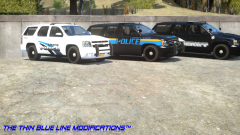
From the album: Scrimps Mods
The new 2010 Chevy Tahoe PPV for the LCPD, LSP and LC Sheriff is spotted near the police station in Bohan. Sorry about the GIF size, it's a bit small :P


