




Kilyin
Members
-
Joined
-
Last visited
Everything posted by Kilyin
-
-
Having to hold the key is a pain in the ass though. Not to mention, the animation for holstering looks like stock GTA5 to me (And I'm not talking about moving, I mean reaching for the gun in the holster, pulling it out, putting it back), whereas Cop Holster looks realistic. I can post a comparison video if that helps.
-
 The lightbar still disappears when moving away from the vehicle, as someone else stated. Other than that, seems good.
- 221 comments
- 34 reviews
-
-

- 1
-
-
Yeah, still prefer Cop Holster (which still works btw). The builtin doesn't have the right animation.
-
-
-
-
 Hold shift while launching RPH and hold it until the settings dialog comes up, or as it's loading click the little gear icon to get the settings dialog. Go to plugins tab and check all the plugins you want to load automatically. Thanks for the quick update.
- 342 comments
- 49 reviews
-
-
- 1
-
-
The author probably hid it while he updates it for 0.3, as have many other developers.
-
carvariations.meta in mpchristmas2, remove the following...
-
Okay. So you got your Grand Theft Auto V folder. Then as a subfolder in there, you made the 'mods' folder. In that mods folder you copy whatever files you want to mod... for example \Grand Theft Auto V\x64e.rpf goes to \Grand Theft Auto V\mods\x64e.rpf. For dlcpacks you just mimic their file structure... like \Grand Theft Auto V\update\x64\dlcpacks\patchday3ng would be \Grand Theft Auto V\mods\update\x64\dlcpacks\patchday3ng. This way your main game files remain in pristine condition and you only need to worry about what lives in the \mods folder. So in your case, what do you have in your \mods folder? For PoliceRadio I'd start with x64e.rpf. So move that file from your mods folder to let's say your desktop, if only temporarily. Then launch the game, and see if you still get cars coming back as hex codes (0x1585858ds, etc). If not, you found the problem.
-
It's just a folder? If you're already using it, what do you need help with? In that mods folder are your modded files. If you want to remove a particular mod, move the file out of that folder.
-
There's really zero reason to finish the story if you just want to play LSPDFR. You can just do the first couple missions, save, and use a trainer to reveal the entire map. If you use a mods folder and want to pick back up on the story without any mods, it's pretty simple to do.
-
-
 Yeah it crashes on RPH 29, just confirmed it myself. Won't matter for too much longer though.
- 246 comments
- 45 reviews
-
-
.thumb.jpg.4066677156985e22489bfecddc2f6c45.jpg) put this in carvariations.meta in mpchristmas2 under common\data at the top after <variationData>
put this in carvariations.meta in mpchristmas2 under common\data at the top after <variationData>- 376 comments
- 81 reviews
-
-
- 1
-
-
-
Do you use a mods folder? If so, that'd make it easier to troubleshoot, without reinstalling the game. If not, that might be your only alternative. You could try deleting x64e.rpf and doing a file verification...
-
Read this thread. You got a bad mod/rpf edit somewheres.
-
-
 I don't either. Maybe you should post a video or something. You have zero animation when reaching for your pistol?
- 560 comments
- 97 reviews
-
There is nothing to fix. It works for everyone except you. I'm still on RPH 29 and there is absolutely no problem with this plugin.
- 560 comments
- 97 reviews
-
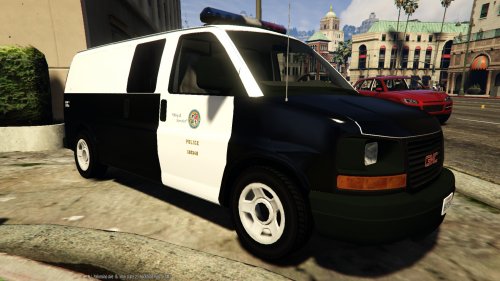 There is a noticeable thick white line on the hood of the van when using this skin that isn't present with the default model livery. In fact, it's visible in the first screenshot. Can you possibly fix that?
- 8 comments
- 4 reviews
-
Well I've never had to update my 7zip to unrar a file, but I did this time. Kept saying it was invalid or damaged. Dunno.
- 376 comments
- 81 reviews





.thumb.jpg.4066677156985e22489bfecddc2f6c45.jpg)
