


.jpg.6560a2901f1c2dd11dcd77a6a554cee7.jpg)

Frosty19
Members
-
Joined
-
Last visited
Everything posted by Frosty19
-
Im using the latest version and its all good tbh, 90% of plugins id say are compatible but even if not updated they still work. I recommend staying up to date unless you have inevitable crashes. Note: Plugins that are not working with me is the PedSearch (Dev Inactive :/) but VehicleSearch work/crashes
-
No Problem, Honestly i really dont like ClearthewayV it doesn't work properly and cars swerve all over the place :D
-
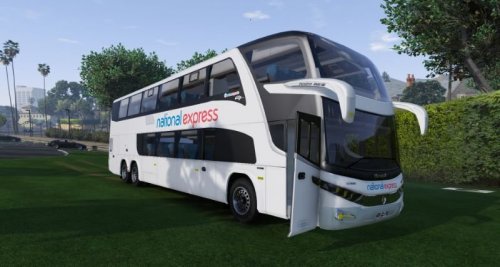 Thanks and yep its big :D
 -
National Express Coach Installation Link to original model this is not my bus! : https://www.gta5-mods.com/vehicles/marcopolo-paradiso-1800 Replace coach.ytd, coach_hi.ytd coach.ytf and coach+hi.ytf in Mods\x64e\levels\gta5\vehicles\ NOTE: Coach included in file with my skin no need to re-download Please Report Anything you may find wrong with the skin! Credit: vagner-zn Me - Frosty19 Includes Los Santos Airport Skin (Manually Add)DO NOT REDISTRIBUTE WITHOUT CONTACT!
-
Why on earth do you want to replace police with fire?
-
When ELS is out ^ This will be a thing! :)
-
Here is my FBI2 data :) Hopefully this will help just add it in! http://pastebin.com/gjLGYSAY
-
No probs :)
-
police2, sheriff, sheriff2 -> update\x64\dlcpacks\patchday3ng\dlc.rpf\levels\gta5\vehicles.rpf police3 -> update\x64\dlcpacks\patchday4ng\dlc.rpf\levels\gta5\vehicles.rpf police, police4, fbi -> x64e.rpf\levels\gta5\vehicles.rpf fbi2 -> update\x64\dlcpacks\patchday2ng\dlc.rpf\levels\gta5\vehicles.rpf This was posted recently after the update so these should be the right locations
-
police3 -> update\x64\dlcpacks\patchday4ng\dlc.rpf\levels\gta5\vehicles.rpf
-
Download Traffic Policer or Speed Radar Although they are not Handheld radars they still are what your looking for
-
Just rename the liveries and add them as foe example Liveries1, Liveries2, Liveries3
-
What your asking can not be done but you can make a vehicle add on so that it does not replace any vehicle but will only spawn in by your command
-
Keep clam and Safer Chases are the only things out at the moment although you could decrease the amount of traffic you have if that is something you could consider :)
-
May i ask what this will be needed for? Have you tried this?
-
I am also wondering which code in Visualsettings turns the brightness down
-
Thanks Desmond :)
-
When ever i am adding a new Male cop skin for british police purposes it still uses the default GTA one. I am not too sure if it has changed location in the last update. It has been placed in components_s_m_y This is the skin> http://imgur.com/f7Kti3A But never shows as that :(
-
Is anyone in development of a NYPD siren pack with rumblers and stuff would really love it!
-
 It is for me, its just when the plugin is loaded and running on normal GTA its fine and i took it out and the stuttering stopped, the game is still playable but its really annoying. I looks like every 2-3 seconds it stutters
- 246 comments
- 45 reviews
-
Is there any way you can have the secondary and third siren to sound without having to hold down a button for it to do it, al you do is press a button once to change it? I am not sure if there is any mods/plugins that do this but any help would really be appreciated!# Thanks :)
-
Someone else has just said they are experiencing the same issue, it might be for certain users but not sure what would be causing it :(
- 246 comments
- 45 reviews
-
Hey love the mod, when i updated though i saw a lot off movement stuttering it wasnt FPS drop though it was just stuttering when looking around im not sure if its this but it only started when having the new update :)
- 246 comments
- 45 reviews
-
EDIT: Fixed
-
Hi i am crashing and in the log it says calloutmanager is making the game crash but i dont have anything called calloutmanager i am really confused if someone could help that would be excellent. [17/01/2016 16:53:35.105] LSPD First Response: ============================== [17/01/2016 16:53:35.105] LSPD First Response: UNHANDLED EXCEPTION DURING GAME THREAD TICK [17/01/2016 16:53:35.105] LSPD First Response: ------------------------------ [17/01/2016 16:53:35.105] LSPD First Response: Origin: Game fiber "CalloutManager". [17/01/2016 16:53:35.105] LSPD First Response: ------------------------------ [17/01/2016 16:53:35.106] LSPD First Response: Exception type: System.MissingMethodException [17/01/2016 16:53:35.106] LSPD First Response: Exception message: Method not found: 'Rage.Task Rage.TaskInvoker.CruiseWithVehicle(Rage.Vehicle, Single, Rage.DriveToPositionFlags)'. [17/01/2016 16:53:35.106] LSPD First Response: ------------------------------ [17/01/2016 16:53:35.106] LSPD First Response: Inner exceptions: [17/01/2016 16:53:35.107] LSPD First Response: ------------------------------ [17/01/2016 16:53:35.107] LSPD First Response: Stack trace: [17/01/2016 16:53:35.107] LSPD First Response: at CalloutsV.Callouts.Breakdown.OnBeforeCalloutDisplayed() [17/01/2016 16:53:35.107] at ?????????????????????????????????????????.?????????????????????????????????????????(Callout ) in E:\GTA V\LSPD First Response\LSPD First Response\Mod\Callouts\CalloutManager.cs:line 244 [17/01/2016 16:53:35.108] at ?????????????????????????????????????????.?????????????????????????????????????????(Type ) in E:\GTA V\LSPD First Response\LSPD First Response\Mod\Callouts\CalloutManager.cs:line 227 [17/01/2016 16:53:35.108] at ?????????????????????????????????????????.?????????????????????????????????????????() in E:\GTA V\LSPD First Response\LSPD First Response\Mod\Callouts\CalloutManager.cs:line 150 [17/01/2016 16:53:35.108] at Rage.GameFiber.Main() [17/01/2016 16:53:35.108] LSPD First Response: ============================== [17/01/2016 16:53:35.108] LSPD First Response:


