


SGTsalamander
Members
-
Joined
-
Last visited
Everything posted by SGTsalamander
-
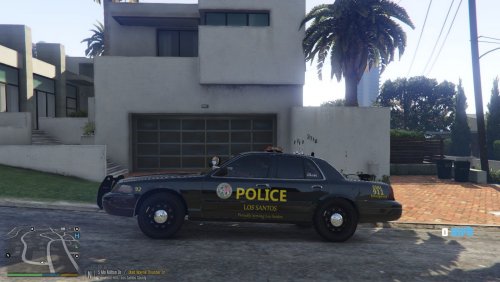 A Crown Victoria based off of the Woolwich Twp. Police department. Model Used originally by TrentMU: To install use open IV and go to mods/update/64/dlcpacks/(latestpatchday)/dlc.rpf/x64/levels/gtav/vehicles.rpf and replace both the cvpi_sign_1new AND lcsdpatrol. Not an exact replica and this is my first texture so dont be too hard on me. Constructive criticism is encouraged.
 -
.thumb.png.84adb823f7f653b8d654f1ab13098851.png) great pack but the Vic's lights are messed up. How do i fix this? The charger and explorer's lights are fine.
great pack but the Vic's lights are messed up. How do i fix this? The charger and explorer's lights are fine.- 89 comments
- 44 reviews
-
ok, thanks anyway for the help
-
should i try manual install? thats ok. all the outfits i saved in 7.4 are still in skin control so its ok
-
Auto, i did have 7.4 but I undownloaded
-
Either way, it crashes the game
-
yes it is just in plugins, no further
-
They are both updated, played it today
-
I Have just downloaded Eup menu, law and order, and serve and rescue correctly, but when I load it using rage in the game, it crashes, please help

.thumb.png.84adb823f7f653b8d654f1ab13098851.png)