D Symons
Members
-
Joined
-
Last visited
-
You're a star, thanks. Although I now appear to be getting a lot of texture loss in parts of the game. Again, now mods installed. Seems very odd. Can you suggest any solution? I suspect it is possibly linked with this....
-
It appears like an anti mac forum!! It's an intel iris pro hd 6100; I have the Intel Iris (basic card) in another mac which ran at about 30fpd - adequate for my needs. It ran with a pretty high end ENB too.
-
I knew that as soon as I posted that I would get that reply... Yes it's a Mac, and CAN run the game very well. I have a much lower powered mac which will run it well. So as I say, for all intensive purposes it is a Win 8.1 machine....
-
Hi, I have a MacbookPro 15" with an adaquete integrated graphics card and i7 CPU....I have bootcamp with Windows 8.1, so for all intensive purposes is a Win 8.1 machine. GTA 4 won't let me adjust the graphics settings. This appears to be a common problem with cards with over 3gb memory - mine isn't in that category. I've tried running a commandline with all conceviable no restriction commands, which does not work. It's really quite annoying, and have even tried adjusting the compatibility to Windows 8, 7 and XP. Any help would be greatly appreciated. I've looked all over google for this and the solutions are not working. Thanks!
-
When I installed my trainer, it worked fine - I then edited it and worked fine (no change in mods or anything), but now crashes the game- I removed it and the game works fine. When I swap the edited trainer (keys mapped) with a fresh one, it still crashes. I've replaced the existing advanced/script hook and looked for solutions but none work. This includes unblocking the DLL's, checking the logs (LCPDFR is NOT installed) which show no issue relating to anything. It really is strange - please help me. Thank you!
-
APPEAL FOR HELP!! I've tried everything now. It isn't working. Fresh install of ELS, GTA 4 etc. What must be the problem? I don't think it is ELS, but need YOUR help LCPDFR forum. Thank you
-
To be honest, I don't understand what your suggestion meant. I have re installed ELS again - to no avail.
-
Done that, whereby I download ELV8.5 again, and replace ALL files. Doesn't work!
-
What are the certain things? Not sure what you mean about importing files (it's just a drag and drop type pack!)
-
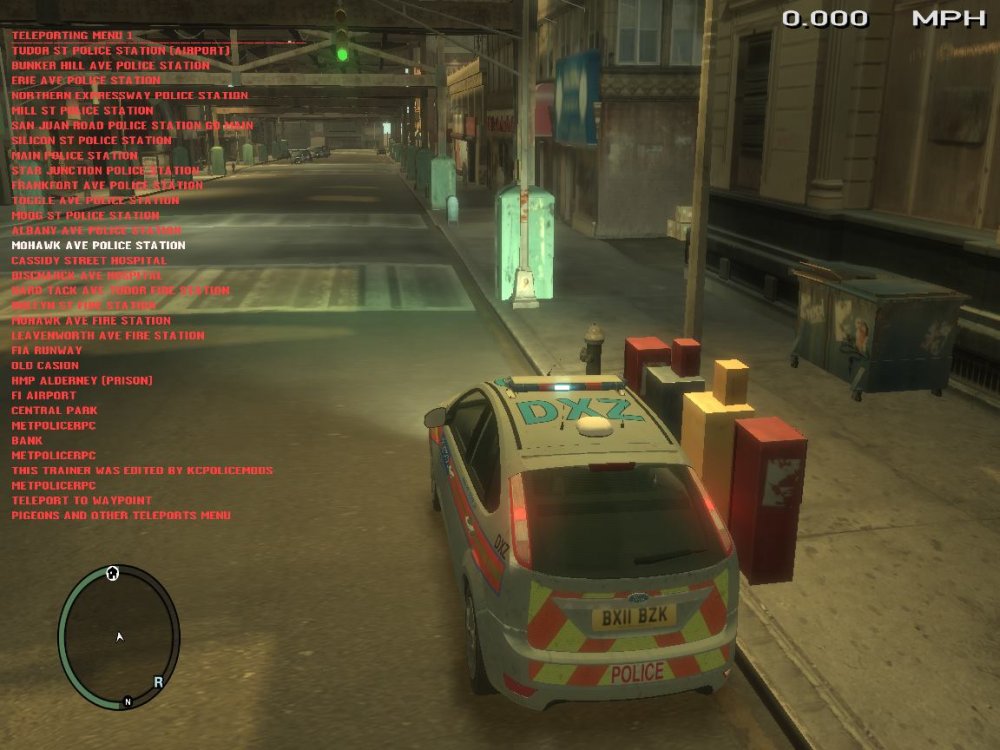
ELS V8.5 - NOT WORKING/Frozen/not functioning I've a very similar problem to this here: http://www.lcpdfr.com/forums/topic/50796-els-v85-not-working-lights-stuck-on/#comment-335632 Basically, I have a selection of ELS V8.5 compatible cars, which I have added to a fresh install of GTA4; these police cars have frozen lights like that of the picture which should be attached. I have done every conceivable thing (since before reinstalling GTA4 a fresh, it worked absolutely fine). Things done is: Replacing script hook, installing ELS a fresh, installing LCPDFR Before/after/not at all; fresh GTA4 directory, Slot Control showing all vehicles as 'ON' (i.e. mapped correctly) -- nothing is working. For all intensive purposes, my ELS is frozen/not working. When I press CTRL M no dash board comes up, and not sign of ELS, since CTRL Backspace shows nothing. The weird thing is that when I press 'G', the sirens activate. GTA 4 doesn't crash, runs very stable, but ELS cannot be switched on. Any support leads would help, I am a novice to this site which means I can't find any other similar problem to mine, but have done everything I/few others can think of. Please help me!! I really will appreciate any help on this - thank you in advance.