V2.jpg.ac7e9f812d959f4d4e1b9d10b0576719.jpg)
BUGMANFR
Members
-
Joined
-
Last visited
Everything posted by BUGMANFR
-
Thanks guys! Those filters will be very useful!
-
That is a fantastic news! Thank you very much for this long awaited progress update, I am (really) looking forward to see what the team has been cooking under the hood! On a small side note, I am simply amazed to see everyone (the devs and community) so involved in making LSPDFR bigger and greater every day, and I am so happy when I see how far this mod came from... A big thank you to everyone involved reading this, your passion is amazing to see and follow!
-
 Hi D0WN7OAD, first of all, thank you very much for this callouts pack ! It is great fun to play and seems to be very very stable too ! Also, well done for keeping your plugin updated ! As a new user of your callouts I have done some tests and found only one issue that I think is not related to my installation (I only have your plugin installed alongside Wilderness Callouts) and I wanted to inform you. The issue I am having is minor, and related to the "Tank Callout" as well as the "Dump Callout", basically, when I accept thoses calls, the "in vehicule" pursuit finish very fast because the driver decide to slam the breaks and flee on foot haha ! Other then that, I have nothing else to tell you ! Keep it up, and see you !
- 191 comments
- 7 reviews
-
-

- 1
-
-
-
-
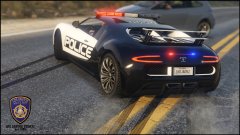 Screens made by : BUG-MAN-FR YouTube Channel : https://www.youtube.com/user/unisus65/videos
© ©BUG-MAN-FR, ©Rockstar, ©AitGamers, ©Mister Brooks
-
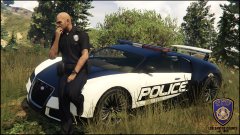 Screens made by : BUG-MAN-FR YouTube Channel : https://www.youtube.com/user/unisus65/videos
© ©BUG-MAN-FR, ©Rockstar, ©AitGamers, ©Mister Brooks
-
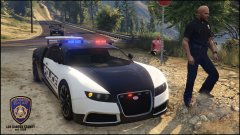 Screens made by : BUG-MAN-FR YouTube Channel : https://www.youtube.com/user/unisus65/videos
© ©BUG-MAN-FR, ©Rockstar, ©AitGamers, ©Mister Brooks
-
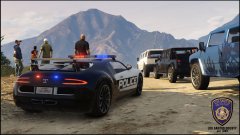 Screens made by : BUG-MAN-FR YouTube Channel : https://www.youtube.com/user/unisus65/videos
© ©BUG-MAN-FR, ©Rockstar, ©AitGamers, ©Mister Brooks
-
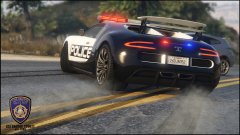 Screens made by : BUG-MAN-FR YouTube Channel : https://www.youtube.com/user/unisus65/videos
© ©BUG-MAN-FR, ©Rockstar, ©AitGamers, ©Mister Brooks
-
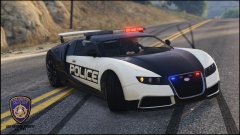 Screens made by : BUG-MAN-FR YouTube Channel : https://www.youtube.com/user/unisus65/videos
© ©BUG-MAN-FR, ©Rockstar, ©AitGamers, ©Mister Brooks
-
-
-
-
-
-
-
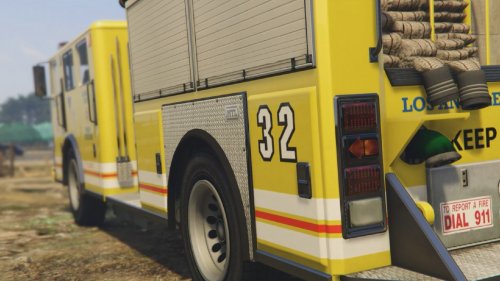 Yes It's me I posted my first mod on lspdfr.com just a few hours ago ! So I decided to post this "old" mod
 -
This pack (from the early days of GTA 5 modding, 2015!) changes the texture of the firetruck in GTA 5 with a fictional Los Angeles inspired livery! INFORMATIONS : • This pack comes in two colors, yellow and red. • All of the installation instructions are in the ReadMe file.
-
-
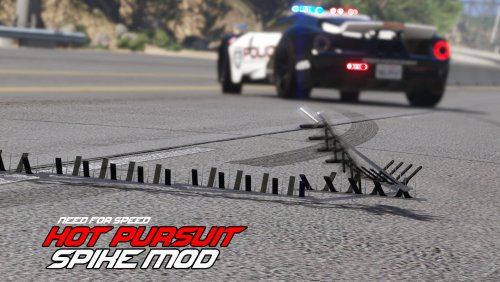 This mod allows you to deploy spikes strips during a pursuit... or not! You can use it in a car or on foot. INFORMATIONS : This mod was initially developed back in 2015 but has since been fully rewritten in order to make it compatible with the latest versions of the game and LSPDFR 0.4! NEW FEATURES : • Spike deployment animation. • Fully integrated spike sound. • Dynamic blips on your minimap. • Customisable keyboard keys. • Work with LSPDFR (and all plugins). • Controller fully supported. • Open source ! Please let me know your changes in the comments INSTALLATION : 1. This mod requires ScriptHookV. 2. Go in your GTA 5 directory and drop Spike.asi and Spike.ini in it. 3. Launch the game and press T to drop a spike strip, and G to remove any spike strips. 4. More information is available in the ReadMe and .ini file. CHANGLOG : 1.0.0 : Initial release. 1.5.0 : Changing the ground detection system (no more spike floating in mid air). Reduced wheel detection radius (more accurate tire detection). Controller support can be disabled in the .ini file. You can now deactivate the cinematic camera. New combo-key support added for controller. Enhanced the spawn system on foot. Fixed a bug not recognising the controller. New auto-cinematic camera feature (facultative). Global mod optimisation and cleanup. • If you like what you see, you can also check Transmet's big other project, Las Venturas, here ! Alternativly you can access the source code of this mod here. CREDITS : Rockstar Games - Original 3D model and sound effect. Transmet - Creation and R&D for the script (the big brain dude). BUG-MAN-FR - Tests, in-game testing, screenshots and documentation.
- 33 comments
- 7 reviews
-
-

- 3
-
V2.jpg.ac7e9f812d959f4d4e1b9d10b0576719.thumb.jpg.f203aa93e88745f015ff5a76cc8bc3f7.jpg)