


Matt Whitaker
Members
-
Joined
-
Last visited
Everything posted by Matt Whitaker
-
-
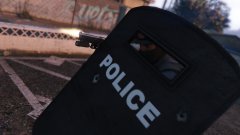 I have found the model but where is the code to shoot out the side of it? And could we put this in the place of a melee weapon to make it useful Re this post: http://www.lcpdfr.com/forums/topic/56023-riot-shield-mod/#comment-374977? This has a lot of potential :)
 -
 Is there a way to add S_M_Y_blackops_01 holster to this? I have just changed the name and the animation still reaches to the same place of the cops holster can this be changed?
- 561 comments
- 97 reviews
-
Are there any updates on when this is being released? Loving the work this is going to be the best update since the release in my opinion!!!
-
 Can you make it so we can change the gun's we get from the back of our police car?
- 342 comments
- 49 reviews

