JAbrahamson
Members
-
Joined
-
Last visited
Everything posted by JAbrahamson
-
-
 same deal. I tried it on 6 different cars and the same issue is happening. the light bar, grill lights, and window lights are on, but very dim and the radiation off of objects is very bright, no idea how to fix this at all
- 2,700 comments
- 240 reviews
-
How to install: Someone using it: If i remember correctly (havent used EUP in a while), you use skin control to set your character and customize (save it). Then just open eup and set the clothing and open you Rage Console (F4 by default) and type "forceduty" (without quotes) and you will be on duty with your character. I had trouble loading my online character with rage so I started the game without Rage and loaded into directors mode and loaded my online character. I saved him using skin control and then restarted with rage. Open skin control and load your online character, then open EUP and set you outfit and then open the console and force duty and you should be all good!
-
Thanks for the advice guys!
-
GTA ran like a charm... recently its starting to stutter and whatnot. Now, fps hovers around 40 in sandy shores, with Geforce Experience's "optimum settings." Im using less than 3 gigs of vram on a 6 gig card but it is still being annoying. My system should crush this game no problem. Anyone else having similar issues? I heard that people were having issues when the latest Windows update got released last week, but i think that may have simply made my issue a little worse. Any suggestions for me? I already optimized the game as best i could, turning of vsync and other common contributors to these problems. SPECS CPU: Intel i7 4790K @4.0GHz MB: AsRock Z97 Extreme6 GPU: EVGA 980ti (6GB) Ram: 16gb GSkill
-
The way I do it (the easy way) is simply to go to update/x64/patchday8ng/dlc.rpf/x64/levels/gta5/vehicles.rpf and install all cars there. That works great for me and keeps all modded cars in one spot
-
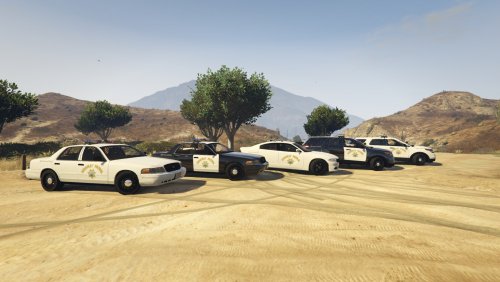 Hey guys, welcome to my first texture set. I really wanted to make a set that used real CHP vehicles, and put the realism of each skin above all else. With that said, there is one part of each skin that is not on current CHP units and that is the 'Thin Blue Line' flag, but I felt it added a lot to the skin and really wanted it on there. The goal for this project is to eventually encompass the entire Los Angeles Emergency Services vehicular arsenal, which will include: Ambulances, Firetrucks, Sheriffs Office, LAPD, and CHP CREDITS: Templates: F5544, Desmond98, PimDSLR, Thehurk Door CHP star: Google, modified by JAbrahamson I also want to thank my brother, for sending me really great photos of his CHP Explorer and some Crown Vics to help me build these as accurately as possible. SKINS INCLUDED IN THIS DOWNLOAD ARE FOR THE FOLLOWING VEHICLES: PLANNED UPDATES: Include New Vehicles 2015 Chevrolet Tahoe Ford F-150 Raptor Los Angeles Sheriffs Department textures Los Angeles Police Department textures Los Angeles Fire Department textures
 -
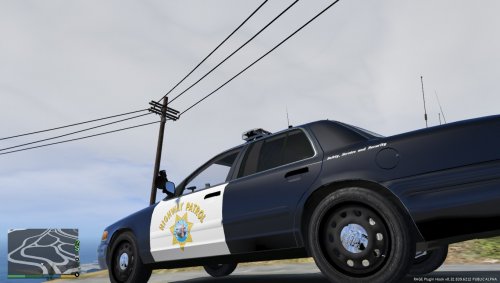 Great skin! The only thing i see is that the door logos need to be a little higher up, like in this photo: Other than that, this is well done!
 -
Figured it out.. well got it fixed at least! Just went to a backup game and reinstalled everything andddd it works, magically. Not sure if I messed something up originally or something, but it all magically works now haha TY for your help sub68
-
No. my mods folder isnt that large. I know where I install the cars, and when i have messed with textures in the past few days that did work in game, I used the exact same files as I am now, it just isnt working. I know what I am doing, I was trying to figure out if something had changed, or if there was a little bug or something that would cause this issue.
-
I assumed that there would be a different file somewhere that overrode the files in patchday4ng. But on that police3 model, the police3+hi.ytd only has one texture for like back seats or something. So I have been searching other locations for police3 files with no luck. Is it possible to just put everything in the vehicle.rpf located in the patchday8ng file path and have that override another file thato may be causing the issue?
-
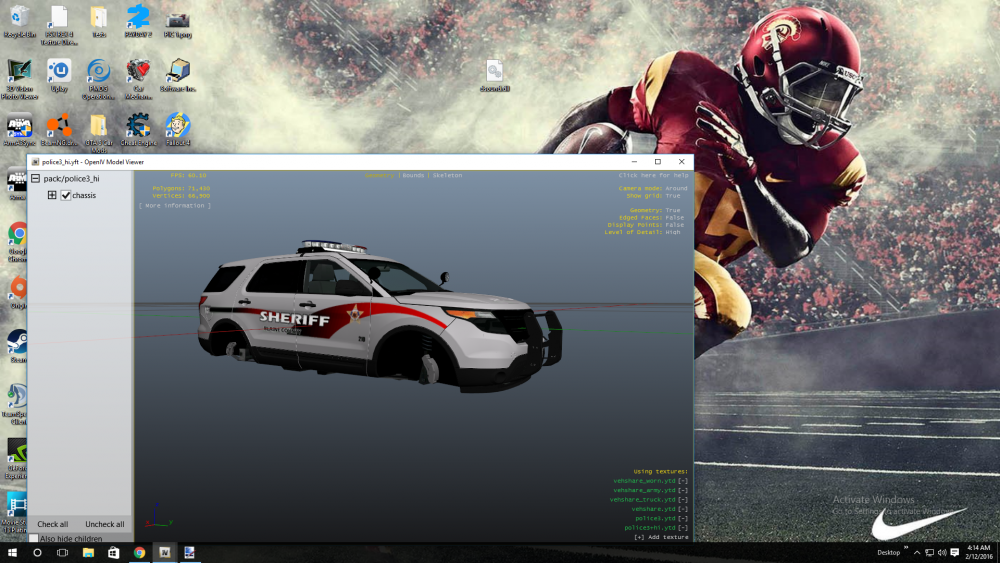
Ok so for that particular vehicle i am in GTAV > update > x64 > dlcpacks > patchday4ng > dlc.rpf > x64 > levels > gta5 > vehicles.rpf This is where the vehicle was supposed to be placed per the read me, and I went into the police3.ytd and replaced the 8 explorer_sign files, which are the actual paint files. I both replaced one by one, as well as dragged and dropped to troubleshoot. And when the "Choose Import Options" dialogue popped up, I automatically generated MipMap levels and set textures format to "Automatically". This process has worked before, just not anymore for some reason and I have no idea why.
-
So I have used OpenIV forever, since GTA4. For whatever reason, now I am having issues i cant seem to figure out. It seems that when I add a model, or texture, open IV will recognize it, but the game will not. For example, I have the explorer and I put the SAHP repaint which is 4K, and that worked. But now I am adding a Blaine County repaint to that same vehicle (replacing the SAHP and LSPD files I already tweaked) and it will not show up in game even though im replacing all of the necessary .pngs in the ytd files. The yft models even show the repaints in OpenIV, but they just arent showing up in game. I have tried to rebuild, and even resorted to downsizing the textures from 4K to 2048s in desperation to find a solution.