Skip to content
View in the app

A better way to browse. Learn more.

LCPDFR.com

A full-screen app on your home screen with push notifications, badges and more.

To install this app on iOS and iPadOS
  1. Tap the Share icon in Safari
  2. Scroll the menu and tap Add to Home Screen.
  3. Tap Add in the top-right corner.
To install this app on Android
  1. Tap the 3-dot menu (⋮) in the top-right corner of the browser.
  2. Tap Add to Home screen or Install app.
  3. Confirm by tapping Install.

officerzephyr

Members
  • Joined

  • Last visited

  1. So I have a Question. I'm running my gta 5 with Jeff's visual settings and visual v w/ the enb that comes in the folder. But my lights look bright on the lights bars, Like my red is almost orange and my blues are a light sky blue. But my coronas show the red and blue in the right shade? help?
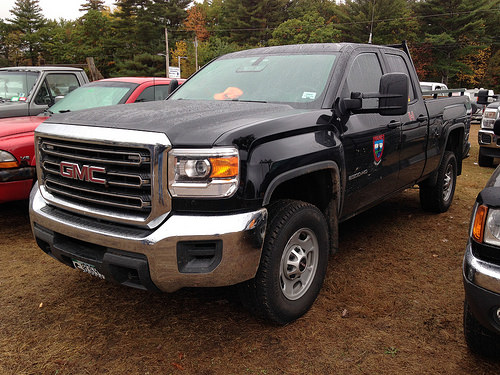
  2. Hoping someone could make a maine game warden and marine patrol skins for an 2010 slicktop f-150 thanks and 2010 gmc/chevy
  3. officerzephyr changed their profile photo
  4. I'm honestly surprised this hasn't been made yet. But I would love to see Bangor police department created as a mega pack or just a pack. Being from Maine that would really hit home to see. If anyone does decide to make that. You can message me for info about the cars they used, And for the mega pack idea I was thinking Bangor pd, Penobscot county sheriffs, Maine state game warden service( north woods law),and the Maine state police(Yes I know someone already made a Maine state police fpis. But that is only 20% of what the state uses for cruisers ) anyways that's all I wanted to get off my chest . Let me know what y'all think. pictures to maybe give inspiration?
  5. officerzephyr started following JFavignano
  6. officerzephyr started following Bxbugs123
  7. officerzephyr started following Black Jesus
  8. Hey, I have gta 4 lcpdfr and I been looking for Maine police departments vehicle models. Not textures just models. thanks

Account

Navigation

Search

Search

Configure browser push notifications

Chrome (Android)
  1. Tap the lock icon next to the address bar.
  2. Tap Permissions → Notifications.
  3. Adjust your preference.
Chrome (Desktop)
  1. Click the padlock icon in the address bar.
  2. Select Site settings.
  3. Find Notifications and adjust your preference.