


Sam316
Members
-
Joined
-
Last visited
Everything posted by Sam316
-
 maybe he doesnt know that
 -
Why not different regions, I too didnt understand what he said until I passed it through a google translator
-
-
 I like this pluggin, some of the features like spawning specific type patrol vehicles cause a crash in the game. But I like the control of the other options. Any chance of you making an update to this to allow you to create a customized loadout. When I play LSPDFR I am full out Robocop all the time. I would like to create a customized load out for him which includes his weaponry "APPISTOL, HEAVYSNIPER (I pretend its the COBRA Assualt rifle), SAWED OFF SHUTGUN (which is modded as a bean bag gun)". I am heavily intense in modding out this Robocop mod. I already have him talking on his own under certain situations, using the PA system, and I am currently trying to figure out how to get his footsteps to work in GTA5.
- 69 comments
- 6 reviews
-
highlight comment and use google translator
-
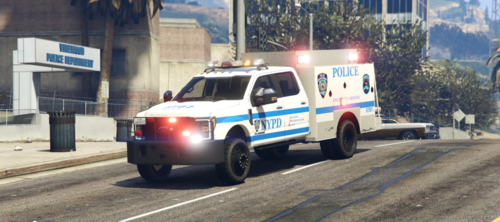 Its missing parts (flood lights on the sides and front ) but looks like a nice model non the less! Good idea we needed this!
 -
 This has always been one of my main stay call out packs to use, you add so much diversity of callouts to the game, it always keeps you busy! This and super call outs are the best call out packs for LSPDFR period. Always a good time to be had utilizing this call out pack! Thanks for all your efforts and the time you put into making this better every update! I know how tedious it is to spend a day just working on a call out pack! Its a hobby like anything else!
- 635 comments
- 53 reviews
-
-

-

- 2
-
-
 At first this mod wasnt working, but after having come back here and reading the trouble shooting tips. It works like a charm and I absolutely love how it deploys barrier types 3x that is awesome! This mod definitely replaced "Traffic policer". The barrier and the custom pull over was my only reason for continued use of "Traffic Policer" This is way better and there is another mod called "Custom Pullover" that replaces that part of Traffic Policer as well making it absolete. Keep up the awesome work!
- 113 comments
- 10 reviews
-
-
- 1
-
-
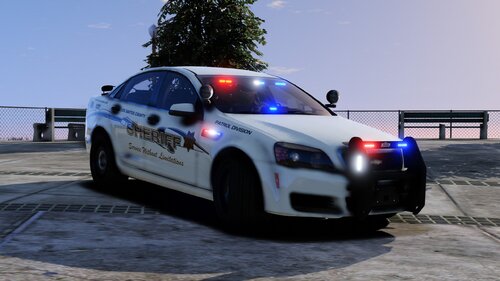 Used to use this as a NYPD fictional Slicktop (made my own skin for it) loved the car and about to pop this back into my game! This car rocks!
- 7 comments
- 4 reviews
-
Nice I can use these in GTAV using the Self Radio Pluggin mod. Audio files are perfect cool!
- 34 comments
- 10 reviews
-
 This worked in version 4.7 dont know if it works in 4.8 yet havent updated yet. Doing it this weekend though. just make sure you have the latest version of scripthookdotnet installed
- 101 comments
- 18 reviews
-
 So for now we should set that to "false" huh I was just realized that this was a bug myself as much as I use this mod now! When I am on foot I accidentally use the megaphone UI mod and the megaphone becomes stuck to my hand lol even inside the police car lol
- 118 comments
- 17 reviews
-
-
- 1
-
-
it creates it but I too noticed that after he uses it he doesnt put it away, Especially when you are trying to use a firearm! That car stop command is awesome man! Just got into one of those chase where they never stop until you pit them or they crash! Dude unexpectedly swerved in the middle of the road and came to a stop lol! Excellent job man! The drop your weapon command needs tweaking so that it is directed at wanted suspect or someone you may pointing a gun at. Dont know if that is possible. I was in grove street and you know the bloods start blasting if you discharge your weapon in they hood. I used the drop your weapon command intended on the person brandishing a weapon, he shot at someone so I shot to take him down and then everyone started shooting! When I gave the PA command it was weird to see all the blood members drop their guns and surrender! I like it but it need a little tweaking so it focuses on the single weapon holder in your sights. The option to order DROP YOUR WEAPONS sounds perfect for when responding to a gang shoot out though!
- 118 comments
- 17 reviews
-
-
- 1
-
-
Thank you for keeping at this and making it so much better with the additional features too! It makes the game more enjoyable to play as it gets more interactive with the environment. I always wanted this out of the other mod that plays MEGAPHONE custom audios. But that mod is good for editing the PA sounds now and your mod is perfect for executing those commands! Hmm make it somehow initiate by your officer ped Pointing a gun at the driver and saying the command. But I think we are asking for too much with this. I can actuallty do this with the Felony stop mod pluggin. Maybe if the two of you guys combine features of your mods it would be much better then using a menu and the ped responding with a verbel response. In the Felony Stop Pluggin the menu has the option for you tell them to turn off the vehicle and step out with your hands up. The ped steps out and says Ok I dont want any problems or something like that. ... Now step in Megaphone UI in the menu combined The Officer would use the same words only saying it over a loudspeaker and now seeing the peds verbel response makes it feel more realistic. It would work with STP just like how Felony Stop Pluggin works with STP. I see a lot of interactive potential in this mod you got growing man! The level of interactive it could have could make it a must have mod just like STP for realism! I try to sell this mod in the LSPDFR page on Facebook, it is so much fun ordering peds to comply with simple commands. What could be hilarious is if a ped responds in defiance prompting you to get out and have to get physical and issue a citation for disorderly conduct lol! But we getting ahead of ourselves. lol All I want is the interactivity of control peds and moving traffic as well!
- 118 comments
- 17 reviews
-
-
- 1
-
-
But I am liking how you can control how you want them to respond, it adds a little more drama to the bomb found call out scripts, when you pull up on scene and find the bomb and use the PA to order everyone to clear the area (panic) and everyone runs away and when the area has cleared out you can work on defusing the bomb knowing that no civilians are nearby that will get accidentally killed! I like you can use the calm disperse to order thugs to stop loitering by a business! and they may talk crap but walk away peacefully without incident. cool that way we can tweak it manually to where it looks more realistic. I havent really sat down with the mod to test it in a bunch of scnerios but I am liking how it makes the AI peds respond. Is that car stop feature in play that if we do a felony stop we can order the ped to turn off the engine and step out the vehicle with their hands up over the PA? It doesnt do that automatically, it plays a stop your vehicle order, but you still have to initiate the vehicle stop command by turning on your code 3 lights. Pressing the car stop request key starts the PA order to Pull over.
- 118 comments
- 17 reviews
-
-
- 1
-
-
its seems a little slow at 2.5 maybe a second slower 1.5 seconds would be better. the way it looks, is like they finishing their cigarette before they respond! lol
- 118 comments
- 17 reviews
-
-
- 1
-
-
The update features are sweet man, just the ped response time seems to have been slowed down after the comment is made from the time they respond to what you ordered. But this is getting way better!
- 118 comments
- 17 reviews
-
-
- 1
-
-
 You dont put them no where the file you are trying should have a file with 2 parts in it. A folder containing all the wav files with conversion files installed in it and then the vehicles aoc outside that folder the way this works is that when you run the import formats command in OpenIV it communicates with that vehicles aoc file in you custom siren folder. It is already extracting the wav files and transfering them into the vehicles awc folder inside the OPENIV software. You can double click on the vehicles awc file in OPENIV and it will open all the wav files in the awc library. Scroll to the bottom of the list and select something like police siren2 listen to that sound. it should be the same as the one in the folder containing all the wave files from your download. That is how you confirm it transfered into the game. If you drop a wav file into this directory it will not attach to the vehicles awc library and it could cause your game to crash for improper installation.
- 13 comments
- 1 review
-
You right click inside the resident rpf and select import open formats what ever the sound file it is you are using you navigate to that file and import the vehicles awc file. it transfers the new siren sounds into the resident rpf overwritting the default vehicles awc.
- 13 comments
- 1 review
-
-
 But the cones sometimes fail as vehicles try to drive over them and become stuck, I think he needs to do an update to include the option to select either larger cones or barriers!
- 112 comments
- 21 reviews
-
- lspdfr plugin
- legacy
- lore
- non-lore
-
Tagged with:
-
 Cool Man look forward to it!
 -
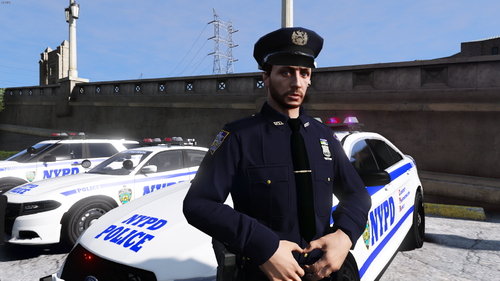 I think he released another version of the NYPD EUP skins 8.15 or something that has Female officers in it, butthey dont look as good as the Male Officer uniforms, but its a start!
- 133 comments
- 7 reviews
-
hmm i dont know i have given up on modding the voices on this mod. I just use Self Radio to play my megaphone sounds and use like Felony Stop Pluggin to excute the order and moved your white cop audio files into the black cop cop directory so I get the NYPD PA sounds for now until you upgrade and get the real black cop voice over in there! Also trying a bunch of different mods to get that authentic BullHorn like echo effect too! Not successful yet but experimenting!
-
I know where it goes boss, the problem is the wav file somehow is not supported by the audio folder transfer. It keeps giving me an error when I try to move it into the S_Full_ser folder saying that it is not supportted because of its bit size and it needs to be a in a mono channel format. I dont know how to change all of that! its the audio wav files that I have created that wont switch over. So i took some of the white officer files and transfered them into the black officer folder and those worked ! I tried to look at the files together and the only difference I see is the default ones are like 765 bytes and mine is like 168 bytes. The source of my recording may have saved them in Stereo sound where the game is telling me I need to format it to mono channel format? Can I upload them to my MEGA storage account and send you a link to download and check them out to see what wrong when ever you get a chance?

