


13696662
Members
-
Joined
-
Last visited
Everything posted by 13696662
-
Hello all, With GTA 5, I would like to modify the sirens. But I would like to modify them with out the use of an external modification such as ELS. Has anyone had any success with this? I have attempted OIV installations, OIV/package installations, OIV with encryption program to make the file compatible for gta5, and either it does not work, or GTA5 crashed apon start, or the game downloads a file 100MB, and deletes the modded siren. I believe there's a mod I attempted, that is called "siren mastery" - but perhaps I installed this modification incorrectly? Id like to use the default siren light bar, just different sounds. as well as the default key/controller bind for the siren, as i current have the key set as "Alternate" so I can adjust if the lights are activated with, or with out siren. Kind regards, -13
-
Thank you, calculating the actual time it took to fully configure the whole operation to work fluid, was a total of about 24 hours. 16-21 of those hours had been troubleshooting what was the cause of constant crashing, not working when loading a certain mod into the plugins folder -ect. the other hours for the sudden slowness due to the WIN update. I hope this guide cuts down the time total for this installation set, with fluid operation to about 2 hours. Thanks for the feed-back. Any improvements, information, or feature requests are greatly appreciated. Kind regards, - 13696662
-
ok well, looks like we can close this topic then, I have posted the write up in the suggested forum. Thanks team.
-
What a write up. Here is a guide for users to install a slew of mods that are baseline for the game. Tested with a low end pc- I'm confident the settings and path towards ensuring game functionality during the installation process, will ensure the user has a positive experience, per the end result. Instead of hours of troubleshooting, researching troubleshooting methods - ect. Tell me what you guys think. - 1369666 ALLINONEUPDATE WRITEUP.pdf
-
Still trying to figure out customs sirens, without crashing the game, causing a -verify to run, then a 100MB to download when modifying resident. Agreed, easy in other areas, stupid hard in others. Quick question. Where would one post such a write-up? - 13
-
Good plan. Ill definitely see if i can make an extensive write up instead! Do not redistribute - I always seen this as, scratching out someone else's name, putting a line a code in then putting it off as my own, or redistributing it on another website, claiming as my own. It was my full intent to track the ...3? authors and include them into the documentation. I'm glad users seen past my ignorance on this, as yes - it was entirely in good faith. Attempting to make a better experience for players out of an already incredible modification to this game. (Again guys, this is glorious, I was unrealistically excited the first few hour I tested it out, and saw the entire new platform, the chases. My jaw dropped, had to get it wired back into place). I was actually hoping some of this mod set, maybe could be implemented with future (if any) roll outs of 0.4 updates. or (if created) 0.5 could have these actions the plugin achieves, to the main LSPDFR installation, much like stop the ped, tfc stop, ect. ect. has been added. It really drives the whole experience home. However, I'm constantly making tweaks and adjustments to various .ini files to make the experience either more realistic - or a certain action /script has crashed the LSPDFR mod, though not the game. Realizing my computer is under powered for this, I found the right plugin sequence - and the time spent to minimize crashes was minimal compared to other projects of this scope. With the Hopes some of these mods listed would possibly implemented based off my research - with more experienced Developers, beta testers - it could be like the API alone - it just works - no crashes. Especially the court system. I have to say, this system is what made me specifically look for Albo's mods primarily. The system at first had bugs, probably due to my system, but man do I love seeing the ticket outcomes, arrests - ect. If theres a system I would love to see implemented out of all the modifications - its that. When I was installing the set of mods, it was my goal to get Albo's mods working first (cause they are so reliable 90% of the time) and then add other mods which turned out to be as reliable - as they had been designed for 0.4. 40 plugins is going to be excessive for my PC I would think - based off the experience I have with the set posted above. EUP really puts a load on the whole thing, further, seems to crash the mod completely at times. Using EUP 7.5, I feel updating EUP will probably fix this. This" all-in-one" package was going to be intended for low end CPU users - with little to no internet access (like myself), where they can bring the file home from a place of internet access, and install the package on their tower at home - Or assist a friend who is interested with the installation and use of the mod all together. With that said, High end users with no internet access could utilize it as well - installing the file set as a base platform, then installing the users desired mods or other-wise later, with out going "oh no, I forgot to get XYZ" - as happened to me 3 times. . So in short, this would be a guide for low-access- high experience , users will just have to go to the download spots individually, to obtain the files which isn't too big of a deal. This path of support, also leaves room for the individual user - to configure key/controller bindings, callour frequencies, and other variables, to their personal liking. Thanks for the intelligent, respectful input all.
-
I apologize, I failed to realize the implications of this. I tried to modify the keys n things to avoid conflicts, and was going to write up a extensive, but reddington really hit the nail on the head. Then drove it home with the last paragraph. However, It saddens me some may not be able to enjoy the absolute pleasure 0.4 brings to the table - although I have to admit, modding 5 is way easier then the IV days, in some aspects. I apologize again LSPDFR team.
-
Ive posted a Beta version of the file, to be reviewed and hopefully added ( forgot to remove the LSPDFR configurator.exe, oops ) Please look for the file there if your interested as it should be posted. Soon, a "golden" stable version, with full documentation on installation and operation will be included. As the page advises, if you are unsure how to install the file with no instruction, please wait until the Golden version is released. - 1369666
-
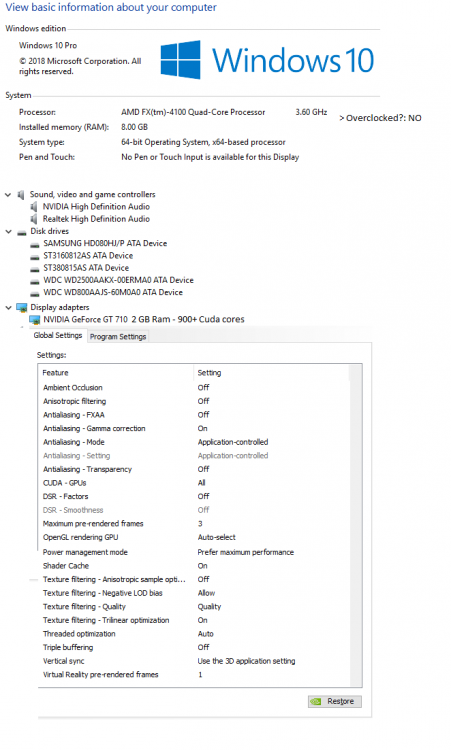
Hello all, A fellow technician for enterprise equipment, so I have had great success with implementing then testing mod to mod. Ive taken the time to collect 0.4+ compatible mods (90% by allbo) and get them all to work within each other. Some .INI files need to be edited to avoid player frustration still regarding controller/keyboard control. No crashes are experienced in this fileset. Further, The file set was produced on a "vanilla" GTA5 Vehicles & sounds, - with regular Rockstar updates. Here's a quick look at the entire directory I propose to upload - if possible, I would like beta, and feedback, or maybe for it to be implemented in 0.4-2 or a optional update package with the LSPDFR installation. Installation of these plugins, and the desired configurations, including for the plugins not to crash each other, took a painstaking 10+ hours of fine tweaking binds, and beta testing plugin by plugin to locate faults that could cause a startup crash. I can now consistently run this file set with no crashes. \ *Now, I'm just curious who would be interested in such a file set? And would it be added to the list of files for download? I'd Love to add to this plugin/callout bundle once more items become available. The court system could work better, but with this file set, you are as close as it gets to a beat officer. Traffic tickets, random call outs, street crime, holdups, and numerous callouts, endless hours of non-crashing fun can be done with this package alone. Callout "bank heist" was disabled in the .ini as it would crash, or lag the CPU pretty hard. Speaking of CPU. Here are the specs, from the computer used for testing: So, anyone interested? -1369666 A quick note, My PC maybe a bit under powered for some, but the game runs a solid 20-25 FPS with the mod installed and plugins running. I found this to be a good base floor to test from, as more capable machine should be able to run this and the plugins, with additional plugins for ELS and special things like this. Personally, I choose not to run ELS, or load modded cars, ect; because of instability issues associated with doing so.

-
Hello, I am also experiencing this issue. Should I upload a list of the modifcations I have loaded? ( i had to configure all the binds for it to work, but man is this game now a game changer with 0.4, with permission, I'd like to upload this as part of the series, email me) This is the only thing that is blocking me from having a flawless police simulator, with albos packs. Please, I as well as many others are eager for a fix for this. I have tried changing the key bind. _______________________________ DATA: AMD quad core, AM+3. CPU: 3200 -3500 Mhz. temp = 40 c 8 gb ram gt730. LSPDFR: and major mod LSPDFR+ Polce radio computer+ (& dependencies that follow for Albos mods. ) Controller = Xbox360 USB. Game crashes?: No. Has the game crashed during play?: No. What is the direct problem?: Failure to initiate pursuit with controller DPadDown, Or DPadUp. (edit) Attached is the plugin list from my directory. IF additional is requested, please inform. (Users looking this thread up, your going to have to edit the keys for each .INI file, as to not conflict with LSPDFR / PDFR+, or the plugins with eachother, should you choose to copy the list of files here. If you don't, the game will crash upon start).

-
Yours is selected. Unslected it boss :) See attached:
-
:/ - When is the last time you have Reinstalled windows? Back up your data first. Before reinstalling windows you can try to reinstall drivers and other resources. Sometimes lag can be produced simply from a fragmented harddisk. Also, Cooling. Always besure your computer is FREE OF DUST. Overheating = failing boards and other hardware. Look into virus' that mybe infecting your pc aswell. Updates for the game have created a higher demand for graphics, also, the game run primaraily on your card. update your card - 1 gb or higher is recommended. GTX630 - 60.00USD one year ago. Im sure its cheaper now. Runs great. but I wish I got the 2 gb...
-
Image MSVCR100.dll in is not a 32-bit image Microsoft visuals is not 32 bit. Sound like you should run the Diagnostics tool and see what you have failing. This looks like dependencies issue. Image MSVCR100.dll in is not a 32-bit image. Also, be sure permissions on ALL DIRECTORIES are NOT SET TO "Read - Only" If this doesnt work try: Reinstallation of GTA 4 - Reinstallation of Net framework and C++ Reinstallation of Each mod individually, step by step instructions, and running the game for each mod, to ensure the installations are correct. If installing ELS besure to reinstall the ANSI with LCPDFR . . . .
-
i had the same issue. If your running steam, be sure the directory out of " steamapps " (" grandtheftautoIV ") is not read only. I made the mistake of changing just the directory - steamapps -> grandtheftautoIV -> GTAIV* And be sure to run the ANSI out of LCPDFR. this resolved my issues.
-
"The error occurred because of one of my mods, (I think it was ELS). I dragged everything into my base game directory, including advancedhook, scripthook etc. This managed to create an error. To fix this I got the manual installation zip file for 1.0D and dragged in just the base game files (advancedhook, scripthook, dsound etc), and this has got rid of my error." Not a problem, I try to help when i can. You know, i have been getting some wierd errors, I might try this resolution of yours to resolve the little bugs i still have. Iv'e just used the auto installation after installing the little mods i like. ... Ive spent hours troubleshooting this, reading forums, I think I should be a game tester lol. Also check permissions, I had a issue with that, If running steam, be sure the directory out of " steamapps " (" grandtheftautoIV ") is not read only. I made the mistake of changing just the directory - steamapps -> grandtheftautoIV -> GTAIV* This caused a variety of issues if you have the steam installation that is..
-
Issue resolved! request to close thread! Resolved: Permissions settings error. Permissions in the directory of STEAM needs also to be set to allow from read only. If running steam, be sure the directory out of " steamapps " (" grandtheftautoIV ") is not read only. I made the mistake of changing just the directory - steamapps -> grandtheftautoIV -> GTAIV* Once this was adjusted i was able to play the game non stop with no crashes or bugs! Sorry to bother, hope this helps users!
-
dependencies failure. Check the following: Installation of netframework - Run the diagnostics tool. it will inform you of any netframe work failures. still as good measure. reinstall them anyway. make sure your using the asi loader with LCPDFR. loader.loader = asi loader. Something wrong with the script loader. or the programs used to run the scripts. Also, be sure to have run windows update after installing netframework installations. this ensured the files installed / reinstalled that windows uses, are up to date and current for operation.
-
Unsure if this is the correct thread - forgive me. I have been receiving an error I have tried several thing to resolve. When a Persuit happens, there is a 50/50 chance it will fail. Sometimes the game just crashes for no reason, fresh start no old saves. Even using a save (to get past tutorials of gta4) the game crashes. other times, which is more frequent, I will get a call out, it will play the music like I have apprehended / contained the suspect. And then i am unable to use LCPDFR - ALT - M,N,B,V,C,P - however ELS operates correctly, with no issues. as well as "dash cam" Game specs: GTA 1070.STEAM INSTALLATION - NOT CRACKED. **** ELS V8 - AI lights = disabled. LCPDFR newest release. Autoinstallation used for LCPDFR. 5 Police car ELS v8 enabled. Sound for Siren updated. Traffic flow fix - "dashcam" v2. 1 MB gphx card8mb ram// gtx 630 quadcore 3.6 Steps I have taken to try and resolve the situation are: Installed more fans as it was possible there was a airflow issue - failed to resolve described issue. settings adjusted to graphics drivers graphics drivers updated. Ram inspected and Tested to be functioning of normal operation, in another PC with DDR3 Capability. "Read only" disabled on ALL subfolders related to GTA. Preloaded models off/on - no effect. "text mode" enabled. disable random radio chatter lowered the allowed number of officers and cars in pursuit. disabled AI Roadblock. lowered game resolutions or graphics, raised them. Reinstallation of GTA 4 - Reinstallation of Net framework an other related sources. Reinstallation of Each mod individually, then testing the mods idividually. result: Dashcam - no error. Cop cars - traffic flow taxi bug / ELS failure (no els installed) Traffic flow - ^resolved. ELS - functioning. LCPDFR - Failure - issue reported in claim is reproduced. - uninstalled All mods. LCPDFR installed - No failure. Minor reported bugs occur, but the reported issue was not reporduced. ELS installed- Failure - reported issue reoccured. . This issue Has been Isolated to LCPDFR with ELS installed. Windows update has been performed as countermeasure. I have spent a total of 46 hours isolating the issue. But unable to resolve the situation. Im sure it's something simple I am completely running over, any help would be very much appreciated. Additional data: LOG FILE: [WARNING - 11:47:01 PM] [AudioDatabase] GetAudioFileForAction: No file found for: INCHON_AVE [iNFO - 11:47:07 PM] [script.Ambient] Saving game [iNFO - 11:50:37 PM] [script.Ambient] Saving game [WARNING - 11:50:57 PM] [AudioDatabase] GetAudioFileForAction: No file found for: EARP_ST [iNFO - 11:51:07 PM] [script.Ambient] Saving game [ERROR - 11:51:32 PM] [Main] CRITICAL ERROR DURING MAINLOOP! REPORT THIS ISSUE AT LCPDFR.COM BY INCLUDING THIS LOGFILE. [ERROR - 11:51:32 PM] [] GTA.NonExistingObjectException: Invalid call to an object that doesnt exist anymore at GTA.Vehicle.set_Visible(Boolean value) at .(Object ) in d:GTA IVLCPDFRSVNbranchesLCPDFR Ambient ActionLCPD First ResponseLCPD First ResponseLCPDFRScriptsCheckpointControl.cs:line 574 at LCPD_First_Response.Engine.Timers.DelayedCaller.Process() in d:GTA IVLCPDFRSVNbranchesLCPDFR Ambient ActionLCPD First ResponseLCPD First ResponseEngineTimersDelayedCaller.cs:line 150 at LCPD_First_Response.Engine.Main.() in d:GTA IVLCPDFRSVNbranchesLCPDFR Ambient ActionLCPD First ResponseLCPD First ResponseEngineMain.cs:line 266 [ERROR - 11:51:32 PM] [ExceptionHandler] GTA.Vehicle.set_Visible(Boolean value) L_000d .(Object[] ) L_0000 LCPD_First_Response.Engine.Timers.DelayedCaller.Process() L_0000 LCPD_First_Response.Engine.Main.() L_011b Error hash: 9B45584916E877FB5AC278C07C704BCA09887CE3 * BREAK * [ERROR - 11:51:32 PM] [Main] CRITICAL ERROR DURING MAINLOOP! REPORT THIS ISSUE AT LCPDFR.COM BY INCLUDING THIS LOGFILE. [ERROR - 11:51:32 PM] [] GTA.NonExistingObjectException: Invalid call to an object that doesnt exist anymore at GTA.Vehicle.set_Visible(Boolean value) at .(Object ) in d:GTA IVLCPDFRSVNbranchesLCPDFR Ambient ActionLCPD First ResponseLCPD First ResponseLCPDFRScriptsCheckpointControl.cs:line 574 at LCPD_First_Response.Engine.Timers.DelayedCaller.Process() in d:GTA IVLCPDFRSVNbranchesLCPDFR Ambient ActionLCPD First ResponseLCPD First ResponseEngineTimersDelayedCaller.cs:line 150 at LCPD_First_Response.Engine.Main.() in d:GTA IVLCPDFRSVNbranchesLCPDFR Ambient ActionLCPD First ResponseLCPD First ResponseEngineMain.cs:line 266 [ERROR - 11:51:32 PM] [ExceptionHandler] GTA.Vehicle.set_Visible(Boolean value) L_000d .(Object[] ) L_0000 LCPD_First_Response.Engine.Timers.DelayedCaller.Process() L_0000 LCPD_First_Response.Engine.Main.() L_011b Error hash: 9B45584916E877FB5AC278C07C704BCA09887CE3 * BREAK * [ERROR - 11:51:33 PM] [Main] CRITICAL ERROR DURING MAINLOOP! REPORT THIS ISSUE AT LCPDFR.COM BY INCLUDING THIS LOGFILE. [ERROR - 11:51:33 PM] [] GTA.NonExistingObjectException: Invalid call to an object that doesnt exist anymore at GTA.Vehicle.set_Visible(Boolean value) at .(Object ) in d:GTA IVLCPDFRSVNbranchesLCPDFR Ambient ActionLCPD First ResponseLCPD First ResponseLCPDFRScriptsCheckpointControl.cs:line 574 at LCPD_First_Response.Engine.Timers.DelayedCaller.Process() in d:GTA IVLCPDFRSVNbranchesLCPDFR Ambient ActionLCPD First ResponseLCPD First ResponseEngineTimersDelayedCaller.cs:line 150 at LCPD_First_Response.Engine.Main.() in d:GTA IVLCPDFRSVNbranchesLCPDFR Ambient ActionLCPD First ResponseLCPD First ResponseEngineMain.cs:line 266 [ERROR - 11:51:33 PM] [ExceptionHandler] GTA.Vehicle.set_Visible(Boolean value) L_000d .(Object[] ) L_0000 LCPD_First_Response.Engine.Timers.DelayedCaller.Process() L_0000 LCPD_First_Response.Engine.Main.() L_011b Error hash: 9B45584916E877FB5AC278C07C704BCA09887CE3
-
Visual issue fixed: notice the strobes were very slow, Fixed: Thanks LCPDFR forums!
-
[WARNING - 3:27:43 AM] [CVehicle] HasDriver: Driver seat is occupied, but ped is invalid [WARNING - 3:27:43 AM] [CVehicle] HasDriver: Driver seat is occupied, but ped is invalid [WARNING - 3:27:43 AM] [CVehicle] HasDriver: Driver seat is occupied, but ped is invalid [WARNING - 3:27:43 AM] [CVehicle] HasDriver: Driver seat is occupied, but ped is invalid [WARNING - 3:27:43 AM] [CVehicle] HasDriver: Driver seat is occupied, but ped is invalid [WARNING - 3:27:43 AM] [CVehicle] HasDriver: Driver seat is occupied, but ped is invalid [WARNING - 3:27:43 AM] [CVehicle] HasDriver: Driver seat is occupied, but ped is invalid [WARNING - 3:27:43 AM] [CVehicle] HasDriver: Driver seat is occupied, but ped is invalid [WARNING - 3:27:43 AM] [CVehicle] HasDriver: Driver seat is occupied, but ped is invalid [WARNING - 3:27:43 AM] [CVehicle] HasDriver: Driver seat is occupied, but ped is invalid [WARNING - 3:27:43 AM] [CVehicle] HasDriver: Driver seat is occupied, but ped is invalid [WARNING - 3:27:43 AM] [CVehicle] HasDriver: Driver seat is occupied, but ped is invalid [WARNING - 3:27:43 AM] [CVehicle] HasDriver: Driver seat is occupied, but ped is invalid [WARNING - 3:27:43 AM] [CVehicle] HasDriver: Driver seat is occupied, but ped is invalid ___________ This is a error in the logs I have seen on a fresh installation of my GTA 4 when i first installed it about 1 year ago. This error has persisted even up-to the hotfix. (good job btw, my game runs for hours now without crashing) I Was just wondering if there was a fix for this, I have searched google and forums extensively, But I'm unsure if it has any developer's attention.
-
I have located the problem. In the installation file for the car I had downloaded, the Instructions named the file different then the actual file name "Move ELS Configlapd_patrol.ini and ELS Configlapd_slickop.ini into your GTAIVELS directory" But the files are named: lapd_unmarked and lapd_marked. I copied and pasted lapd_patroll and pd_slicktop into the "_SLOTCONTROL" file for the ELS controls. Creating a failed directory. The other mistake was I did copy AdvancedHook.dll, ScriptHook.dll, or dsound.dll before you said something. Additionally, Winzip made the installation confusing, and contributed to the many errors. The ELS is running and seem to work with Key bing Cntrl+ Backspace. M does not function (binded by LCPDFR) But, The visual effects on the light bar are particularaily low, and i transfered the file Visual file ..... but to only one location.. Ill research into this because I saw another thread with a solution to the issue i thought. Thanks for your help. and sorry to blame the DL for the error when it was winzip. never use Winz again Edit: Oh and the controls and now i understand the config is 100% better then v6. this is incredible, hope i can figure out the visual issues!
-
Now GTA 4 will not start 7 zip solved the folders issue, thank you Diagnostics_2.3.2015_23_50_3.log log of the diagnotic tool for lcpdfr
-
You install ELS by dragging all of the contents of "INSTALLATION FILES" to your main GTA IV directory. If you have LCPDFR installed, however, do not copy AdvancedHook.dll, ScriptHook.dll, or dsound.dll as LCPDFR already installed the newest versions of those. This is interesting.... ill try uninstall / reinstalling both mods. thanks
-
Update GTA IV to 1.0.7.0 (the latest version of the game, or 1.1.2.0 for EFLC) - This sometimes fixes a wide variety of issues {done} Make sure that you run the game as an administrator. {done} Make sure that you are using the Advancedhooks and Scripthooks provided with LCPD:FR {done} Delete AdvancedHookInit.asi (If present in main directory) {done} Make sure that your GTA IV root folder (and every subdirectory) is not set to "read-only" {WAS NOT done} Ensure that ScriptHook.dll, ScriptHookDotNet.asi and Dsound.dll OR Xlive.dll are in the GTA IV ROOT folder {done} Ensure that there is a folder titled 'LCPDFR' in the ROOT GTA IV folder. {done} Check that all the above files exist, if they do not, reinstall LCPDFR with the MANUAL installation. {done} Ensure that you are using up to date versions of every LCPDFR dependency and LCPDFR itself. Install Net Framework 4.5 and Microsoft Visual C++ Redist 2012 {done} ensured the vehicle setting are correct and true to installation packages. Running Dsound. Still not working. About to completely uninstall the game and reinstall it.
-
tried adding the config files - no go. the zip file is incomplete seems to be a problem with the file, which i got from this site......read the instructions multiple times




